

CookDrawer
Morikawa Tatsunosuke · Food & Drink
Independent analytics for this App Store listing. AppTracker is not affiliated with Morikawa Tatsunosuke.
Chart standing · US
What changed · US
Listing changes AppTracker has observed for this app in this storefront — new versions, price moves, rating shifts, and store copy.
Improved account deletion, purchases, and sign-in. • Fixed account deletion for users signed in with Apple. • After deleting your account, keep viewing and editing recipes saved on your device in offline-only mode. Resume online use from the Account screen when you choose. • Clearer notices before purchase and deletion explain that unused extra imports are lost when you delete your account. • Before deletion, see a reminder that monthly subscriptions must be canceled separately, with a link to subscription management. • Fixed an issue where restoring purchases after account deletion could grant extra imports from past purchases again. • Linking Apple after resuming online use now updates the sign-in status on screen immediately. • Fixed permanent Plus access unlocked through a monthly plan so it remains available after the plan ends. • Improved the usage guide and error messages for URL imports.
In-app purchases · US
What this app sells inside itself, grouped by kind and priced for this storefront.
Screenshots



Keywords this app targets
Search terms AppTracker associates with this app — estimates, not search volume. ❝ = in the app's title; a highlighted number is its current position for that term.
Similar apps
Competitors and close alternatives, as estimated by AppTracker.
 CookZone: Recipe Manager
EichGnomies GmbH & Co. KG
2 shared topics
CookZone: Recipe Manager
EichGnomies GmbH & Co. KG
2 shared topics
 Recipe Keeper: CookBook
CookBook Co. Pty Ltd
1 shared topic
Recipe Keeper: CookBook
CookBook Co. Pty Ltd
1 shared topic
 Cookle
Hiromu Nakano
1 shared topic
Cookle
Hiromu Nakano
1 shared topic
 Recipe Keeper - Cook'n
DVO Enterprises
2 shared topics
Recipe Keeper - Cook'n
DVO Enterprises
2 shared topics
 CookNest・Save Your Recipes
CookNest, SL
2 shared topics
CookNest・Save Your Recipes
CookNest, SL
2 shared topics
 CookClip: Recipe Manager
Laila Mauhibah Izzuddin
CookClip: Recipe Manager
Laila Mauhibah Izzuddin
 Drop Recipe - Keeper & Saver
Kaan Toksoy
1 shared topic
Drop Recipe - Keeper & Saver
Kaan Toksoy
1 shared topic
 ReciBites
Raef Makrai
1 shared topic
ReciBites
Raef Makrai
1 shared topic
About
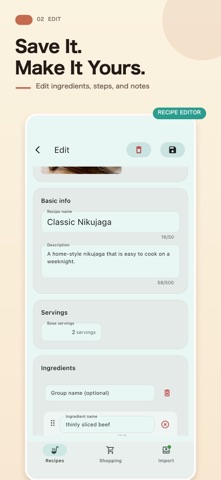
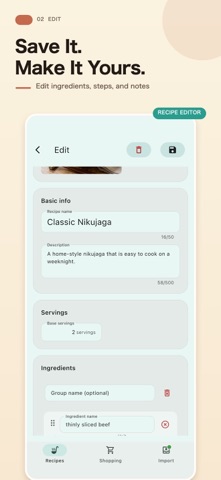
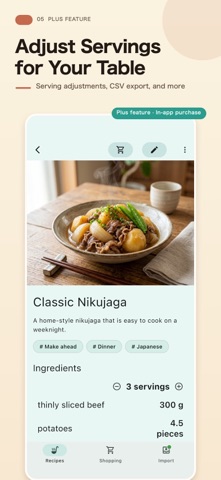
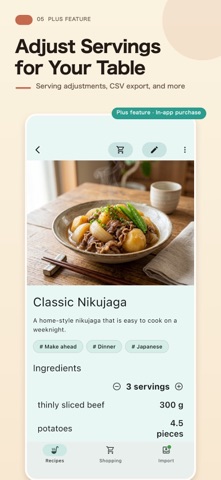
Turn recipes from social posts, websites, and paper into your own recipe collection, with ingredients and steps together. CookDrawer helps you import, edit, and organize recipes, then turn ingredients into shopping lists. Keep family favorites and new discoveries ready for the next time you cook. IMPORT RECIPES YOU FIND Create editable recipes from public Instagram and TikTok captions, YouTube descriptions, and compatible webpages. You can also paste text or recognize recipe text with the camera, an image, or a screenshot. REVIEW AND MAKE IT YOURS Preview ingredients and directions before saving. When you import a single recipe, choose Save and edit to adjust its ingredients, steps, and notes right away. FIND RECIPES WITH TAGS AND SEARCH Organize by quick meals, meal prep, favorites, and more. Search your collection and choose a list or grid view. TURN INGREDIENTS INTO SHOPPING LISTS Review the destination list and ingredient count before adding. Create a new list or add everyday shopping items by hand. BACK UP TO ICLOUD DRIVE Back up and restore recipes, tags, and shopping lists. Image files themselves are not included in backups. FREE FEATURES AND IMPORT ALLOWANCES Manually adding, viewing, and editing recipes, organizing with tags, and using shopping lists are free. Eligible devices can try 3 imports as a one-time offer. Registering again or reinstalling the app does not grant another trial on the same device. Camera, image, and screenshot text recognition is free. Creating a recipe from recognized text uses your import allowance. OPTIONAL PURCHASES • Monthly Plus An automatically renewing subscription with 50 imports each month while active, plus all Plus features. Your first purchase permanently unlocks Plus features, which remain available after the subscription ends. The monthly import allowance ends, but unused trial imports and purchased imports remain. • Lifetime Plus features A one-time payment unlocks Plus features permanently, with no automatic renewal. This purchase does not add any imports. • 10 extra imports Buy 10 imports when you need them, with no automatic renewal or expiration. Available to both free and Plus users. Connecting your account with Apple is required before purchasing. This purchase does not unlock Plus features. Plus features include serving-size adjustments, CSV export, color customization, and keeping the screen awake while cooking. See the app for prices and purchase details. IMPORT NOTES Even public posts may be unavailable because of age verification or access restrictions. YouTube imports use the video description. If recipe text appears in a video or comment, try recognizing it from a screenshot. Review imported content and edit it as needed. Keep every recipe you want to cook again within easy reach.
What's new · 1.6.1
Improved account deletion, purchases, and sign-in. • Fixed account deletion for users signed in with Apple. • After deleting your account, keep viewing and editing recipes saved on your device in offline-only mode. Resume online use from the Account screen when you choose. • Clearer notices before purchase and deletion explain that unused extra imports are lost when you delete your account. • Before deletion, see a reminder that monthly subscriptions must be canceled separately, with a link to subscription management. • Fixed an issue where restoring purchases after account deletion could grant extra imports from past purchases again. • Linking Apple after resuming online use now updates the sign-in status on screen immediately. • Fixed permanent Plus access unlocked through a monthly plan so it remains available after the plan ends. • Improved the usage guide and error messages for URL imports.
Details