

Imageless - Image Blocker
Jacob D Kamile · Utilities
Independent analytics for this App Store listing. AppTracker is not affiliated with Jacob D Kamile.
Chart standing · US
What changed · US
Listing changes AppTracker has observed for this app in this storefront — new versions, price moves, rating shifts, and store copy.
- Fixed a bug preventing blocking of images and video when using the back button.
Price & rating history · US
Reconstructed from the listing changes AppTracker has observed in this storefront. A field is charted once it has changed more than once, and each line starts at the value it moved from.
Average rating · ★ 4.00 now · 2 changes on record
Ratings breakdown · US
The star breakdown behind this app's rating in this storefront.
In-app purchases · US
No in-app purchases.
Screenshots


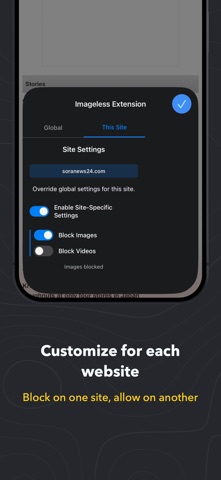


Keywords this app targets
Search terms AppTracker associates with this app — estimates, not search volume. ❝ = in the app's title; a highlighted number is its current position for that term.
Similar apps
Competitors and close alternatives, as estimated by AppTracker.
 Media Blocker Web Extension
Alfredo Grassau
Media Blocker Web Extension
Alfredo Grassau
 Stop Ads - The Ultimate Ad-Blocker for Safari
Denys Ievenko
2 shared topics · 1 shared title word
Stop Ads - The Ultimate Ad-Blocker for Safari
Denys Ievenko
2 shared topics · 1 shared title word
 Image Blocker
Koji Iino
1 shared topic · 3 shared title words
Image Blocker
Koji Iino
1 shared topic · 3 shared title words
 XBlocker for Safari
Alfredo Grassau
1 shared topic
XBlocker for Safari
Alfredo Grassau
1 shared topic
 JavaScript Blocker for Safari
Alfredo Grassau
1 shared topic · 1 shared title word
JavaScript Blocker for Safari
Alfredo Grassau
1 shared topic · 1 shared title word
 Pacific Block
Pod 98, LLC
Pacific Block
Pod 98, LLC
 Browser Content Blocking
Albert Parti
2 shared topics
Browser Content Blocking
Albert Parti
2 shared topics
 Ad Blocker Pro: Safari & DNS
CloudEx Inc.
1 shared topic · 1 shared title word
Ad Blocker Pro: Safari & DNS
CloudEx Inc.
1 shared topic · 1 shared title word
About
Imageless is a simple Safari Extension that allows you to easily block images & video, reducing data usage and speeding up browsing. Features: * Blocks images and videos at the network level * Block globally or on a site-specific level * Saves bandwidth and improves page load speed * Works independently - block images, videos, or both * Toggle on/off anytime from Safari's extension menu * Option to lock media blocking settings behind Face ID/Touch ID or using a custom PIN. (Note that the extension itself can still be disabled from within Safari unless you also enable the 'Limit Adult Websites' option within Screen Time on your device.) * No data is ever collected or sent anywhere by the extension How to enable: * Go to Settings → (Apps) → Safari → Extensions * Find "Imageless Extension" in the list and toggle it ON * In Safari, tap the Extensions button (puzzle piece icon) in the address bar to choose what to block To prevent someone from disabling the extension: Open Settings → Screen Time → Content & Privacy Restrictions → App Store, Media, Web, & Games → Web Content, then choose Limit Adult Websites. That setting also restricts changes to Safari extensions Image Blocker operates entirely locally on your device. The extension: * Processes web content locally in your browser * Applies image blocking rules without sending data externally * Stores preferences locally on your device only * Does not communicate with external servers
What's new · 1.5
- Fixed a bug preventing blocking of images and video when using the back button.
Details