

Crop
ANDREW PAUL BECKETT · Photo & Video
Independent analytics for this App Store listing. AppTracker is not affiliated with ANDREW PAUL BECKETT.
Chart standing · US
Ratings breakdown · US
The star breakdown behind this app's rating in this storefront.
In-app purchases · US
What this app sells inside itself, grouped by kind and priced for this storefront.
Screenshots



About
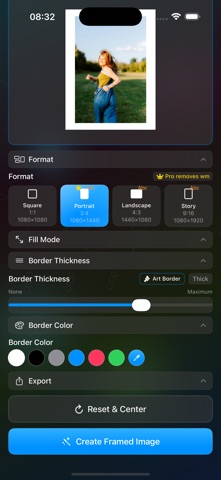
Transform any photo into perfect Instagram content with Crop - the smartest way to crop and frame your images for social media. PERFECT INSTAGRAM CROPS Auto-crop photos to Instagram's exact dimensions (1:1, 4:5, 9:16, 16:9) Smart scaling preserves your image's most important content No more awkward cropping or lost details BEAUTIFUL BORDERS & FRAMING Add elegant borders in thin, medium, or large sizes Smart color matching extracts dominant colors from your image Cycle through 4 different color algorithms for perfect color selection Premium outline options (thin, medium, thick) for enhanced framing ART BORDER MODE Special bottom-weighted border for artistic compositions Perfect for portraits and vertical content Professional gallery-style presentation LIGHTNING FAST One-tap cropping and processing Instant preview of your final result Retain settings for your next image SEAMLESS SHARING Direct export to Instagram Stories and Posts Save to Photos with one tap Smart guidance for posting your perfectly cropped images FREEMIUM MODEL Square (1:1) photos are completely FREE Premium formats unlock with one simple purchase No subscriptions, no recurring fees Remove Crop logo for premium users PROFESSIONAL FEATURES Support for all Instagram aspect ratios High-quality image processing iOS 26 optimized with latest features Intuitive, one-screen interface 35mm film strip for quick photo selection Refresh button for latest photos Perfect for: Instagram influencers and content creators Social media managers Photography enthusiasts Anyone who wants professional-looking Instagram posts Download Crop today and never struggle with awkward photo cropping again. Your Instagram feed will thank you!
What's new · 1.5.0
Choose images from virtual contact sheets from simulated 36 frame films. Scan through large versions of the image to select the ones to add to your social feed. New easier to use edit screen in landscape orientation.
Details