

BrainFlow: AI Voice Notes
Tristan Manchester · Productivity
Independent analytics for this App Store listing. AppTracker is not affiliated with Tristan Manchester.
Chart standing · US
What changed · US
Listing changes AppTracker has observed for this app in this storefront — new versions, price moves, rating shifts, and store copy.
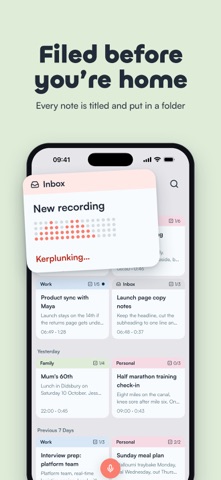
Start recording straight from the bottom navigation, with new recording animations and refreshed menus. • More reliable audio uploads, playback seeking, and recording recovery from Trash • Better search results and improved handling of imported notes • Fixes for task editing, speaker labels, and moving guest notes to an existing account • Clearer import progress and more reliable note processing
In-app purchases · US
What this app sells inside itself, grouped by kind and priced for this storefront.
Screenshots




About
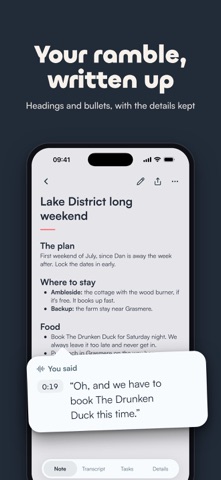
Tap record and say what's on your mind. BrainFlow writes it up as a proper note, with headings, the details you mentioned and a list of the things you said you'd do. It's made for the thoughts that turn up at awkward moments, like halfway through a walk or on the drive home from a meeting. Talk however it comes out. You don't have to sort anything. What you get back • A written note with a title and headings • Tasks pulled out of what you said, ready to tick off • The full transcript with timestamps, and the recording to play back • Speaker labels for meetings and interviews, so you can see who said what Finding it again Each note is titled, filed into a folder and tagged while it's written. Search looks for what you meant as well as the words themselves, so "school holidays" finds your half term plans. Adding to a note Record more into an existing note or import audio from Files, and BrainFlow rewrites the note from everything you've said. Sending it on Send a note or its transcript to Notion, email it to yourself, or share it anywhere with the share sheet. Your notes stay yours Recordings and notes are encrypted in transit and at rest, and there are no ads. You can start without an account and add Apple or Google sign-in later to open your notes on another phone. Deleted notes wait in Recently Deleted for 30 days. Pricing BrainFlow is free for 3 notes a month. BrainFlow Plus removes the limit. Privacy policy: https://brainflow.tech/privacy Terms of use (EULA): https://www.apple.com/legal/internet-services/itunes/dev/stdeula/
What's new · 2.1.14
Start recording straight from the bottom navigation, with new recording animations and refreshed menus. • More reliable audio uploads, playback seeking, and recording recovery from Trash • Better search results and improved handling of imported notes • Fixes for task editing, speaker labels, and moving guest notes to an existing account • Clearer import progress and more reliable note processing
Details