

HDRfy – HDR Photo Lab
才熹 郑 · Graphics & Design
Independent analytics for this App Store listing. AppTracker is not affiliated with 才熹 郑.
Chart standing · US
What changed · US
Listing changes AppTracker has observed for this app in this storefront — new versions, price moves, rating shifts, and store copy.
Thank you for using HDRfy! If you enjoy the app, please rate us on the App Store. For questions or suggestions, go to Settings > Contact Us. What's New - Adapted for iOS 27. - Improved HDR photo recognition and home photo management. - Improved editing on wider screens. - Fixed export and original-photo saving issues. Previous Updates - Added custom canvas ratios for Collage and comparison images. - Added a photo action extension for quick HDR conversion from the system action menu. - Added sorting, filtering, and time-based grouping to the photo library. - Added export quality settings. - Improved HDR-to-HDR conversion and added a Shortcut for it. - Added SDR/HDR comparison images. - Expanded watermark settings with text and image watermarks. - Added RAW processing, 8K HDR, and HDR PNG export. - Added batch processing, HDR Collage, and more import options.
Price & rating history · US
Reconstructed from the listing changes AppTracker has observed in this storefront. A field is charted once it has changed more than once, and each line starts at the value it moved from.
Average rating · ★ 4.64 now · 2 changes on record
Ratings breakdown · US
The star breakdown behind this app's rating in this storefront.
In-app purchases · US
What this app sells inside itself, grouped by kind and priced for this storefront.
Screenshots



About
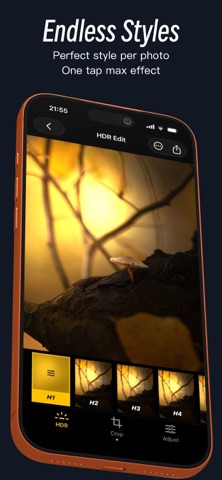
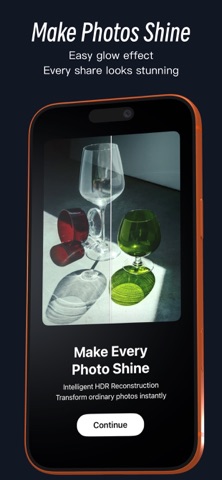
HDRfy - Make photos closer to what the human eye sees. We often think our photos have captured everything. Until I reopened them with HDRfy. Details once hidden in shadows and flattened highlights begin to reappear. The sky feels clearer, sunlight more real, and memories more vivid. I suddenly realized this isn’t just enhancement, but a restoration of the scene. The realism and presence feel like turning back time. When I revisit these old photos, I’m not just seeing them—I’m reliving the journey. With advanced HDR Gain Map technology, HDRfy upgrades standard SDR photos into true HDR images with one tap—delivering far greater brightness range and detail on HDR/XDR displays. What you see is not an effect, but a system-recognized, truly displayable HDR image. From brilliant highlights to preserved shadow details, HDRfy brings images closer to real-world perception. ------ Features * Supports HDR processing for photos and Live Photos Live Photos generate an HDR cover and export as HDR Live Photos * Supports multiple export formats: HEIC / JPG (UltraHDR) / Live Photo / HDR Video * Import directly from your library with real-time HDR preview and editing * Resolution support: * Up to 8K HDR for photos * Up to 4K for video * Batch SDR - HDR conversion ------ What is HDR Gain Map? HDR Gain Map is a next-generation HDR representation. While preserving the original SDR image, it records additional brightness data, allowing the same image to: * Display normally as SDR on standard screens * Show higher brightness and richer detail on HDR/XDR devices HDRfy uses a standard HDR Gain Map workflow to generate true HDR image files recognized by the system, not simulated effects. ------ What can you do with it? Upgrade photos to HDR * Automatically generate HDR Gain Map * No manual adjustments or complex parameters required * One-tap conversion with instant results Enhance display quality (not filters) * Brighter highlights without overexposure * Significantly improved shadow detail * More natural color depth All results are based on HDR display capabilities, not simple contrast or saturation adjustments. ------ Why choose HDRfy Unlike traditional “HDR-style filters”: * Produces true HDR files, not visual simulations * Recognized by iOS and the Photos app * Full effect on HDR devices, compatible on non-HDR displays * Preserves original image structure and color relationships ------ HDRfy Membership Auto-Renewal Information Subscription Plans: - Weekly Plan: $2.99/week - Monthly Plan: $4.99/month • As a HDRfy member, you can unlock all premium features, remove ads, and enjoy future feature updates for free. • Payment will be charged to your Apple ID account upon confirmation of purchase, and the subscription will automatically renew 24 hours before the end of the current period unless canceled beforehand. • You can manage or cancel your subscription at any time in Settings > Apple ID > Subscriptions. • If a free trial is offered, it will begin upon first subscription. If not canceled during the trial period, the subscription will begin automatically when the trial ends. Unused trial time will be forfeited once you subscribe. Terms of Use: https://jixuqianxing.super.site/jixuqianxing/terms-of-use Privacy Policy: https://jixuqianxing.super.site/jixuqianxing/privacy-policy [Contact Us] If you have any questions, suggestions, or business inquiries, feel free to reach out to us: Email: jixuqianxingpro@163.com
What's new · 3.7.6
Thank you for using HDRfy! If you enjoy the app, please rate us on the App Store. For questions or suggestions, go to Settings > Contact Us. What's New - Adapted for iOS 27. - Improved HDR photo recognition and home photo management. - Improved editing on wider screens. - Fixed export and original-photo saving issues. Previous Updates - Added custom canvas ratios for Collage and comparison images. - Added a photo action extension for quick HDR conversion from the system action menu. - Added sorting, filtering, and time-based grouping to the photo library. - Added export quality settings. - Improved HDR-to-HDR conversion and added a Shortcut for it. - Added SDR/HDR comparison images. - Expanded watermark settings with text and image watermarks. - Added RAW processing, 8K HDR, and HDR PNG export. - Added batch processing, HDR Collage, and more import options.
Details