

Inkiostro: Markdown Editor
Carlo Di Giuseppe · Productivity
Independent analytics for this App Store listing. AppTracker is not affiliated with Carlo Di Giuseppe.
Chart standing · US
What changed · US
Listing changes AppTracker has observed for this app in this storefront — new versions, price moves, rating shifts, and store copy.
Your own style, in CSS. • Your CSS: start from any preview style and change what you like — a red title, a drop cap, more room between paragraphs. Ready-made recipes if you've never written CSS, and a bar above the keyboard for braces and colons. It reaches the preview, the PDF, the ePub and the HTML. In Settings › Styles. • On iPad the CSS and its preview sit side by side, full screen. • A book can have its own CSS, on top of its style, from the book panel. • You stay where you were writing: saving no longer moves the cursor or the page, and Undo undoes what you just did. If a save fails, it turns red and tells you why. • After an export, a short note tells you it's saved in Files.
Price & rating history · US
Reconstructed from the listing changes AppTracker has observed in this storefront. A field is charted once it has changed more than once, and each line starts at the value it moved from.
Average rating · ★ 3.00 now · 5 changes on record
Ratings breakdown · US
The star breakdown behind this app's rating in this storefront.
Screenshots


About
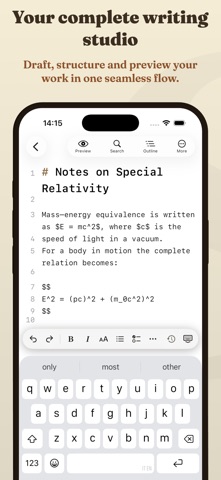
Inkiostro is a Markdown editor for people who write — notes, documentation, theses, novels. Plain text files that stay yours, a preview that looks like a finished page, and exports ready to hand over. Write in Markdown, or in the visual editor and never see a symbol. Buy once, no subscription. No account, no tracking. WRITE, SEE, FINISH • Two ways to write: the Markdown editor shows the symbols, the visual editor formats as you type, like a word processor. Either way the file stays plain Markdown. (Visual editor: Pro, free for 7 days) • A complete Markdown toolbar: headings, lists, tables and code blocks, one tap away. • A side-by-side preview that comes back exactly where you left it. • LaTeX formulas typeset by KaTeX, and Mermaid diagrams drawn as you type. • 27 preview styles, 11 of them free: GitHub, Sepia, Nord, Solarized and more. With Pro, Manuscript, Book, Report, Academic and others set the page like print. • Focus and Typewriter modes, a live word count and a daily writing goal. FROM DRAFT TO BOOK • PDF with selectable text, formulas and diagrams included. Free, with a small credit line in the footer. • A professional ePub: real chapters, a cover, ISBN, series, footnotes that open over the page, and the accessibility declaration Europe requires. The export sheet tells you what a store would reject — before you send it. (Pro) • A book made of many files: one chapter per file, in a folder, in the order you choose. Arranging it is free; exporting it as a single ePub is Pro. • Self-contained HTML, and page setup for PDF: paper, margins, headers and page numbers. (Pro) NEVER LOSE A WORD • Version history: Inkiostro saves versions as you write. Search them, compare them line by line, and bring back a single word or a whole draft. (Pro) • Backups of your whole library: a dated zip archive with your version history inside, offered when one is due, while the app is open, in a folder you pick. Open it in the Files app and your Markdown files are right there. (Pro) YOUR FILES, YOUR RULES • Unlimited documents, as plain .md files you can open anywhere. • Folders, color labels and tags, with search that filters by tag. • iCloud Drive sync between iPhone, iPad and Mac, with no setup. • External folders: work directly inside any folder on your device or in iCloud Drive. (Pro) INKIOSTRO PRO — ONE PURCHASE, EVERY DEVICE One purchase unlocks Pro on iPhone, iPad and Mac, forever. Try it free for 7 days. • The visual editor • Version history with search, comparison and a year of versions • Backups of your library • Professional ePub, HTML, and books made of many files • PDF page setup • Focus and Typewriter modes • External folders • 24 app themes, the Pro preview styles and any font installed on your device MADE FOR • Writers: novels and essays in plain text, out as a real ebook • Students and researchers: notes and theses with proper formulas • Developers: READMEs, documentation and technical notes with diagrams • Anyone tired of paying every month for a text editor • Anyone new to Markdown: the visual editor works like a word processor PRIVACY Your documents stay in your iCloud Drive or on your device. No servers of ours, ever. Inkiostro collects only anonymous, aggregated usage statistics — never personal data, never the content of your documents — and you can turn them off in Settings.
What's new · 1.13.0
Your own style, in CSS. • Your CSS: start from any preview style and change what you like — a red title, a drop cap, more room between paragraphs. Ready-made recipes if you've never written CSS, and a bar above the keyboard for braces and colons. It reaches the preview, the PDF, the ePub and the HTML. In Settings › Styles. • On iPad the CSS and its preview sit side by side, full screen. • A book can have its own CSS, on top of its style, from the book panel. • You stay where you were writing: saving no longer moves the cursor or the page, and Undo undoes what you just did. If a save fails, it turns red and tells you why. • After an export, a short note tells you it's saved in Files.
Details