

MechanicML
Francisco Salinas · Utilities
Independent analytics for this App Store listing. AppTracker is not affiliated with Francisco Salinas.
Chart standing · US
What changed · US
Listing changes AppTracker has observed for this app in this storefront — new versions, price moves, rating shifts, and store copy.
PART IDENTIFICATION • More accurate automotive part identification • Improved recognition of visually similar parts and components • Reduced scan-to-result processing time PARTS SEARCH • Results are ranked by evidence: matching part numbers, your vehicle, and part details • Vehicle engine information is now used to find parts that fit your specific configuration • Repeat searches now return near-instantly • Improved listing relevance and search completion reliability • Added automatic retry handling for temporary search-provider failures • Part numbers are no longer treated as exact search requirements unless verified • Listing part numbers are now displayed only when supported by retailer information VEHICLE FITMENT • Listings now clearly indicate when compatibility has not been verified, instead of showing unconfirmed fitment claims • Added a reminder when searching without a vehicle selected — adding your VIN improves match quality FEEDBACK & REVIEWS • Rate a listing with a quick thumbs up or down after viewing it — your feedback directly improves future search results • Improved feedback reliability after part identification STABILITY • Improved continuity across VIN scanning, photo capture, identification, and results • Updated core dependencies for improved iOS stability and compatibility • Additional performance improvements and bug fixes throughout the app KNOWN BUGS • Some small or tightly framed components may lose identifying details during image processing For best results, photograph the entire part, keep it centered, and leave some space around its edges. You can edit the identification before searching if the detected part is incorrect. ROADMAP • Preparing verified vehicle-fitment data, OEM part-number matching, and expanded retailer coverage
Ratings breakdown · US
The star breakdown behind this app's rating in this storefront.
In-app purchases · US
No in-app purchases.
Screenshots


Keywords this app targets
Search terms AppTracker associates with this app — estimates, not search volume. ❝ = in the app's title; a highlighted number is its current position for that term.
Similar apps
Competitors and close alternatives, as estimated by AppTracker.
 VIN Report for Used Cars
iSeeCars.com
VIN Report for Used Cars
iSeeCars.com
 VIN PRO Check Used Car History
Sergey Vishnyov
VIN PRO Check Used Car History
Sergey Vishnyov
 O'Reilly Pro
O'Reilly Auto Parts
O'Reilly Pro
O'Reilly Auto Parts
 Ringaat
Omar Atwa
Ringaat
Omar Atwa
 Toyota, Lexus Car Parts
Ruslan Balkarov
Toyota, Lexus Car Parts
Ruslan Balkarov
 Car Parts - OEM catalogs
Karina Balkarova
Car Parts - OEM catalogs
Karina Balkarova
 Motorist: Car Maintenance
Edovia Inc.
Motorist: Car Maintenance
Edovia Inc.
 Vehicle History, Car Check-UK
Navis Apps LLC
Vehicle History, Car Check-UK
Navis Apps LLC
About
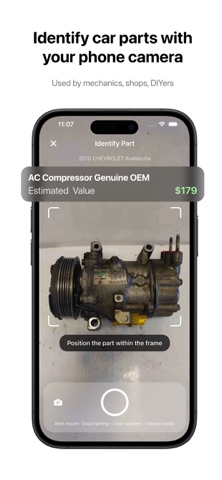
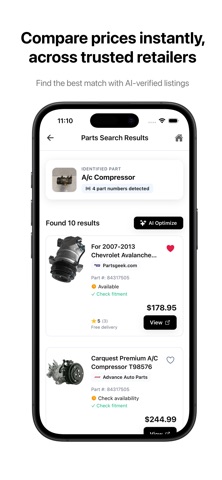
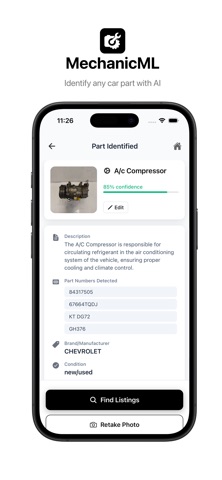
MechanicML — Identify Car Parts With Your Phone Camera MechanicML uses advanced vision models and real-time data to instantly identify car parts from a single photo. No more guessing part numbers, digging through catalogs, or ordering the wrong part. Just snap, identify, and compare. How it Works 1. Scan or enter your VIN for precise fitment (recommended) 2. Take a clear photo of the part you need 3. Get instant AI identification with part numbers, description, and manufacturer 4. Compare prices across trusted retailers in seconds Key Features • Instant Part Recognition: Snap a photo and get an accurate match powered by computer vision • VIN Integration: Scan your vehicle VIN for make, model, and trim specific fitment • AI Verified Listings: View exact matches and compatible alternatives across multiple suppliers • Price Comparison: Instantly compare pricing and availability to get the best deal • Shareable Results: Send identified parts to mechanics, sellers, buyers, or friends • Location Based Availability (Coming Soon): Check which stores near you have the part in stock Perfect For • DIY mechanics and car enthusiasts • Professional mechanics and body shops • Fleet managers and maintenance teams • Anyone who needs fast, accurate part identification Why MechanicML? Finding the right part should not be a guessing game. MechanicML identifies the part, finds trusted matches, and compares prices so you can fix faster and buy smarter. No expertise required. Just take a photo and let the AI do the rest.
What's new · 1.0.4
PART IDENTIFICATION • More accurate automotive part identification • Improved recognition of visually similar parts and components • Reduced scan-to-result processing time PARTS SEARCH • Results are ranked by evidence: matching part numbers, your vehicle, and part details • Vehicle engine information is now used to find parts that fit your specific configuration • Repeat searches now return near-instantly • Improved listing relevance and search completion reliability • Added automatic retry handling for temporary search-provider failures • Part numbers are no longer treated as exact search requirements unless verified • Listing part numbers are now displayed only when supported by retailer information VEHICLE FITMENT • Listings now clearly indicate when compatibility has not been verified, instead of showing unconfirmed fitment claims • Added a reminder when searching without a vehicle selected — adding your VIN improves match quality FEEDBACK & REVIEWS • Rate a listing with a quick thumbs up or down after viewing it — your feedback directly improves future search results • Improved feedback reliability after part identification STABILITY • Improved continuity across VIN scanning, photo capture, identification, and results • Updated core dependencies for improved iOS stability and compatibility • Additional performance improvements and bug fixes throughout the app KNOWN BUGS • Some small or tightly framed components may lose identifying details during image processing For best results, photograph the entire part, keep it centered, and leave some space around its edges. You can edit the identification before searching if the detected part is incorrect. ROADMAP • Preparing verified vehicle-fitment data, OEM part-number matching, and expanded retailer coverage
Details