

Edit Documents: Sign PDF
Umer Ahmed · Utilities
Independent analytics for this App Store listing. AppTracker is not affiliated with Umer Ahmed.
Chart standing · US
What changed · US
Listing changes AppTracker has observed for this app in this storefront — new versions, price moves, rating shifts, and store copy.
• Faster, smaller app • Smoother signing and saving • Bug fixes and stability improvements
Price & rating history · US
Reconstructed from the listing changes AppTracker has observed in this storefront. A field is charted once it has changed more than once, and each line starts at the value it moved from.
Average rating · ★ 4.55 now · 2 changes on record
Ratings breakdown · US
The star breakdown behind this app's rating in this storefront.
In-app purchases · US
What this app sells inside itself, grouped by kind and priced for this storefront.
Screenshots



About
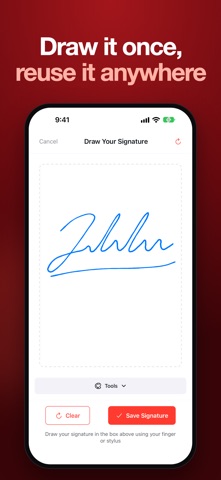
Sign PDF documents and fill out forms right on your phone – no printing, no scanning, no account needed. PDF Signer is the fast, simple way to add your electronic signature to contracts, agreements, invoices, leases, permission slips and any other PDF. SIGN PDF DOCUMENTS IN SECONDS • Draw your signature with your finger or Apple Pencil and save it for one-tap reuse • Add initials, dates, names, email and phone fields • Drop checkboxes and text anywhere on the page • Drag fields exactly where you need them • Sign multi-page PDFs and documents with multiple signers FILL & SIGN PDF FORMS • Fill in PDF forms, applications and contracts • Type text directly onto any document • Turn photos from your gallery into a PDF and sign it • Export and share the signed PDF by email, WhatsApp, Drive or any app ORGANISE YOUR DOCUMENTS • Track every document: Draft, Pending, Signed • Search, sort and filter in grid or list view • Save documents you use often as reusable templates • Get reminders so nothing goes unsigned PRIVATE & SECURE • Your documents stay on your device – nothing is uploaded to our servers • Works offline, no sign-up or login required AVAILABLE IN 20 LANGUAGES PERFECT FOR • Freelancers & small business owners signing contracts and invoices • Real estate agents, landlords and tenants signing leases • Students and parents signing forms and permission slips • Employees signing NDAs, offer letters and HR documents • Anyone who needs an easy e-signature app or PDF signer Why PDF Signer? Instead of printing a document, signing it by hand and scanning it back, just open the PDF, add your electronic signature and send it – all in under a minute. It's the easiest way to e-sign documents on iPhone and iPad. PREMIUM Upgrade to unlock unlimited signing, unlimited templates and priority support. Privacy Policy: https://umerahmedd.github.io/esign-privacy-policy/privacy-policy.html Terms of Service: https://umerahmedd.github.io/esign-terms-and-condition/terms-of-service.html
What's new · 1.6
• Faster, smaller app • Smoother signing and saving • Bug fixes and stability improvements
Details