

DeckSettings
WEBGEHEUER OU · Entertainment
Independent analytics for this App Store listing. AppTracker is not affiliated with WEBGEHEUER OU.
Chart standing · US
What changed · US
Listing changes AppTracker has observed for this app in this storefront — new versions, price moves, rating shifts, and store copy.
- New: Tablet support - Fix: Restore SteamDeckHQ report FPS, battery life, and power draw after the website redesign - Fix: Keep Steam review ratings syncing after Steam's service update
In-app purchases · US
No in-app purchases.
Screenshots




About
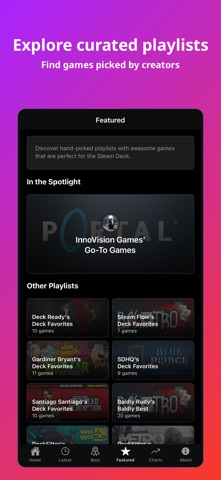
Check Steam Deck compatibility and find community-tested game settings. Browse Most Played charts, Latest Settings, and hand-picked playlists. Compare trusted signals in one free companion app. DeckSettings helps Steam Deck players explore games, get them running, and tune them without jumping between store pages, Reddit threads, and report sites. Why Steam Deck players use DeckSettings: - Check Deck Verified status, SteamOS compatibility, ProtonDB tiers, release details, tags, and Steam review sentiment - Find community-tested settings from sources like ShareDeck, SteamDeckHQ, and DeckVerifiedGames when reports are available - Compare FPS targets, battery estimates, power draw, graphics presets, and LCD/OLED notes when supported by source data - See regional prices, discounts, free-to-play labels, and coming-soon releases - Jump to Steam, ProtonDB, HowLongToBeat, PCGamingWiki, discussions, SteamDB, SteamCharts, and other trusted resources - Browse Latest Settings, Best on Deck recommendations, and creator-curated playlists How it works: 1. Search the Steam store or browse discovery feeds 2. Open a game to compare compatibility, reviews, price, and release signals 3. Use available community settings to tune FPS, battery life, and graphics faster DeckSettings is free to use, with no login requirements, ads, or in-app purchases. Download DeckSettings to spend less time researching and more time choosing what to play next. Disclaimer: DeckSettings is an unofficial companion app and is not affiliated with, endorsed by, or sponsored by Valve Corporation, Steam, Steam Deck, ProtonDB, ShareDeck, SteamDeckHQ, DeckVerifiedGames, HowLongToBeat, PCGamingWiki, SteamDB, or SteamCharts. All trademarks, logos, images, and game assets belong to their respective owners.
What's new · 1.6.1
- New: Tablet support - Fix: Restore SteamDeckHQ report FPS, battery life, and power draw after the website redesign - Fix: Keep Steam review ratings syncing after Steam's service update
Details