

Converter+ Video to MP3
Raphael Monteiro · Photo & Video
Independent analytics for this App Store listing. AppTracker is not affiliated with Raphael Monteiro.
Chart standing · US
What changed · US
Listing changes AppTracker has observed for this app in this storefront — new versions, price moves, rating shifts, and store copy.
Some improvements and fixes for the latest system updates. Thanks for using Converter+!
Screenshots



About
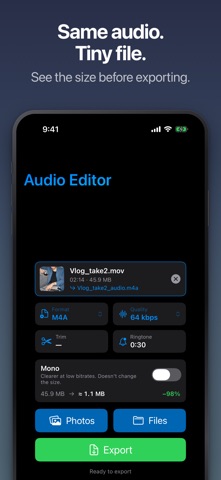
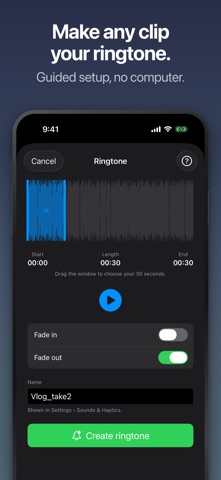
Pull a clean audio track out of any video in seconds — then trim it, shrink it, and save it as MP3, M4A, WAV, AIFF, CAF or an iPhone ringtone. Everything runs on your device, and Pro is one payment with no subscription. MAKE IT YOUR RINGTONE Slide a 30-second window over any song or clip, add a fade in and a fade out, and hear it loop before you commit. Then follow the built-in guide: it walks you through GarageBand step by step, so the ringtone actually ends up on your iPhone. No computer needed — and if you do have a Mac, that shortcut is in there too. CONVERT ANYTHING WITH SOUND Drop in a video or an audio file and get the format you actually need. Six outputs: MP3 to play anywhere, M4A for smaller files at the same quality, WAV and AIFF when you cannot lose a thing, CAF for very long recordings, and M4R for iPhone ringtones. Pick your bitrate all the way up to 320 kbps. TRIM IT. SHRINK IT. The Editor cuts a clip down to the part you want and compresses it to a fraction of its original size. Switch to mono, drop the bitrate, and watch the before and after estimate update before you export a single byte. BRING FILES IN FROM ANYWHERE Import straight from Photos, open a file with Converter+ from the Files app, or share one to Converter+ from any app at all. A notification brings you back the moment it is ready. YOUR LIBRARY, YOUR WAY Every conversion lands in a library you can search, sort and rename. Attach notes to any file, play it back in the background while you do something else, and swipe to send it anywhere through the iOS share sheet. PRIVATE BY DESIGN Conversion happens entirely on your iPhone. Nothing is uploaded, nothing is collected, and everything works offline. FREE AND PRO Free covers M4A at up to 128 kbps, one file at a time. Pro unlocks ringtones, all six formats, 320 kbps, batch conversion and playback from 0.5x to 2.5x — for a single payment, not a subscription. M4V files cannot be converted because of Digital Rights Management restrictions.
What's new · 1.1.2
Some improvements and fixes for the latest system updates. Thanks for using Converter+!
Details