

Lilara - Family Meal Planner
CONNOR JOSEF MCGARTY-WOOD · Food & Drink
Independent analytics for this App Store listing. AppTracker is not affiliated with CONNOR JOSEF MCGARTY-WOOD.
Chart standing · US
What changed · US
Listing changes AppTracker has observed for this app in this storefront — new versions, price moves, rating shifts, and store copy.
• Type a meal right into the day and hit return — no extra screen. The book icon in the field still opens Browse recipes when you want one. • Shopping has a clearer home: the list you're shopping from sits at the top with its dates and progress, other lists sit underneath, and finished ones are tucked away under Previous lists. • Name and rename your lists, archive the ones you're done with, and bring one back anytime with "Show archived lists" in the filter menu. • Make a list from your plan right from the planner menu (Lilara Pro). When the plan changes, the list now tells you exactly which dishes were added or removed, and updating it keeps everything you've checked off and leaves your own items alone. • Tap "Where it's from" on an item to see the dishes and days it's for. • Items you add yourself go into the section you last put them in. • Reminders now reach people who plan on their own, not just households. • Plus: in Smart Plan, a mealtime that has already passed shows as one quiet line with "Add anyway" instead of a crossed-out dish; a new blank list no longer disappears if you leave it empty; and a batch of smaller fixes.
In-app purchases · US
What this app sells inside itself, grouped by kind and priced for this storefront.
Screenshots






Keywords this app targets
Search terms AppTracker associates with this app — estimates, not search volume. ❝ = in the app's title; a highlighted number is its current position for that term.
Similar apps
Competitors and close alternatives, as estimated by AppTracker.
 MealMood: Family Meal Planner
Alexandre Vazquez
1 shared topic · 6 shared title words
MealMood: Family Meal Planner
Alexandre Vazquez
1 shared topic · 6 shared title words
 Simple Meal Planner & Cookbook
Sergei Korneev
2 shared topics · 3 shared title words
Simple Meal Planner & Cookbook
Sergei Korneev
2 shared topics · 3 shared title words
 Weekly Meal Planner AI
BAUGEY MATHEO JAMES MORGAN
2 shared topics · 3 shared title words
Weekly Meal Planner AI
BAUGEY MATHEO JAMES MORGAN
2 shared topics · 3 shared title words
 Simmerly: Meal Planner
Maybe Blueberries LLC
2 shared topics · 3 shared title words
Simmerly: Meal Planner
Maybe Blueberries LLC
2 shared topics · 3 shared title words
 Meal Planner & Weekly Menu
Raquel Martinez Figueirido
2 shared topics · 3 shared title words
Meal Planner & Weekly Menu
Raquel Martinez Figueirido
2 shared topics · 3 shared title words
 lopu: Weekly Meal Plan & Prep
Dmytro Kobets
3 shared topics · 1 shared title word
lopu: Weekly Meal Plan & Prep
Dmytro Kobets
3 shared topics · 1 shared title word
 Feeding Littles: Meal Planner
Chin and Cheeks LLC
2 shared topics · 3 shared title words
Feeding Littles: Meal Planner
Chin and Cheeks LLC
2 shared topics · 3 shared title words
 meek - Meal Planner & Calendar
kenta ito
1 shared topic · 3 shared title words
meek - Meal Planner & Calendar
kenta ito
1 shared topic · 3 shared title words
About
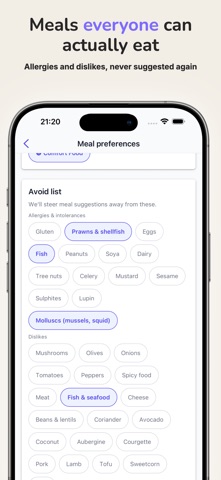
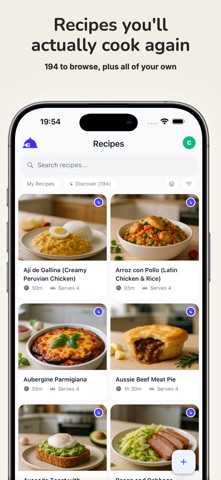
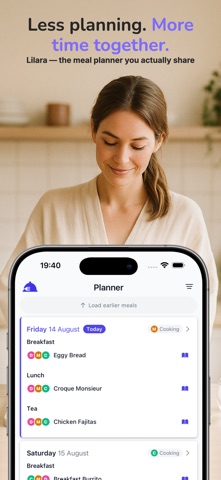
Lilara is the shared plan for what your household is eating this week. Invite whoever else cooks, and you all see the same plan — the same meals, the same days, the same people. Everyone sees the same week Plan breakfast, lunch and dinner in one place, and everyone in the household sees it the moment it changes. The week stops living in one person's head. Who's eating, and who's cooking Give everyone their own profile, then say who each meal is for and whose turn it is to cook. Guided setup walks you through adding the people you cook for and inviting a co-planner. Real meals, not just recipes Takeout. Leftovers. Same as yesterday. Daycare lunch. Tap a chip or type whatever you're actually eating — no recipe needed, nothing to look up. Next week, already drafted Smart Plan writes the days ahead from the meals your household actually cooks, and shows you what it took into account. Swap anything that doesn't fit, then save. It gets better the more weeks it has seen. Meals that suit your household Tell Lilara about allergies, intolerances, and the foods your family simply won't eat. Smart Plan won't suggest them, and recipes containing them stay out of the way until you ask to see them. A nudge before the week runs out Lilara tells you when your plan is running out, and can send a Sunday reminder to sit down and sort out the next one. Reminders through the day are optional too. Nearly 200 recipes to start from Every one is illustrated, with calories, protein, carbs and fat per serving estimated from the ingredients. Save your own family favorites, or paste a recipe in and Lilara pulls out the ingredients and steps for you to check. Shopping, sorted Keep a grocery list by hand whenever you like, or with Pro, build one straight from the week you've planned. On your Home Screen A widget keeps today's and tomorrow's meals a glance away. Ask Siri what's for dinner tonight. Moving from another meal planner? There's nothing to import and nothing to rebuild. Add this week's meals as you go — takeout, leftovers and "same as yesterday" all count — and once Lilara has seen a couple of weeks, Smart Plan drafts the next one from the meals you actually cook. Free and Pro Lilara is free to use: plan up to 14 days ahead, keep up to 4 people in your household, and use Smart Plan for 14 days each month. Lilara Pro adds unlimited Smart Plan, grocery lists built from your plan, 90 days of planning, up to 20 people, the calendar month view, meals grouped by member, a longer window for editing past meals, and custom reminder times. Start planning your week together with Lilara. Terms of Use (EULA): https://www.apple.com/legal/internet-services/itunes/dev/stdeula/
What's new · 1.97.0
• Type a meal right into the day and hit return — no extra screen. The book icon in the field still opens Browse recipes when you want one. • Shopping has a clearer home: the list you're shopping from sits at the top with its dates and progress, other lists sit underneath, and finished ones are tucked away under Previous lists. • Name and rename your lists, archive the ones you're done with, and bring one back anytime with "Show archived lists" in the filter menu. • Make a list from your plan right from the planner menu (Lilara Pro). When the plan changes, the list now tells you exactly which dishes were added or removed, and updating it keeps everything you've checked off and leaves your own items alone. • Tap "Where it's from" on an item to see the dishes and days it's for. • Items you add yourself go into the section you last put them in. • Reminders now reach people who plan on their own, not just households. • Plus: in Smart Plan, a mealtime that has already passed shows as one quiet line with "Add anyway" instead of a crossed-out dish; a new blank list no longer disappears if you leave it empty; and a batch of smaller fixes.
Details