

Planning Center
Ministry Centered Technologies · Productivity
Independent analytics for this App Store listing. AppTracker is not affiliated with Ministry Centered Technologies.
Chart standing · US
What changed · US
Listing changes AppTracker has observed for this app in this storefront — new versions, price moves, rating shifts, and store copy.
Tasks got a refresh! Tapping a task now opens a clean details view, with editing one tap away. You can also duplicate a task from the swipe menu or the details screen, and repeat settings are quicker to set. This version also makes email, phone, and text links open more reliably, improves support for larger text sizes, and includes many bug fixes and stability improvements.
Price & rating history · US
Reconstructed from the listing changes AppTracker has observed in this storefront. A field is charted once it has changed more than once, and each line starts at the value it moved from.
Average rating · ★ 4.67 now · 5 changes on record
Ratings breakdown · US
The star breakdown behind this app's rating in this storefront.
In-app purchases · US
No in-app purchases.
Screenshots



About
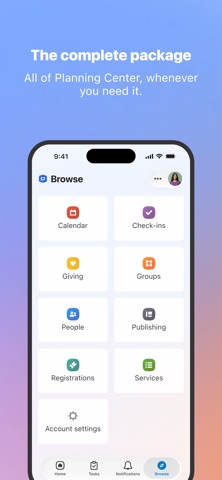
Ministry work doesn’t just happen at your desk. With the Planning Center app, church admins get mobile access to every product they use, their task lists, and notifications all in one place. The Planning Center you know and love, now easily accessible from the church lobby, the youth building, or wherever your ministry work takes you. Key Features Access any product — Use People, Giving, Services, Check-Ins, or any other product, all from within the app All admin notifications — Facilities requests, workflow updates, form submissions, and more Your Home dashboard — A clear overview of stats, information, and items that need your attention Tasks — Keep collaborating with your team whether you're in a coffee shop or hustling on a Sunday morning Requirements Login requires an existing Planning Center account. Any action you take on web or mobile will be synced. Support Questions, issues, or want to request new features? Go to your profile page by tapping your avatar and use the "Contact Support" link to let us know. Typical reply time is ~1 business hour.
What's new · 2026.10.3
Tasks got a refresh! Tapping a task now opens a clean details view, with editing one tap away. You can also duplicate a task from the swipe menu or the details screen, and repeat settings are quicker to set. This version also makes email, phone, and text links open more reliably, improves support for larger text sizes, and includes many bug fixes and stability improvements.
Details