

Photo Blur – Brush to Censor
MITSUKO MARGOT KUBOTA ONO · Photo & Video
Independent analytics for this App Store listing. AppTracker is not affiliated with MITSUKO MARGOT KUBOTA ONO.
Chart standing · US
What changed · US
Listing changes AppTracker has observed for this app in this storefront — new versions, price moves, rating shifts, and store copy.
Added a one-time purchase option to remove ads. You can purchase it or restore your purchase from Settings.
In-app purchases · US
What this app sells inside itself, grouped by kind and priced for this storefront.
Screenshots



About
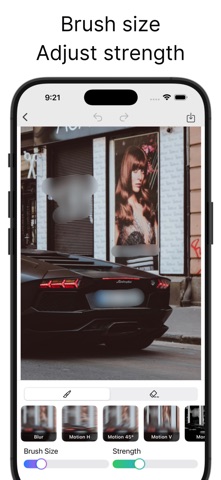
Hide unwanted parts of your photos by tracing with your finger. It’s simple: pick a photo, trace the areas you want to hide, and you’re done. Apply mosaic/blur selectively to protect privacy. ● Features 【Simple workflow】 ・Pick a photo → trace to hide → save/share (3 steps) ・One-tap switch between pen and eraser ・Adjust brush size and effect strength (granularity) with sliders ・“Color Pen” lets you fill with any color 【Preview & editing】 ・Instant feedback along your strokes ・Undo/Redo so you can revise anytime 【Rich filters】 ・Pixelation: Mosaic / Hexagon / Crystallize / Pointillize ・Halftone screens: Dot / Line (Vertical & Horizontal) / Circular / CMYK Halftone ・Blur: Gaussian Blur / Motion Blur (Horizontal / Vertical / Diagonal) ・Others: Monochrome / Color Pen (solid color fill) 【High-quality export】 ・Save and share at the photo’s original resolution ・Share directly to social apps and messages 【No sign-up required】 ・No account needed ・Start right after installing 【Use cases】 ・Quickly hide only what you don’t want to show—faces, name tags, license plates, addresses, parts of screens, etc. ・Mask screenshots before reviews; anonymize photos before posting to social media.
What's new · 1.2.0
Added a one-time purchase option to remove ads. You can purchase it or restore your purchase from Settings.
Details