

Tempus: ADHD Daily Planner
Anh Nguyen · Productivity
Independent analytics for this App Store listing. AppTracker is not affiliated with Anh Nguyen.
Chart standing · US
What changed · US
Listing changes AppTracker has observed for this app in this storefront — new versions, price moves, rating shifts, and store copy.
ANY EMOJI CAN BE A TASK'S ICON When you add or edit a task, tap its icon, then the smiley under Emoji, and your keyboard opens straight to emoji. The ones you pick wait there for next time, and the task shows its emoji wherever it appears: on the timeline, in widgets and Live Activities, on Apple Watch and in its reminders. READY FOR IPHONE DUO Closed, Tempus fits the outer display, with its buttons in a column at the side. Held open like a book, it works around the fold: the week splits four days and three, and the Focus timer sits on one side with its controls on the other. MOVE YOUR DAY BY HAND Press and hold a task to lift it off the timeline, then drop it on a new time or carry it up to another day. Pinch it to make it longer or shorter. EVERY REPEATING TASK IS A HABIT Open any repeating task to see its streak, its completion rate and a month of the days you showed up. PLAN A DAY WITH APPLE INTELLIGENCE Describe the day you want, by voice or in writing, and watch it take shape around your calendar. Nothing is saved until you've reviewed it. SIRI IN YOUR OWN WORDS On iOS 27, "Create a dentist appointment in Tempus tomorrow at 3pm" just works. Mark a task done or start focus straight from Siri's card. Behind the scenes, a round of bug fixes makes every part of Tempus a little more dependable.
Ratings breakdown · US
The star breakdown behind this app's rating in this storefront.
Screenshots



About
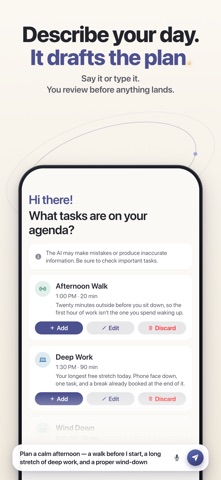
Tempus is a calm daily planner built for ADHD brains — one clear timeline for your day, real app blocking for your focus, streaks that forgive, and a Siri that finally understands what you mean. MADE FOR REAL ADHD CHALLENGES Most planners assume your brain cooperates. Tempus is designed for the days it doesn't: • Time blindness — see time as space on a visual timeline • Task paralysis — describe your day and let Apple Intelligence draft the plan; you review it before anything is saved • Forgetfulness — alarms, smart reminders and Live Activities that meet you where you are • Overwhelm — one signal per state, one accent per screen. Nothing shouts. • Broken routines — streaks that forgive a day off, because coming back is the win PLAN — DESCRIBE YOUR DAY, THEN DECIDE • Say or type what needs to happen: "deep work this morning, gym after lunch, call the clinic" • Tempus turns it into tasks with a duration, a priority and an energy level, and fits them around what's already on your calendar • Watch the plan take shape on the timeline as it's written. Fix a title, drop what you don't want, then add it to your day. Nothing lands until you say so. • Plan today or tomorrow — from the app, or by asking Siri • Tasks, habits, routines, Apple Calendar (including the Google and Outlook accounts on your iPhone) and Reminders on one timeline • Inbox to capture thoughts now and sort them later ASK SIRI — IN YOUR OWN WORDS • "Plan my day in Tempus", "What's next in Tempus", "Start focus in Tempus" — ten Siri shortcuts, most of them without opening the app • On iOS 27, Apple Intelligence understands Tempus like a calendar: "Create a dentist appointment in Tempus tomorrow at 3pm" just works, with no phrase to memorize • Siri answers with cards you can act on — mark the next task done or start a focus session right from the card • Find any task in Spotlight and open it directly • With a task on screen, "Start focus in Tempus" starts on that one • Shortcuts for Prepare Tomorrow, Reschedule Task, Move Unfinished Tasks (with undo) and Review Day PROTECT — FOCUS THAT CAN'T BE STOLEN • Focus Mode blocks distracting apps with one tap, using Apple's Screen Time technology • The world dims until you're done — Live Activities keep the session on your Lock Screen • Timers, interactive widgets and Apple Watch support FORGIVE — PROGRESS WITHOUT PUNISHMENT • Streaks that forgive: a day with nothing planned never breaks your streak • Quiet statistics by week, month or year that celebrate coming back, not output • No confetti. No guilt. Just a calm acknowledgment and your next step. PRIVATE BY DESIGN • No account required. Your tasks live on your device and in your own iCloud. • With Apple Intelligence, planning runs on Apple silicon — where neither Apple nor Tempus can read your request • Where Apple Intelligence isn't available, Tempus's own planning service drafts the plan, and you still review everything before it's saved ALSO IN TEMPUS • iCloud sync across iPhone, iPad and Mac • Works offline • Home Screen and Lock Screen widgets, Live Activities, an Apple Watch app and complications • A native Liquid Glass interface, with a proper split view on iPad PERFECT FOR • Adults with ADHD or executive function challenges • Students managing classes, deadlines and revision • Professionals who need deep work without distractions • Anyone overwhelmed by traditional productivity apps Tempus is free to download. Tempus Pro unlocks the full experience, available monthly, yearly, or as a one-time lifetime purchase — stated once, no countdown timers. Requires iOS 26.2 or later. Planning with Apple Intelligence needs a supported device with Apple Intelligence turned on. Siri in your own words needs iOS 27. Privacy Policy: https://www.gettempus.app/privacy-policy Terms of Use: https://www.gettempus.app/terms-of-service
What's new · 2.1.1
ANY EMOJI CAN BE A TASK'S ICON When you add or edit a task, tap its icon, then the smiley under Emoji, and your keyboard opens straight to emoji. The ones you pick wait there for next time, and the task shows its emoji wherever it appears: on the timeline, in widgets and Live Activities, on Apple Watch and in its reminders. READY FOR IPHONE DUO Closed, Tempus fits the outer display, with its buttons in a column at the side. Held open like a book, it works around the fold: the week splits four days and three, and the Focus timer sits on one side with its controls on the other. MOVE YOUR DAY BY HAND Press and hold a task to lift it off the timeline, then drop it on a new time or carry it up to another day. Pinch it to make it longer or shorter. EVERY REPEATING TASK IS A HABIT Open any repeating task to see its streak, its completion rate and a month of the days you showed up. PLAN A DAY WITH APPLE INTELLIGENCE Describe the day you want, by voice or in writing, and watch it take shape around your calendar. Nothing is saved until you've reviewed it. SIRI IN YOUR OWN WORDS On iOS 27, "Create a dentist appointment in Tempus tomorrow at 3pm" just works. Mark a task done or start focus straight from Siri's card. Behind the scenes, a round of bug fixes makes every part of Tempus a little more dependable.
Details