

Promptty - AI Prompt Manager
Michal Kos · Productivity
Independent analytics for this App Store listing. AppTracker is not affiliated with Michal Kos.
Chart standing · US
What changed · US
Listing changes AppTracker has observed for this app in this storefront — new versions, price moves, rating shifts, and store copy.
Made for iPhone Duo Promptty now takes full advantage of iPhone Duo. Your library, prompt details and editor adapt to the larger display, so you can browse and work with prompts more comfortably. Copy & Open in your AI app Send any prompt straight to your favorite AI app. Promptty copies the prompt and opens the app for you, so all that's left is to paste. A redesigned keyboard The Promptty keyboard has a new look. The prompt cards are cleaner, and confirmations are clearer. A new welcome experience New users get an animated introduction to Promptty, plus a step-by-step guide to setting up the keyboard.
Screenshots


About
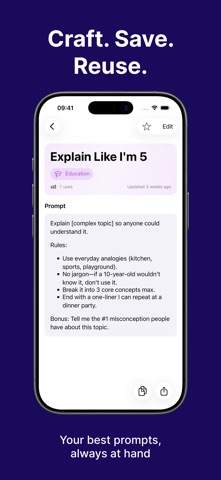
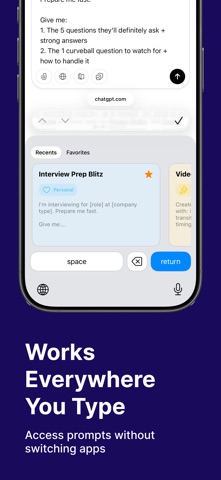
Promptty is a native prompt manager for people who reuse AI prompts every day. Keep prompts, templates, instructions, workflows, and reusable text organized on iPhone, iPad, and Mac — then insert them from the Promptty keyboard without digging through notes, chats, docs, or screenshots. WHY PROMPTTY Paste from the keyboard Open the Promptty keyboard in any app, search your library, and insert the prompt you need. Build a real prompt library Organize prompts with custom categories, colors, icons, and tags so your best workflows are easy to find. Search everything fast Find prompts by title, content, category, or tag. Sync with iCloud Keep your prompt library available on iPhone, iPad, and Mac. No extra account required. Share prompts Create public prompt links when you want to share a reusable prompt with someone else. Private by default Your prompts stay on your device and in your personal iCloud. Promptty doesn’t see, store, or analyze your prompt content. USE PROMPTTY FOR • System prompts and reusable AI instructions • Writing, marketing, and social templates • Code review, debugging, and documentation prompts • Research workflows and analysis frameworks • Any text you paste often and don’t want to rewrite HOW IT WORKS 1. Save your favorite prompts 2. Organize them with categories and tags 3. Search from the app or Promptty keyboard 4. Paste the right prompt wherever you’re working START FREE Use Promptty with 10 prompts for free. Upgrade to Pro for unlimited prompts and advanced workflow features. Built natively for the Apple ecosystem. --- Built with love for the Apple ecosystem. Native SwiftUI. No subscriptions required for basic use. Questions or feedback? We'd love to hear from you. https://www.promptty.ai Terms of Use: https://www.promptty.ai/terms-and-conditions Privacy Policy: https://www.promptty.ai/privacy-policy
What's new · 1.5.0
Made for iPhone Duo Promptty now takes full advantage of iPhone Duo. Your library, prompt details and editor adapt to the larger display, so you can browse and work with prompts more comfortably. Copy & Open in your AI app Send any prompt straight to your favorite AI app. Promptty copies the prompt and opens the app for you, so all that's left is to paste. A redesigned keyboard The Promptty keyboard has a new look. The prompt cards are cleaner, and confirmations are clearer. A new welcome experience New users get an animated introduction to Promptty, plus a step-by-step guide to setting up the keyboard.
Details