

Hearthboard Home Display
JudeWorks LLC · Utilities
Independent analytics for this App Store listing. AppTracker is not affiliated with JudeWorks LLC.
Chart standing · US
What changed · US
Listing changes AppTracker has observed for this app in this storefront — new versions, price moves, rating shifts, and store copy.
NEW FEATURES • Chores widgets: Organize household routines by person, with recurring chores, due times, and flexible completion options. Choose the handwritten Kitchen Board or clean Checklist style, with layouts supporting up to six people in one widget. • Frigate NVR widgets: Bring your cameras and Birdseye view to your board, with adjustable framing and full-screen viewing. • Plex widgets: Display Recently Added, Continue Watching, or a favorite collection with poster artwork and watch progress. • Refreshed widget setup: Browse the growing widget collection, explore flexible sizes, and customize your board with clearer, more focused controls. BUG FIXES & IMPROVEMENTS • More consistent editor layouts and clearer navigation to help prevent accidentally closing widget setup. • Widget previews remain available when your board is full, with a clear space message before you can add them. More widgets and integrations are coming soon! If there’s a particular widget, plugin, or integration you’d love to see, share your suggestion and vote for ideas in Settings > Roadmap. If you run into an issue or need a hand, reach out through Settings > Contact Support. I’m here to help, and your feedback helps shape what comes next. Thanks for making Hearthboard part of your home!
Screenshots



About
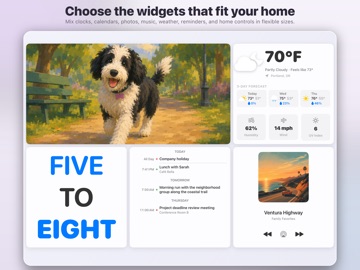
Turn your iPad into a customizable home dashboard, family wall calendar, smart home controller, and digital photo frame. Hearthboard brings calendars, reminders, weather, photos, clocks, Apple Music, HomeKit, and Home Assistant together on one calm screen. Mount it on a wall, place it on the kitchen counter, or keep it by the entryway so everyone can see what matters at a glance. ONE BOARD, BUILT YOUR WAY Hearthboard is not a fixed dashboard. Choose the widgets and sizes that fit your household, then arrange them on a flexible grid. Create separate portrait and landscape layouts, move widgets with drag and drop, and use the starter dashboard builder when you want a quick setup. FAMILY ORGANIZATION • See calendar agendas, the next event, remaining daily time, and availability • Keep Today reminders and household tasks visible • Build a kitchen calendar, morning launchpad, family command center, or quiet room display • Add clocks in digital, analog, word, flip, 24-hour, LCD, and bold styles SMART HOME AT A GLANCE Use HomeKit and Home Assistant widgets beside the rest of your family information. HomeKit support includes compatible: • Lights, switches, outlets, fans, and humidifiers • Thermostats, temperature, humidity, and other sensors • Locks, garage doors, blinds, curtains, and security systems • Scenes and live camera feeds Home Assistant support includes compatible: • Lights, switches, fans, climate, covers, locks, and humidifiers • Sensors for motion, doors, windows, smoke, moisture, air quality, batteries, power, and more • Cameras, media players, vacuums, valves, scenes, scripts, buttons, and automations • Home energy widgets for live consumption, solar production, and daily totals PHOTOS, MUSIC, AND WEATHER • Fill widgets with photos, albums, slideshows, and Live Photos • Reposition media and supported camera views to keep the important area in frame • Play Apple Music albums and playlists with playback controls • Check current conditions plus hourly and multi-day forecasts powered by WeatherKit MADE FOR AN IPAD HOME DISPLAY • Flexible widget sizes for glanceable or detailed views • Portrait and landscape dashboard layouts • Light and dark appearances with accent color options • Permission requests only when you choose a feature that needs access • Idle photo wallpaper and display-focused controls with Hearthboard Pro TRY IT FREE Try any three widgets for free. Hearthboard Pro is an optional one-time purchase—no subscription—that unlocks: • Unlimited widgets • A sleep schedule with an overnight black screen • Wake on approach using motion detection • Idle photo wallpaper • Motion-triggered Live Photo playback PRIVACY AND REQUIREMENTS Hearthboard does not require a Hearthboard account. Your personal HomeKit, Home Assistant, calendar, reminder, photo, and music content is used only to power the widgets you choose and is not sold or used for advertising. Home Assistant connects directly to the server you configure, and its access token is stored securely on your device. Some features require compatible hardware, services, permissions, subscriptions, or network access. HomeKit requires a configured Apple Home. Home Assistant requires a reachable server and long-lived access token. Apple Music playback requires Apple Music access and available media. Weather requires network access.
What's new · 1.3
NEW FEATURES • Chores widgets: Organize household routines by person, with recurring chores, due times, and flexible completion options. Choose the handwritten Kitchen Board or clean Checklist style, with layouts supporting up to six people in one widget. • Frigate NVR widgets: Bring your cameras and Birdseye view to your board, with adjustable framing and full-screen viewing. • Plex widgets: Display Recently Added, Continue Watching, or a favorite collection with poster artwork and watch progress. • Refreshed widget setup: Browse the growing widget collection, explore flexible sizes, and customize your board with clearer, more focused controls. BUG FIXES & IMPROVEMENTS • More consistent editor layouts and clearer navigation to help prevent accidentally closing widget setup. • Widget previews remain available when your board is full, with a clear space message before you can add them. More widgets and integrations are coming soon! If there’s a particular widget, plugin, or integration you’d love to see, share your suggestion and vote for ideas in Settings > Roadmap. If you run into an issue or need a hand, reach out through Settings > Contact Support. I’m here to help, and your feedback helps shape what comes next. Thanks for making Hearthboard part of your home!
Details