

CloudGear: PC Gaming Browser
Bitwise Solutions Limited · Games
Independent analytics for this App Store listing. AppTracker is not affiliated with Bitwise Solutions Limited.
Chart standing · US
What changed · US
Listing changes AppTracker has observed for this app in this storefront — new versions, price moves, rating shifts, and store copy.
- (tvOS) Fixed HDR games looking washed out - (tvOS) Frame pacing is now off by default for lower latency - turn it back on in Settings > Video if you see stutter - (iOS) Fixed the mouse pointer losing its lock in certain scenarios - Luna: Added support for the Amazon Luna Controller in "Cloud Direct" mode - the controller talks to Luna over your Wi-Fi network directly instead of routing its input through your iPhone or iPad, which keeps latency down - Luna: Fixed the mouse cursor sometimes incorrectly appearing at the beginning of a stream - GFN: Restored the overlay disclosure in desktop mode when playing with only a Steam Controller - OnePlay: Fixed the dashboard failing to load - Miscellaneous bug fixes and other improvements
Price & rating history · US
Reconstructed from the listing changes AppTracker has observed in this storefront. A field is charted once it has changed more than once, and each line starts at the value it moved from.
Average rating · ★ 4.82 now · 11 changes on record
Ratings breakdown · US
The star breakdown behind this app's rating in this storefront.
In-app purchases · US
What this app sells inside itself, grouped by kind and priced for this storefront.
Screenshots



About
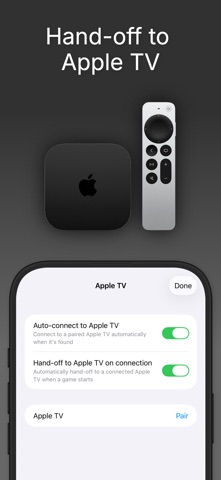
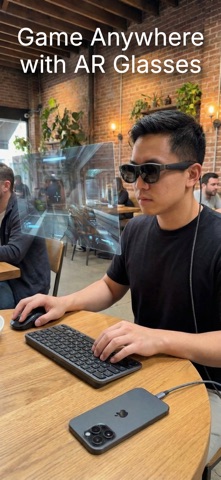
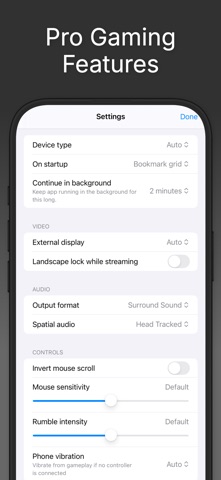
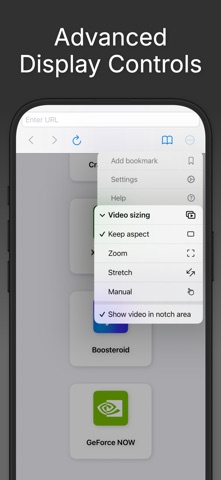
CloudGear is the browser designed for gamers - custom-engineered to deliver the speed, visuals, and control that other browsers can't. Stream from GeForce NOW, Xbox Cloud Gaming, Amazon Luna, Boosteroid, or any browser-based game with performance and immersion mobile gaming has never had. Plug into a TV, monitor, or AR glasses and your iPhone or iPad becomes a portable gaming rig. No console required. UNCOMPROMISED PERFORMANCE - High-Resolution Gaming: Stream at up to 5K video on supported platforms. - Smooth Frame Rates: Up to 120fps for fast, responsive gameplay - plus frame pacing that helps to eliminate stutter. - Advanced Codec Support: H.265 and AV1 for efficient streaming at maximum quality. - Low-Latency Streaming: A custom rendering engine built for speed. Frames display sooner and gameplay feels closer to native. YOUR GAME, ANY SCREEN - External Display & AR Glasses: Connect to a TV, monitor, or AR glasses like XREAL, Rokid, VITURE, or RayNeo via USB-C or HDMI. CloudGear outputs at native resolution with no black bars, turning your iOS device into a portable gaming rig you can plug in and play anywhere. - Apple TV Companion: Pair your iPhone or iPad with the CloudGear app for Apple TV and hand games off to the big screen. - HDR & 10-Bit Color: High dynamic range and rich color depth bring games to life the way developers intended. - Configurable Video Sizing: Zoom, stretch, or manually position the stream to fill every inch of your display. - Spatial Audio & Surround Sound: Support for 7.1 channel surround sound and spatial audio. DESKTOP-CLASS GAMING CONTROLS - True Mouse Pointer & Keyboard Lock: Get the precision you need with mouse pointer lock that makes your mobile experience feel like playing on desktop. - Steam Controller: First-class Valve Steam Controller support - use its trackpad as a mouse, with full control remapping for keyboard-and-mouse only games. - Controller Vibration: Full rumble for any connected controller. For controllers without motors, vibration routes through your iPhone's Taptic Engine. - Virtual Mouse: No mouse or controller? Control a virtual pointer using touch gestures alone. - Universal Compatibility: Works with any iOS-supported Bluetooth or USB-C controller, plus external keyboards and mice. QUICK LAUNCH & WIDGETS - Quick Launch Bookmarks: Bookmark individual games and launch them with a single tap - no menus, no browsing. - Home Screen Widget: Add any game to your iOS Home Screen as a widget for instant access. - iCloud Sync: All bookmarks sync automatically across your devices via iCloud. CloudGear works with major cloud gaming services and enables the best experience for each: - GeForce Now: Up to 5K @ 120fps, H.265 & AV1 codec, HDR, 10-bit color, 7.1 surround sound - Boosteroid: Up to 4K @ 120fps, AV1 codec, HDR, custom resolution selection - Xbox Cloud Gaming: Up to 1440p video, built-in Better xCloud script manager for higher bitrate, improved input, and more - Amazon Luna: Up to 1080p @ 60fps, max resolution and bitrate unlocked even on iPhone - OnePlay: Up to 4K @ 120fps - HTML5 Gaming Sites: Full controller support, mouse pointer lock, and keyboard lock for browser-based games Actual streaming quality depends on each service's capabilities and your account tier. CloudGear enables the maximum quality available. Please note: CloudGear is a premium utility. A subscription or one-off lifetime purchase is required to access the browser and all features. A 7-day free trial is available for new subscribers. Disclaimer: CloudGear is an independent application and is not affiliated with, endorsed by, or sponsored by GeForce Now, Boosteroid, Amazon Luna, OnePlay or Xbox. It is simply compatible with these third-party services in its capacity as a general web browser. Terms of Use: https://www.apple.com/legal/internet-services/itunes/dev/stdeula/ Privacy Policy: https://www.cloudgear.app/privacy/
What's new · 2.1
- (tvOS) Fixed HDR games looking washed out - (tvOS) Frame pacing is now off by default for lower latency - turn it back on in Settings > Video if you see stutter - (iOS) Fixed the mouse pointer losing its lock in certain scenarios - Luna: Added support for the Amazon Luna Controller in "Cloud Direct" mode - the controller talks to Luna over your Wi-Fi network directly instead of routing its input through your iPhone or iPad, which keeps latency down - Luna: Fixed the mouse cursor sometimes incorrectly appearing at the beginning of a stream - GFN: Restored the overlay disclosure in desktop mode when playing with only a Steam Controller - OnePlay: Fixed the dashboard failing to load - Miscellaneous bug fixes and other improvements
Details