

Photo Eraser & Object Remover
umer nawaz · Photo & Video
Independent analytics for this App Store listing. AppTracker is not affiliated with umer nawaz.
Chart standing · US
What changed · US
Listing changes AppTracker has observed for this app in this storefront — new versions, price moves, rating shifts, and store copy.
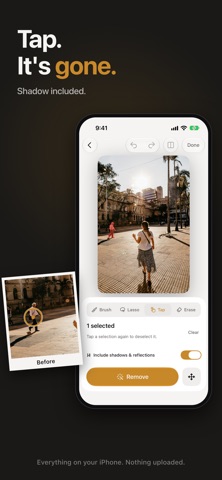
A brand new editor, built around one idea: tap it, it's gone. • Tap to remove: tap a person, object or sign and it's selected instantly, shadow and reflection included. • Distraction finder: Eraser spots passers-by and stray text in your photo and suggests them for removal. • Move objects: lift anything and place it somewhere else. The spot it left is filled in. • Brush, Lasso and Erase: paint, trace or refine any selection. Pinch to zoom for fine edges. • Sharper, cleaner removals with no smudges, even after many edits. • Hold the compare button to see your original anytime. • A simpler save screen, plus before/after videos to share. • Fresh Liquid Glass design throughout. • A smaller download.
Ratings breakdown · US
The star breakdown behind this app's rating in this storefront.
In-app purchases · US
What this app sells inside itself, grouped by kind and priced for this storefront.
Screenshots




About
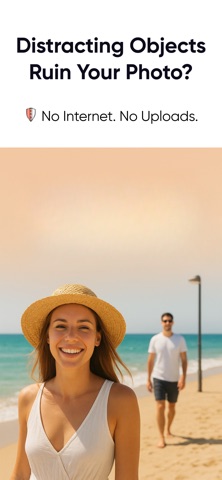
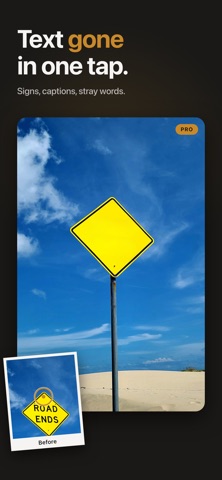
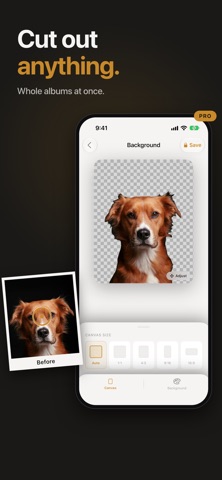
Tap anyone or anything in your photo and it's gone. Eraser removes people, objects, signs and text, fills the spot so it looks like nothing was there, and saves in full resolution. Everything happens on your iPhone or iPad. Your photos are never uploaded. TAP IT. GONE. Tap a person or object and Eraser selects it, shadow included. Tap Remove and the space fills in naturally. Brush, Lasso and Erase are there for fine edits, with pinch to zoom. FINDS DISTRACTIONS FOR YOU Passers-by and stray people are spotted and marked automatically. Select them all, remove them in one go. REMOVE ALL TEXT Shop signs, captions and stray words, cleared in one tap. CLEAR SKIN Acne, spots and blemishes removed while pores and skin texture stay real. Choose how much to smooth. RESTORE OLD PHOTOS Blurry, soft and old faces made sharp again, and small photos upscaled at the same time. REPAIR SCRATCHES (BETA) Scratches, cracks and dust on scanned prints found for you and repaired. MOVE ANYTHING Lift an object and place it somewhere else. The old spot fills in. CUT OUT ANY SUBJECT Remove the background in one tap and save a transparent PNG, or put the subject on a new color. Do up to 10 photos at once with Batch. UPSCALE Make small photos 2x or 4x bigger and sharper. PRIVATE BY DESIGN No account, no sign-in, no uploads. Every edit runs on your device. ERASER PRO Try Pro free for 7 days, then $29.99 a year. Pro unlocks Tap to remove, Move, Remove all text, Retouch, Restore, Repair, background removal, Batch and full-quality saves with no watermark. Payment is charged to your Apple Account when you confirm the purchase after the trial. The subscription renews automatically unless cancelled at least 24 hours before the end of the current period. Manage or cancel any time in your Apple Account settings. Terms of Use: https://www.apple.com/legal/internet-services/itunes/dev/stdeula/ Privacy: https://bilalnawaz.com/privacy.html QUESTIONS OR FEEDBACK eraser@viorastudio.com
What's new · 27.0
A brand new editor, built around one idea: tap it, it's gone. • Tap to remove: tap a person, object or sign and it's selected instantly, shadow and reflection included. • Distraction finder: Eraser spots passers-by and stray text in your photo and suggests them for removal. • Move objects: lift anything and place it somewhere else. The spot it left is filled in. • Brush, Lasso and Erase: paint, trace or refine any selection. Pinch to zoom for fine edges. • Sharper, cleaner removals with no smudges, even after many edits. • Hold the compare button to see your original anytime. • A simpler save screen, plus before/after videos to share. • Fresh Liquid Glass design throughout. • A smaller download.
Details