

SurfMap: Your Surf Forecast
Guillaume Bernos · Weather
Independent analytics for this App Store listing. AppTracker is not affiliated with Guillaume Bernos.
Chart standing · US
What changed · US
Listing changes AppTracker has observed for this app in this storefront — new versions, price moves, rating shifts, and store copy.
Each month of surfing now gets its own recap page in Your Log, and you can share it as a story or a post. • When the tide makes a spot dangerous, the map shows a warning sign next to its rating. • The map, Best Conditions, surf alerts, widgets and your Apple Watch now give the same rating as the spot page, tide included. • Your iPhone now counts the same waves as your watch, and you can rate a session right from its recap. • On iPad, the map fits narrow windows in Split View and Stage Manager, and keeps your spot open when the layout changes. • Favorites are now a pink heart, so a yellow star always means your personal AI prediction.
Ratings breakdown · US
The star breakdown behind this app's rating in this storefront.
In-app purchases · US
What this app sells inside itself, grouped by kind and priced for this storefront.
Screenshots




Keywords this app targets
Search terms AppTracker associates with this app — estimates, not search volume. ❝ = in the app's title; a highlighted number is its current position for that term.
Similar apps
Competitors and close alternatives, as estimated by AppTracker.
 Surf-Forecast.com
Meteo365 Ltd.
2 shared topics · 3 shared title words
Surf-Forecast.com
Meteo365 Ltd.
2 shared topics · 3 shared title words
 Swell Scope — Surf Forecast
Flockatoo Tech Pty Ltd
2 shared topics · 3 shared title words
Swell Scope — Surf Forecast
Flockatoo Tech Pty Ltd
2 shared topics · 3 shared title words
 Spotadvisor Surf Forecast
Pixelnomads LTD
2 shared topics · 3 shared title words
Spotadvisor Surf Forecast
Pixelnomads LTD
2 shared topics · 3 shared title words
 Surfline: Wave & Surf Reports
Surfline/Wavetrak
2 shared topics · 1 shared title word
Surfline: Wave & Surf Reports
Surfline/Wavetrak
2 shared topics · 1 shared title word
 Surf Forecast - Curlio
Leveling LP
2 shared topics · 3 shared title words
Surf Forecast - Curlio
Leveling LP
2 shared topics · 3 shared title words
 Surf forecast | Surfnerd
Joris de Ruiter
2 shared topics · 3 shared title words
Surf forecast | Surfnerd
Joris de Ruiter
2 shared topics · 3 shared title words
 SurfSignal
Sebastiaan Dalmeijer
1 shared topic
SurfSignal
Sebastiaan Dalmeijer
1 shared topic
 EPIC - Surf Report & Forecast
Nuno Fernandes
1 shared topic · 2 shared title words
EPIC - Surf Report & Forecast
Nuno Fernandes
1 shared topic · 2 shared title words
About
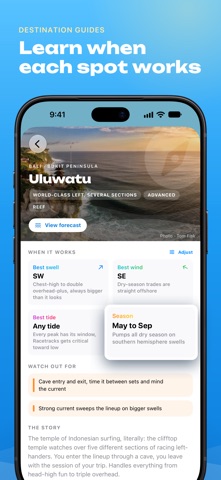
SurfMap rates the surf for your level at more than 5,000 spots around the world. For each spot, it shows you the best hours to go and tells you why. RATED FOR YOUR LEVEL • Tell SurfMap if you're a beginner, an intermediate or an advanced surfer, and every hour of the week gets a rating for you. • Each rating gives its reason in plain words, like "Ideal size for your level" or "Too much wind". • When the tide makes a spot dangerous, a warning sign shows next to its rating. • Rate your sessions and the AI adds a personal score that predicts how much you'll enjoy each hour. It runs on your iPhone and learns only from your own sessions. MAKE EACH SPOT YOURS • Tell SurfMap which tides work at your spot, which ones are dangerous and how big the waves really get there, and the ratings take it into account. • Save your favorite spots. Around 6:30 pm, SurfMap tells you if one of them looks good tomorrow, and it stays quiet when nothing is worth the trip. • Home Screen widgets show the spot you pick, or the closest spot wherever you are. FIND WHERE TO SURF • See which spots around you, or which of your favorites, look good today, tomorrow, this weekend or later in the week. • Hourly graphs show the waves, wind, tide and weather. Drag across the day to check any hour. • The nearby forecast shows seven days for every spot around you. Open the week in landscape, or compare two spots side by side. • Search spots, towns and guides by the name locals use or the one travelers know. WHERE THE FORECAST COMES FROM • Waves, wind and weather come from global wave and weather models, refreshed twice a day for the next seven days. The ratings are SurfMap's own reading of them. • Tides are predicted for each spot from its own tidal constants, the same method behind printed tide tables. 16 SURF GUIDES • The guides cover Ericeira, Peniche, the Algarve, Hossegor, both sides of the Basque Country, Galicia, Asturias, Cornwall, the west coast of Ireland, Fuerteventura, Taghazout, Bali, the Mentawai Islands, Siargao and Sri Lanka. • Each guide says which spot suits your level, the tide that makes it work and the hazards to watch out for. ASK SIRI • "Hey Siri, does it surf today in Huntington Beach with SurfMap?" Siri answers with your rating and the best window, and a tap opens the spot. • With Apple Intelligence, ask SurfMap anything, like "Is tomorrow better than today at Huntington Beach?" Siri questions need iOS 26. APPLE WATCH • Track your session from your wrist, with no phone in the water. The watch counts your waves, and notices missed waves and wipeouts too. • Follow your heart rate, calories and paddle distance live, and keep the GPS track. If your watch runs out of battery, the session isn't lost. • The watch shows conditions and tide for your spots, and its complications can follow the closest spot. YOUR SURF LOG • Every session goes into your log with its conditions and the board you rode, and each month gets its own recap page. • Share a spot's forecast, a session or a whole month as an image. • Your profile keeps your records and a stamp for each new spot and each new country. • Surf workouts go to Apple Health and count toward your rings. SurfMap has no ads. Please note: All features in SurfMap require a subscription. Subscriptions renew automatically unless cancelled at least 24 hours before the end of the current period. You can manage or cancel your subscription in your App Store account settings. Terms of Use (EULA): https://www.apple.com/legal/internet-services/itunes/dev/stdeula/
What's new · 2.6.0
Each month of surfing now gets its own recap page in Your Log, and you can share it as a story or a post. • When the tide makes a spot dangerous, the map shows a warning sign next to its rating. • The map, Best Conditions, surf alerts, widgets and your Apple Watch now give the same rating as the spot page, tide included. • Your iPhone now counts the same waves as your watch, and you can rate a session right from its recap. • On iPad, the map fits narrow windows in Split View and Stage Manager, and keeps your spot open when the layout changes. • Favorites are now a pink heart, so a yellow star always means your personal AI prediction.
Details