

WrenchTime: Car Maintenance
Samuele Mancuso · Utilities
Independent analytics for this App Store listing. AppTracker is not affiliated with Samuele Mancuso.
Chart standing · US
What changed · US
Listing changes AppTracker has observed for this app in this storefront — new versions, price moves, rating shifts, and store copy.
Thanks for using WrenchTime! New - Archive a vehicle you sold. Archive it from its details and it leaves your lists, statistics, charts and widgets, and nothing new can be logged on it. Its history is kept: export or restore it any time from Settings > Data & iCloud > Archived Vehicles. - Quick actions on every vehicle. Touch and hold a vehicle card or row to add a fill-up, a charge or care, start a trip, update the odometer, see its oil life, tire pressure or parking spot, edit it, favorite it, export it or archive it. - Reorder your vehicles. Choose Reorder from the same menu and drag them into the order you want: every vehicle list and picker in the app follows it. - Engine oil type, brand and quantity. Save your vehicle's oil and how much it holds in its details, and log what went in on every oil change or service, in liters or quarts (Settings > Units & Currency). A new oil change starts from the saved oil, and the vehicle's details and Oil life follow the oil that went in last. - Signals. The Custom PIDs tool is now Signals, free to open: every reading your vehicle reports, with your custom signals below. Any of them can be a Live dashboard card, and custom signals get statistics, CarPlay alerts, their own gauge scale, trip charts and your units. - WrenchTime Signal Library. The Community Catalog now opens with WrenchTime's own custom signal collections, built in and offline: 131 signals for the Alfa Romeo Giulia and Stelvio and over 1,800 for BMW B48, B58, N55, N63, S55 and S63 engines and diesels. - Test before you add. Swipe a catalog signal to read it from your vehicle, or tap Start Full Test to try the whole list once. - Tourer and Circuit gauge styles (Pro) for Live and CarPlay, with style and color per Live page and per CarPlay vehicle. - Service visits import as kits. A service visit in a CSV file (annual service, tagliando, Inspektion, revizie) now comes in as a Service kit, or EV Service on an electric vehicle, instead of a General Inspection. Improved - Bluetooth devices and OBD-II adapters set up for a vehicle now read Paired, so it is clear when an adapter is only paired and when it is actually connected. - CSV and PDF exports now list the tire pressures measured on each check, in your pressure unit. - Ticking interventions in a kit now animates, and the sections that depend on them slide in and out. - When another app holds your OBD-II adapter, WrenchTime now says so, with a notification during a trip and in Live Data & Status. - Vehicle card colors now look vivid in light and dark mode, and the card's text switches between white and black to stay readable. - Many optimizations and performance improvements to OBD-II readings. Fixed - Mileage reminders go off whenever the odometer reaches them, after trips, OBD-II readings or edits, on every device. A fired reminder reads Reminded and re-arms if you move its date. - Boost and exhaust temperature readings no longer show as unavailable on some cars. - Trouble codes are never read or cleared while the car sleeps with Disconnect When the Vehicle Sleeps on. - A trip ends on time after you switch off and walk away. - Merging or splitting a trip keeps its custom signal readings, and trip charts use your gauge scales. - A number field holding only a minus sign no longer saves a zero. - Editing a care entry from a procedure into a kit, or from a kit back into a procedure, now saves instead of keeping the old type.
Ratings breakdown · US
The star breakdown behind this app's rating in this storefront.
Screenshots





About
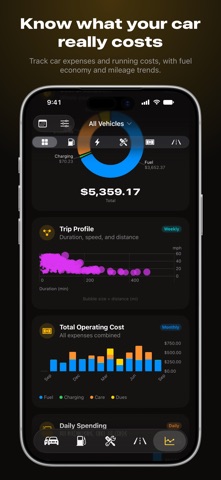
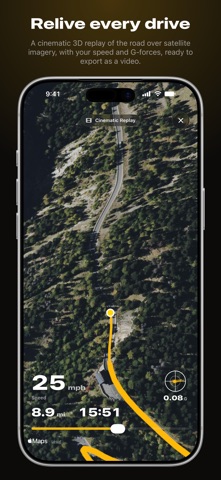
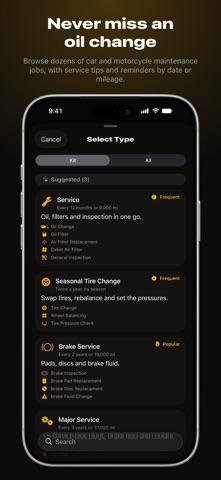
WrenchTime is two apps in one: the logbook that remembers every service, fill-up, and mile for your car or motorcycle, and, with an OBD-II adapter, a live window onto the engine while you drive. • YOUR WHOLE GARAGE, ORGANIZED Every car and motorcycle with photos, odometer, license plate, engine type, and full history. Petrol, diesel, hybrid, or electric, all of them fit. • NEVER MISS A SERVICE Schedule maintenance by date or by mileage and get reminded before it is due. 56 procedures, from oil changes and brake pads to chain lube and tire rotations, each with cost, odometer, and notes. • LOG EVERY FILL-UP AND CHARGE Record fuel and EV charging with volume, energy, cost, and location, and WrenchTime works out your real economy and running costs on its own. Snap a pump display, a charger, or a receipt and on-device AI reads the numbers, nothing leaving your iPhone. • READ THE CAR WHILE YOU DRIVE Pair a Bluetooth OBD-II adapter and WrenchTime reads the engine live: revs, speed, engine load, coolant temperature, fuel rate. Every channel is recorded for the whole drive and kept with the trip, to scrub back through on a chart. • WRENCHTIME LIVE A full-screen dashboard for the road: revs, temperatures, fuel level, speed, lean angle, G-force, compass, altitude, a live map, trip stats, and weather, on a board you build. Several pages, seven card shapes, one layout per orientation, every widget drawn as a real instrument with colored bands past the normal range. • TRIPS THAT RECORD THEMSELVES Trips log themselves with GPS routes, and your car stereo over Bluetooth starts and stops them. Routes follow the roads you actually drove, and you can join two trips that were really one, or cut one that was really two. Then watch one back in 3D: a chase camera over satellite terrain, live gauges, and a short vertical video to share. • ON CARPLAY AND ON YOUR WRIST CarPlay gives you gauge grids for your adapter's readings and your last ten drives, arranged the way you read them. Apple Watch shows what is due and logs a fill-up, a charge, an odometer reading, or where you parked, plus five complications. • KNOW WHAT IT REALLY COSTS 31 charts: spending by category, fuel economy over time, cost per mile, and more. • MORE - Home Screen and Lock Screen widgets for spending, service, parking - Live Activity and Dynamic Island while you drive, on CarPlay too - Find my car, Siri, Shortcuts, CSV and PDF export, iCloud sync, iPad - Your units: km or miles, liters or gallons • FUEL AND CHARGING PRICES NEARBY Price Radar plots the stations around you by real direction and distance, cheapest one highlighted, one tap to navigate. Prices come from official public registries, so here is exactly where that works today: - Italy, France, and Spain: real prices straight away, nothing to set up. - Germany: real prices with your own free Tankerkönig key, entered once in Settings. - Everywhere else: the stations around you, from Apple Maps, without prices. Charging points are the exception, and work worldwide. Switch the radar to EV and it finds them anywhere, with the connectors they carry, how fast they are, who checked in last, and when it was verified, matched to the connector your vehicle holds. • FREE AND PRO Free covers 1 vehicle, 3 fuel, 2 care, and 3 charging entries a month, 10 trips a week, 1 chart, and 3 Live widgets. WrenchTime Pro lifts every limit and adds trip maps, all 31 charts, every widget, AI auto-fill, CarPlay, and Apple Watch. Try it free, then subscribe monthly or yearly, or buy once with a lifetime unlock. Your data stays yours. WrenchTime syncs only through your private iCloud account and never sells your information. ------ Privacy Policy: https://sites.google.com/view/wrenchtime-app/privacy-policy-terms-of-service Terms of Service: https://www.apple.com/legal/internet-services/itunes/dev/stdeula
What's new · 6.8.0
Thanks for using WrenchTime! New - Archive a vehicle you sold. Archive it from its details and it leaves your lists, statistics, charts and widgets, and nothing new can be logged on it. Its history is kept: export or restore it any time from Settings > Data & iCloud > Archived Vehicles. - Quick actions on every vehicle. Touch and hold a vehicle card or row to add a fill-up, a charge or care, start a trip, update the odometer, see its oil life, tire pressure or parking spot, edit it, favorite it, export it or archive it. - Reorder your vehicles. Choose Reorder from the same menu and drag them into the order you want: every vehicle list and picker in the app follows it. - Engine oil type, brand and quantity. Save your vehicle's oil and how much it holds in its details, and log what went in on every oil change or service, in liters or quarts (Settings > Units & Currency). A new oil change starts from the saved oil, and the vehicle's details and Oil life follow the oil that went in last. - Signals. The Custom PIDs tool is now Signals, free to open: every reading your vehicle reports, with your custom signals below. Any of them can be a Live dashboard card, and custom signals get statistics, CarPlay alerts, their own gauge scale, trip charts and your units. - WrenchTime Signal Library. The Community Catalog now opens with WrenchTime's own custom signal collections, built in and offline: 131 signals for the Alfa Romeo Giulia and Stelvio and over 1,800 for BMW B48, B58, N55, N63, S55 and S63 engines and diesels. - Test before you add. Swipe a catalog signal to read it from your vehicle, or tap Start Full Test to try the whole list once. - Tourer and Circuit gauge styles (Pro) for Live and CarPlay, with style and color per Live page and per CarPlay vehicle. - Service visits import as kits. A service visit in a CSV file (annual service, tagliando, Inspektion, revizie) now comes in as a Service kit, or EV Service on an electric vehicle, instead of a General Inspection. Improved - Bluetooth devices and OBD-II adapters set up for a vehicle now read Paired, so it is clear when an adapter is only paired and when it is actually connected. - CSV and PDF exports now list the tire pressures measured on each check, in your pressure unit. - Ticking interventions in a kit now animates, and the sections that depend on them slide in and out. - When another app holds your OBD-II adapter, WrenchTime now says so, with a notification during a trip and in Live Data & Status. - Vehicle card colors now look vivid in light and dark mode, and the card's text switches between white and black to stay readable. - Many optimizations and performance improvements to OBD-II readings. Fixed - Mileage reminders go off whenever the odometer reaches them, after trips, OBD-II readings or edits, on every device. A fired reminder reads Reminded and re-arms if you move its date. - Boost and exhaust temperature readings no longer show as unavailable on some cars. - Trouble codes are never read or cleared while the car sleeps with Disconnect When the Vehicle Sleeps on. - A trip ends on time after you switch off and walk away. - Merging or splitting a trip keeps its custom signal readings, and trip charts use your gauge scales. - A number field holding only a minus sign no longer saves a zero. - Editing a care entry from a procedure into a kit, or from a kit back into a procedure, now saves instead of keeping the old type.
Details