

DysCalculator
ExplainIT NZ Ltd · Education
Independent analytics for this App Store listing. AppTracker is not affiliated with ExplainIT NZ Ltd.
Chart standing · US
What changed · US
Listing changes AppTracker has observed for this app in this storefront — new versions, price moves, rating shifts, and store copy.
Did you know DysCalculator has a portrait-mode keyboard layout that mimics a traditional calculator? We've polished that experience and updated the internals for an even smoother experience.
In-app purchases · US
No in-app purchases.
Screenshots




Keywords this app targets
Search terms AppTracker associates with this app — estimates, not search volume. ❝ = in the app's title; a highlighted number is its current position for that term.
Similar apps
Competitors and close alternatives, as estimated by AppTracker.
 Caldy - Visual Calculator
Alventir Ltd
1 shared topic
Caldy - Visual Calculator
Alventir Ltd
1 shared topic
 Calzy
Raja Vijayaraman
1 shared topic
Calzy
Raja Vijayaraman
1 shared topic
 Calca
Krueger Systems, Inc.
1 shared topic
Calca
Krueger Systems, Inc.
1 shared topic
 Calculator HD Pro
Cider Software LLC
1 shared topic
Calculator HD Pro
Cider Software LLC
1 shared topic
 Tydlig
 Software AB
1 shared topic
Tydlig
Tydlig Software AB
1 shared topic
 Sessagesimale
Vittorio Spinelli
1 shared topic
Sessagesimale
Vittorio Spinelli
1 shared topic
 Kalkulilo (Calculator)
Alexander Clauss
1 shared topic
Kalkulilo (Calculator)
Alexander Clauss
1 shared topic
 OmniCalc (cf126c)
MASAHIRO HIRAIWA
1 shared topic
OmniCalc (cf126c)
MASAHIRO HIRAIWA
1 shared topic
About
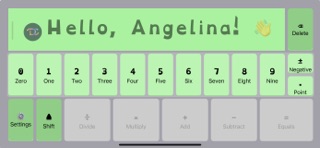
DysCalculator is designed for people with dyscalculia and related learning differences. It reflects how these individuals perceive and work with numbers, using language, visual, and spatial cues to build number sense, confidence, and understanding. Developed from years of research into maths accessibility, DysCalculator simplifies numerical tasks by adapting to how users interact with numbers and technology. Key features: • Numbers arranged by magnitude (0 to 9) • Operators ordered by precedence (PEMDAS/BODMAS) • Natural-order input (e.g. 2 + 3 = for addition) • Visual step-by-step workings to explain calculation logic • Solve for unknowns (e.g. 3 + ? = 5) • Solve time calculations (e.g. elapsed time, differences) • Pictograms for time, fractions, and percentages • Tax and percentage calculators with preset values Customisable: • Personal greetings • Alternate key labels (e.g. “plus” or “and” for +) • OpenDyslexic font for dyslexic users • Irlen-style shading to improve legibility • Multiple languages, including te reo Māori and German • Read keys aloud • Different keyboard layouts and fixed decimal formats DysCalculator doesn’t just give answers – it helps everyone understand how maths works. Whether you're using it independently, in a classroom, or as a support tool, it’s built to make maths more accessible, intuitive, and less intimidating.
What's new · 1.2.1
Did you know DysCalculator has a portrait-mode keyboard layout that mimics a traditional calculator? We've polished that experience and updated the internals for an even smoother experience.
Details