

MannerShotNote
Ryo Sato · Photo & Video
Independent analytics for this App Store listing. AppTracker is not affiliated with Ryo Sato.
Chart standing · US
What changed · US
Listing changes AppTracker has observed for this app in this storefront — new versions, price moves, rating shifts, and store copy.
- Import from your photo library: turn existing photos and screenshots into notes, then straighten them, recognize text, and export to PDF - Text recognition now follows your device language and supports Korean, Chinese, German, French, Spanish, Italian, Portuguese, and Russian - Open the camera instantly from Control Center, the Lock Screen, the Action button, or the Shortcuts app - Photos are now kept as you shoot. If the app closes before you save, you can pick up where you left off the next time you open it
In-app purchases · US
No in-app purchases.
Screenshots
Keywords this app targets
Search terms AppTracker associates with this app — estimates, not search volume. ❝ = in the app's title; a highlighted number is its current position for that term.
Similar apps
Competitors and close alternatives, as estimated by AppTracker.
 Kantan Scan - Docs to PDF
NOBUHIRO MIYARA
1 shared topic
Kantan Scan - Docs to PDF
NOBUHIRO MIYARA
1 shared topic
 PhotoNote - Photo with Info
Mug of Coffee Software GmbH
PhotoNote - Photo with Info
Mug of Coffee Software GmbH
 SuperNote Notes Recorder+Photo
FITNESS22 LTD
SuperNote Notes Recorder+Photo
FITNESS22 LTD
 FadeShot
Ryan Richardson
FadeShot
Ryan Richardson
 Notes - Professional
LiveBird Technologies Private Limited
Notes - Professional
LiveBird Technologies Private Limited
 PhotoMemo_AI
Manabu Inoue
PhotoMemo_AI
Manabu Inoue
 Intent Photo Notes
Blackdaw Media LLC
Intent Photo Notes
Blackdaw Media LLC
 Snap Markup - Annotation Tool
Raghvendra Bhargava
Snap Markup - Annotation Tool
Raghvendra Bhargava
About
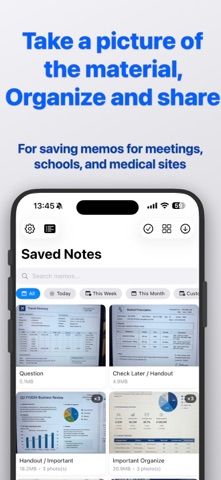
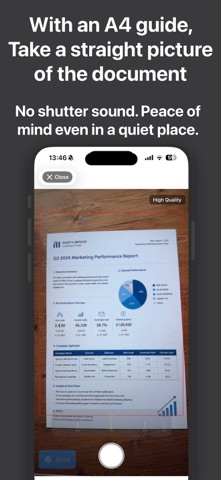
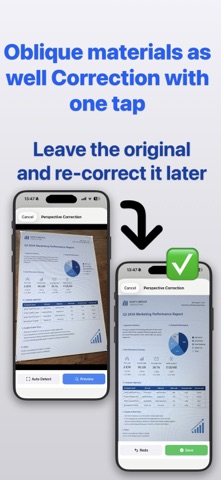
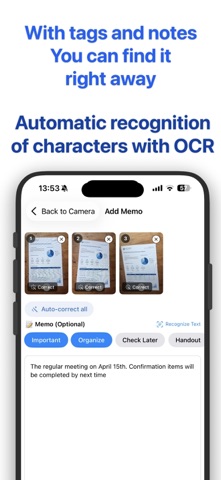
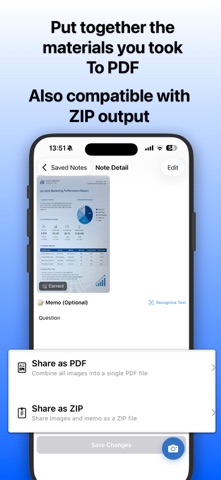
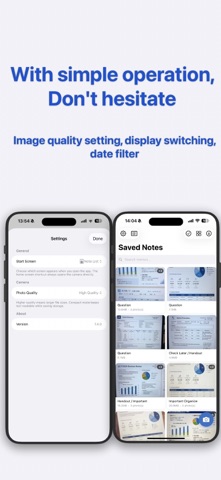
Keep what is in front of you, even in a room where a camera sound would be out of place. Your photos become notes you can tag, search, and send on as a PDF. CAPTURE - No shutter sound, so you can use it in a meeting or a lecture without drawing attention - Add as many photos as you like to a single note - Import existing photos and screenshots from your library into a note - Open the camera straight from Control Center, the Lock Screen, or the Action button - Three quality levels, so you can save space when readable text is all you need ORGANIZE - Write your note the moment you finish shooting - One tap for tags like Important, Organize, and Check Later - Add tags of your own FIND IT LATER - Full-text search across every note you have written - Filter by today, this week, this month, or a range you choose - Switch between list and grid SHARE - Turn a whole note into a single PDF - Or send the images and the note together as a ZIP STRAIGHTEN - Photos taken at an angle can be corrected to look as if shot head-on - Correct every uncorrected image in a note in one go READ THE TEXT - Recognize text in a photo and add it to your note - Follows your device language: English, Japanese, Korean, Chinese, German, French, Spanish, Italian, Portuguese, and Russian Everything happens on your device. No account needed. GOOD FOR - Whiteboards and handouts from a meeting - Lecture slides you want to go back to - Material you pick up at a conference - Paperwork and statements you want as a PDF
What's new · 2.1.1
- Import from your photo library: turn existing photos and screenshots into notes, then straighten them, recognize text, and export to PDF - Text recognition now follows your device language and supports Korean, Chinese, German, French, Spanish, Italian, Portuguese, and Russian - Open the camera instantly from Control Center, the Lock Screen, the Action button, or the Shortcuts app - Photos are now kept as you shoot. If the app closes before you save, you can pick up where you left off the next time you open it
Details