

Health Data AI Analyzer
Keith Rumjahn · Health & Fitness
Independent analytics for this App Store listing. AppTracker is not affiliated with Keith Rumjahn.
Chart standing · US
What changed · US
Listing changes AppTracker has observed for this app in this storefront — new versions, price moves, rating shifts, and store copy.
AI exports now keep clear next steps and a Share again button. Export errors appear where you need them, and you can optionally tell us whether a file was usable. Anonymous diagnostics help us improve setup and exports. Share anonymous usage stats is on by default, can be turned off in Settings, never includes health data, and is not linked to you.
Ratings breakdown · US
The star breakdown behind this app's rating in this storefront.
In-app purchases · US
What this app sells inside itself, grouped by kind and priced for this storefront.
Screenshots





Keywords this app targets
Search terms AppTracker associates with this app — estimates, not search volume. ❝ = in the app's title; a highlighted number is its current position for that term.
Similar apps
Competitors and close alternatives, as estimated by AppTracker.
 HLExport -Health Data to AI-
Tadanobu Sekiguchi
1 shared topic · 4 shared title words
HLExport -Health Data to AI-
Tadanobu Sekiguchi
1 shared topic · 4 shared title words
 Health Export - AI Data Share
Pierre Stanislas
3 shared title words
Health Export - AI Data Share
Pierre Stanislas
3 shared title words
 Health Auto Export - JSON+CSV
Lybron Sobers
1 shared topic · 1 shared title word
Health Auto Export - JSON+CSV
Lybron Sobers
1 shared topic · 1 shared title word
 Health Export CSV
Tomas Parizek
1 shared topic · 1 shared title word
Health Export CSV
Tomas Parizek
1 shared topic · 1 shared title word
 Heart Data Exporter
Cognitive Commerce LLC
1 shared topic · 1 shared title word
Heart Data Exporter
Cognitive Commerce LLC
1 shared topic · 1 shared title word
 Health for Agents
Sebastian Philipp Brabetz
Health for Agents
Sebastian Philipp Brabetz
 Health Exporter & Shortcuts
Michele Cantelli
1 shared title word
Health Exporter & Shortcuts
Michele Cantelli
1 shared title word
 Walklytics Data Exporter
Uri Nachmias
1 shared topic · 1 shared title word
Walklytics Data Exporter
Uri Nachmias
1 shared topic · 1 shared title word
About
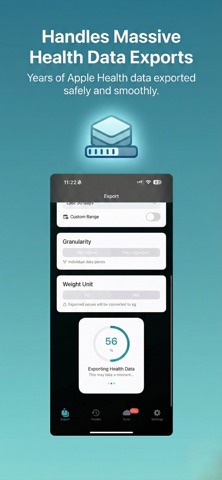
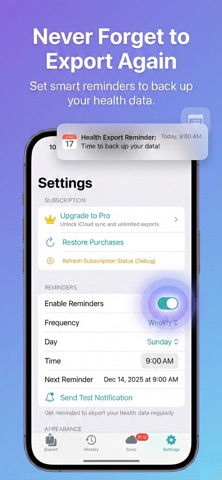
Turn your Apple Health data into a file you can actually use. Create a JSON summary for your AI tool, export XML for Mac analysis, or keep a CSV for your own spreadsheet. CHOOSE YOUR NEXT STEP Use an AI tool On iPhone, open AI Health > Connect, choose your tool, and create a JSON summary of the last 90 days with a README prompt. Share the file, then attach it in your chosen tool. Exporting a file does not connect an AI account or set up an MCP server. External AI tools have their own fees, limits, and privacy terms. Analyze on your Mac Export XML on your iPhone, AirDrop it to your Mac, and import it into Health Data AI Analyzer. Explore reports and trends, then optionally analyze a summary with a local or cloud AI provider. Mac import uses XML; CSV and JSON are for your other tools. Understand on your iPhone Open Ask or Weekly in AI Health for on-device calculations. Answers show the metric, date range, and sample count behind the result. Available answers depend on your Health records and permissions. EXPORT OPTIONS • CSV for spreadsheets, JSON for scripts and AI tools, XML for Mac import. • Choose date ranges and granularity for CSV and JSON. • XML exports cover all available history, regardless of the date-range selector. • Keep exports in History and share through Files, AirDrop, or the iOS share sheet. • Apple Health access determines which records can be included. BASE APP AND OPTIONAL PRO • Base app: US $4.99 one-time purchase. Local exports, manual sharing, on-device iPhone answers, and Mac analysis. • Optional Pro: US $3.99/month or $24.99/year for built-in cloud AI and sync workflows. • Local Mac AI can use Ollama, LM Studio, or Jan. OpenRouter uses your own API key; provider charges may apply. • Pro sync options include direct Mac transfer and supported cloud destinations. Check the in-app plan for included features. • Prices vary by country. The App Store shows your purchase and renewal terms. Manage or cancel subscriptions in your Apple account settings. YOUR DATA, YOUR CHOICE Export processing and iPhone answers run locally. Sharing sends your selected file to the destination you choose. Optional sync uses your chosen provider when enabled. Mac cloud AI requires consent before sending your prompt and a compact Health Data Summary; the raw export is not sent by that analysis flow. Share anonymous usage stats is on by default and can be turned off in Settings. These stats never include health data and are not linked to you. This app is for personal information and exploration, not medical diagnosis. Trends do not establish causes. Terms: https://www.apple.com/legal/internet-services/itunes/dev/stdeula/ Privacy: https://applehealthdata.com/privacy/
What's new · 1.109
AI exports now keep clear next steps and a Share again button. Export errors appear where you need them, and you can optionally tell us whether a file was usable. Anonymous diagnostics help us improve setup and exports. Share anonymous usage stats is on by default, can be turned off in Settings, never includes health data, and is not linked to you.
Details