
Chart standing · US
What changed · US
Listing changes AppTracker has observed for this app in this storefront — new versions, price moves, rating shifts, and store copy.
SoundGrid 1.6.0 introduces powerful new creation, personalization and backup tools: - Create complete pads in AI Studio with generated voices, music and sound effects. - Build multitrack projects on a visual timeline, import your own audio, preview the mix and keep projects editable. - Reuse previous AI generations from local history without spending new credits. - Explore and remix projects from the community creations library. - Generate custom AI artwork for pads and reuse images from your personal or shared library. - Protect banks, sounds, images and settings with a versioned SoundGrid Cloud library. - Restore the entire app, selected settings, one bank, an earlier version or an individual Cloud pad. - Move pads between banks and duplicate a configured pad into an available slot. - Manage SoundGrid Pro, AI allowances and Cloud storage directly from the app. - Contact support or send a detailed bug report without leaving SoundGrid. - Benefit from improved navigation, clearer settings and numerous reliability fixes.
Ratings breakdown · US
The star breakdown behind this app's rating in this storefront.
Screenshots





About
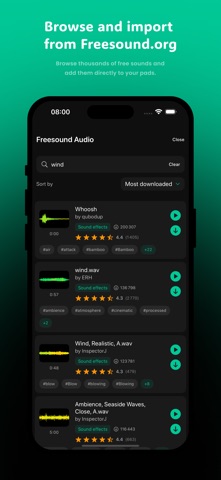
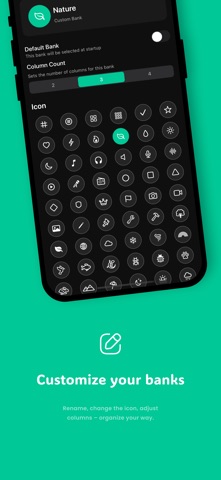
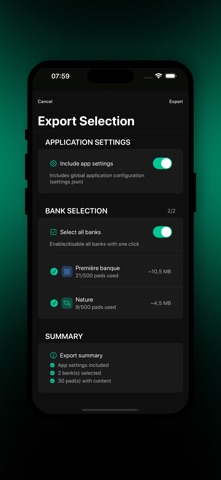
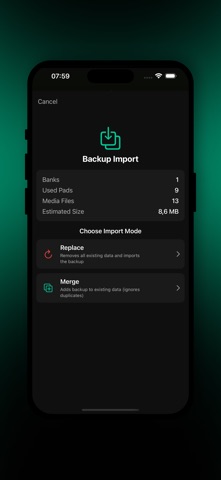
Turn your iPhone or iPad into a complete audio control center. SoundGrid is a fast, flexible soundboard for live playback, audio creation, streaming and recording. FEATURES Pads and playback - 10 color choices, custom names and optional artwork for clear visual organization - MP3, WAV, M4A, AIFF, AIFC and CAF audio support - Normal, Loop and Play Next modes, with automatic transition to the next pad - Waveform trimmer with precise start and end points - Per-pad volume, Fade In and Fade Out controls - Master volume, global fade out, pause, resume and stop-all controls - Priority pads that automatically lower other sounds, with an adjustable ducking level - Background audio and system media controls - Played indicators, individual or automatic pad locking, unlock-all and status reset tools - Optional progress display and remaining-time countdown - Live mode to reduce accidental triggers during a performance Import and media - Import audio from Files, iCloud Drive and compatible cloud providers - Import unprotected tracks from your Apple Music library - Open supported audio files directly in SoundGrid - Search, preview, sort and download sounds from Freesound.org - Add pad artwork from Photos, Files or Unsplash - Automatically find Unsplash artwork from an imported file name - Generate custom pad artwork with AI and reuse it from your image library AI Studio - Generate voices, music and sound effects from a written description - Choose voices and languages and fine-tune advanced generation settings - Enhance prompts automatically and create seamless sound-effect loops - Build multitrack projects on a visual timeline with manual or adaptive duration - Import tracks from Files, Apple Music, existing pads or SoundGrid Cloud - Position clips, preview individual tracks, play the full mix and approve or regenerate results - Keep editable projects and reuse local generation history without spending new credits - Mix a finished project directly into a new pad - Search, preview, edit and share projects through the community creations library Banks and live control - Organize pads into unlimited thematic banks - Customize each bank's name, color, icon and grid column count - Switch with bank tabs or optional swipe navigation - Move pads between banks or duplicate them into the first available slot - Assign letters, numbers, arrows, function keys, Space and other hardware-keyboard shortcuts - Trigger pads instantly from a Magic Keyboard or another connected keyboard Streaming and recording - Native AirPlay output to Apple TV, HomePod and compatible speakers - Local HTTP streaming to browsers, VLC and other players on the same network - Record app audio with or without the microphone - Automatic mixing plus Balanced, App+ and Mic+ presets with independent levels - Export a mixed file, separate app and microphone files, or both - Standard, High and Studio quality options in M4A or WAV - Play, share, delete or bulk-delete saved recordings Backup, transfer and maintenance - Export selected banks, media and app settings as a portable backup - Import backups by replacing or merging existing content - Versioned SoundGrid Cloud library for banks, sounds, images and device settings - Restore the entire app, settings only, one bank, an earlier version or a bank as a new copy - Browse and restore individual audio pads from the Cloud - Resume incomplete uploads and avoid duplicate Cloud media - View local storage use and remove unreferenced files - Built-in contact and detailed bug-report forms - Optional privacy-first anonymous usage analytics - Performance monitoring and configurable interface, scrolling and grid controls - French, English, Spanish and Italian interface SoundGrid includes a free plan. Optional SoundGrid Pro subscriptions expand AI creation allowances and Cloud storage, while voluntary donations can also support ongoing development. Terms of Use (EULA): https://www.apple.com/legal/internet-services/itunes/dev/stdeula/
What's new · 1.6
SoundGrid 1.6.0 introduces powerful new creation, personalization and backup tools: - Create complete pads in AI Studio with generated voices, music and sound effects. - Build multitrack projects on a visual timeline, import your own audio, preview the mix and keep projects editable. - Reuse previous AI generations from local history without spending new credits. - Explore and remix projects from the community creations library. - Generate custom AI artwork for pads and reuse images from your personal or shared library. - Protect banks, sounds, images and settings with a versioned SoundGrid Cloud library. - Restore the entire app, selected settings, one bank, an earlier version or an individual Cloud pad. - Move pads between banks and duplicate a configured pad into an available slot. - Manage SoundGrid Pro, AI allowances and Cloud storage directly from the app. - Contact support or send a detailed bug report without leaving SoundGrid. - Benefit from improved navigation, clearer settings and numerous reliability fixes.
Details