

Dove - AI Email Assistant
Cartasec Pte. Ltd. · Productivity
Independent analytics for this App Store listing. AppTracker is not affiliated with Cartasec Pte. Ltd.
Chart standing · US
What changed · US
Listing changes AppTracker has observed for this app in this storefront — new versions, price moves, rating shifts, and store copy.
1.19.2 just dropped. Here's what's inside: - Calendar: See your week, and make time in it, without leaving your mail. Connect your Gmail or Outlook calendar, then just say it — "Coffee with Sam tomorrow 3pm" — and it's scheduled. Browse by Day, 3 Days or Schedule, answer invitations right from a mail or Today, and get reminders even when Dove is closed. Ask Dove can check your day, find free time, and add, move or cancel events once you approve. - Areas, in Your Own Words: Describe the mail that belongs in an Area in a sentence, and Dove turns it into rules you can edit — a sender, a domain, a subject, or matching by meaning — and shows exactly which mail would move. Nothing moves until you save, Ask Dove asks before it changes your Areas, and if you've moved a mail yourself, Let Dove decide hands it back. - Faster Selecting: On iPhone, drag two fingers down your list to select a run of emails, or tap All to select everything. Archive all for Noise is now on iPhone and iPad too. We've also added a Start week on setting for the calendar, made notifications show Dove's headline when a summary is too long to fit, let iPad email text follow your system text size, and opened Ask Dove suggestion details in a bottom sheet on iPhone search. New Gmail and Outlook accounts now offer calendar access along with mail — decline it and the account is still added. A few bugs are fixed too: long iPhone drafts no longer get cut off, sharing to Dove no longer flickers, replies to your own alias keep it as the From address, and onboarding recovers when the connection drops. As always, let us know what you think at hey@dove.email.
Price & rating history · US
Reconstructed from the listing changes AppTracker has observed in this storefront. A field is charted once it has changed more than once, and each line starts at the value it moved from.
Average rating · ★ 4.71 now · 17 changes on record
Ratings breakdown · US
The star breakdown behind this app's rating in this storefront.
In-app purchases · US
What this app sells inside itself, grouped by kind and priced for this storefront.
Screenshots






About
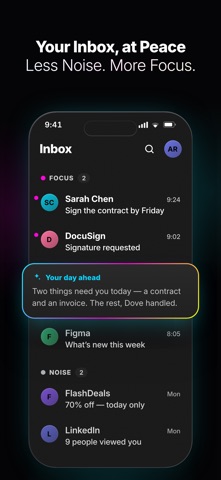
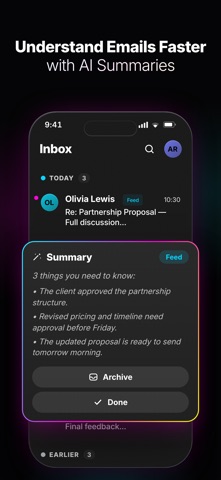
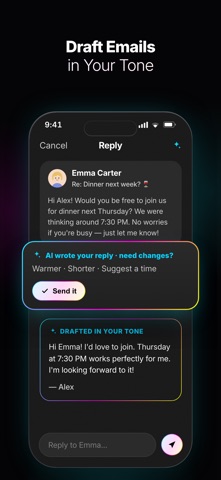
Dove Mail is the AI email app for real work. Manage multiple email accounts in one place, cut through inbox noise, and turn emails into action. Write and reply with AI, find what matters faster, organize your inbox, and stay on top of tasks — without spending your day sorting through messages. The app helps teams using Gmail and Outlook save hours per person each week, focus on what needs their attention, and move work forward faster. Use an easy way to clean your inbox and keep your inbox under extra control with Dove Mail — the most productive email client app ever made. Try it now. CONNECT ALL OF YOUR ACCOUNTS Bring all your email accounts together in one app. Connect Gmail, Outlook, Hotmail, Yahoo Mail, AOL, iCloud, Office 365, Exchange, IMAP, POP3 accounts, with support for Exchange ActiveSync and EWS. Then switch between accounts with a single swipe. Keep all your inbox in one unified view, or manage each account separately — without jumping between apps. ONE-TAP UNSUBSCRIBE FROM EMAILS Clean out inbox clutter with one tap. Unsubscribe from unwanted emails instantly and block senders, domains to keep recurring messages out of your inbox. Secure your inbox from phishing and scams using email cleaner. Dove Mail for Android is the email app that helps keep your device secure. UNDERSTAND EMAIL FASTER WITH AI SUMMARIES Get the key information from long emails in seconds with AI- summaries. Quickly understand messages without reading every word, so you can focus on what matters. Find emails and information faster with AI search. Search across your inbox, team emails, and attachments, with smart spark suggestions and advanced filters to narrow down results. AI EMAIL WRITER Write spark personalized email in seconds with AI email writer, or get a complete AI reply draft with Wingman AI generator in just one tap. Use Voice Input to search your inbox or compose webmails hands-free. With AI Email Writer, you can draft, rewrite, and refine emails while keeping your own tone and style. READ RECIPES Send from the address you choose with Custom Email Aliases, see when recipients open your messages with Read Receipts, and export individual emails as EML files when you need them. DRAFT EMAILS IN YOUR TONE Write and refine emails with an AI editor and mailbox generator. Complete drafts, adjust length and tone, translate emails into other languages, and polish your writing in seconds. TAKE ACTIONS FASTER WITH CUSTOM SWIPES Extra instantly archive, delete, mark as read, snooze, or move emails with customizable swipe actions. FOCUS ON WHATS MATTERS Spend less time managing email and more time getting things done. Group important emails by sender, smart labels, email classification to quickly sort subscriptions, travel plans, bills, packages and more. With Smart Notifications, choose which webmail deserves your attention and reduce unnecessary distractions. Dove Mail also supports system text sizing and email zoom, with a modern interface featuring Liquid Glass styling, redesigned navigation, and haptic feedback. With Flexible Navigation, choose whether Dove Mail opens to Smart Inbox, Today, or the last screen you used. Multilingual Experience supports localized interfaces and AI suggestions in the app's language. TRY DOVE PRO FREE FOR 7 DAYS After the trial, continue using the free plan or upgrade to a subscription whenever you're ready. Choose the email client app workflow that works for you — and let Dove Mail help you turn your inbox into a more organized, actionable part of your day. Less inbox noise. More focus. More extra time for real work. Privacy Policy: dove.email/privacy Terms of Use: dove.email/terms Help and Support: hey@dove.email
What's new · 1.19.2
1.19.2 just dropped. Here's what's inside: - Calendar: See your week, and make time in it, without leaving your mail. Connect your Gmail or Outlook calendar, then just say it — "Coffee with Sam tomorrow 3pm" — and it's scheduled. Browse by Day, 3 Days or Schedule, answer invitations right from a mail or Today, and get reminders even when Dove is closed. Ask Dove can check your day, find free time, and add, move or cancel events once you approve. - Areas, in Your Own Words: Describe the mail that belongs in an Area in a sentence, and Dove turns it into rules you can edit — a sender, a domain, a subject, or matching by meaning — and shows exactly which mail would move. Nothing moves until you save, Ask Dove asks before it changes your Areas, and if you've moved a mail yourself, Let Dove decide hands it back. - Faster Selecting: On iPhone, drag two fingers down your list to select a run of emails, or tap All to select everything. Archive all for Noise is now on iPhone and iPad too. We've also added a Start week on setting for the calendar, made notifications show Dove's headline when a summary is too long to fit, let iPad email text follow your system text size, and opened Ask Dove suggestion details in a bottom sheet on iPhone search. New Gmail and Outlook accounts now offer calendar access along with mail — decline it and the account is still added. A few bugs are fixed too: long iPhone drafts no longer get cut off, sharing to Dove no longer flickers, replies to your own alias keep it as the From address, and onboarding recovers when the connection drops. As always, let us know what you think at hey@dove.email.
Details