
Chart standing · US
What changed · US
Listing changes AppTracker has observed for this app in this storefront — new versions, price moves, rating shifts, and store copy.
Expenses The expense list is now grouped by what actually needs doing — what's waiting on you, what's approved but unsettled, and everything already settled tucked away at the bottom. The who-owes-who balance at the top finally lines up with what you can see. • Search your expenses • Tag an expense with the child or children it was for • Set a custom split when a cost isn't shared the usual way — one-off reimbursements, uneven costs, or something you're logging just so your co-parent can see it • Custom splits are always labelled for the parent approving them, and never auto-approve • Type split amounts directly instead of nudging a slider Messages Peacekeeper now highlights the exact words it flagged, right in your draft, so you can see what to change without opening anything. The tone indicator is clearer, and message coaching is now a "Coach" button next to Send, where you'd look for it. Throughout the app Dialogs slide up from the bottom of the screen instead of appearing in the middle. On Android, the back button closes whatever is open rather than navigating away from the page. Plus a long list of smaller fixes to spacing, color and keyboard behavior.
Price & rating history · US
Reconstructed from the listing changes AppTracker has observed in this storefront, so each line starts at the first change on record.
Average rating
Ratings breakdown · US
The star breakdown behind this app's rating in this storefront.
Screenshots






About
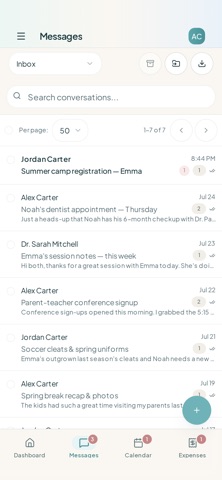
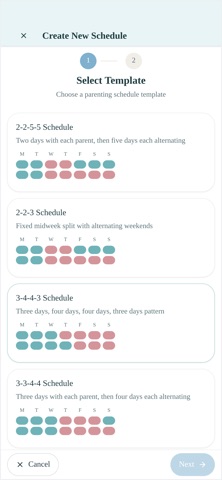
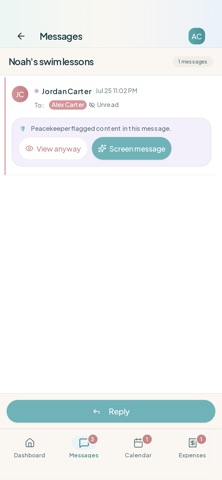
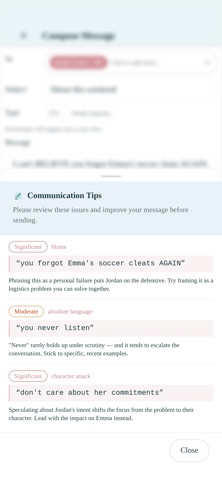
Coparency is a co-parenting app built for high-conflict situations. It helps separated and divorced parents communicate through structure instead of conflict — keeping every exchange calm, documented, and focused on the kids, even when the relationship between parents is strained. This is not texting. Coparency replaces chaotic, emotionally charged messaging with a structured communication system designed to reduce escalation, create clear records, and protect your peace of mind. KEY FEATURES Peacekeeper AI — Communication Support • Get real-time feedback on tone before you send • Turn conflict-prone messages into calm, child-focused communication • Catch hostile or defensive language before it escalates • Protect yourself from impulsive replies you'll regret Structured Messaging & Records • Keep every conversation organized, on-topic, and documented • Build a clear, court-friendly communication record automatically • End the endless back-and-forth and circular arguments Shared Schedules & Parenting Plans • Coordinate parenting time, exchanges, and important dates • Reduce misunderstandings about who has the kids and when • Keep both parents aligned on the plan Expense Tracking • Log shared costs and keep a transparent record • Reduce disputes over money and reimbursements • Know who owes what, without the argument DESIGNED FOR HIGH-CONFLICT CO-PARENTING • Built to reduce emotional harm and escalation • Encourages child-centered, business-like communication • Helps you set boundaries and stay consistent WHY COPARENCY? If you're dealing with constant hostile messages, manipulation, or communication that always turns into conflict, Coparency gives you the tools, structure, and emotional guardrails to stay calm, clear, and focused on what matters most: your kids. Whether you're newly separated or years into a high-conflict dynamic, Coparency helps you: • Reduce stress and emotional drain • Avoid reactive messages you'll regret • Create clear records and firm boundaries • Keep your children out of adult conflict This isn't just a messaging app. It's a communication safety system for co-parents. Built by a parent who's lived it. Designed for parents who need it.
What's new · 1.1.6
Expenses The expense list is now grouped by what actually needs doing — what's waiting on you, what's approved but unsettled, and everything already settled tucked away at the bottom. The who-owes-who balance at the top finally lines up with what you can see. • Search your expenses • Tag an expense with the child or children it was for • Set a custom split when a cost isn't shared the usual way — one-off reimbursements, uneven costs, or something you're logging just so your co-parent can see it • Custom splits are always labelled for the parent approving them, and never auto-approve • Type split amounts directly instead of nudging a slider Messages Peacekeeper now highlights the exact words it flagged, right in your draft, so you can see what to change without opening anything. The tone indicator is clearer, and message coaching is now a "Coach" button next to Send, where you'd look for it. Throughout the app Dialogs slide up from the bottom of the screen instead of appearing in the middle. On Android, the back button closes whatever is open rather than navigating away from the page. Plus a long list of smaller fixes to spacing, color and keyboard behavior.
Details