

Lynqu: Digital Business Card
Gravisun Soft Korlatolt Felelossegu Tarsasag · Business
Independent analytics for this App Store listing. AppTracker is not affiliated with Gravisun Soft Korlatolt Felelossegu Tarsasag.
Chart standing · US
What changed · US
Listing changes AppTracker has observed for this app in this storefront — new versions, price moves, rating shifts, and store copy.
- Search your contacts by name, company, title, email, phone number or tag from the first letter, without worrying about accents. - A voice note comes back as a short summary with the main points as bullets, and any steps you dictated kept in order, instead of a word for word transcript. - If you are on a team plan, your AI scan and enrichment allowance follows your team's plan, even when a personal subscription you used to have has ended. - Sort your contacts by Recent, Name or Company, and filter them by tags. - Each widget keeps the card you picked, and adding a widget asks which card it should show. - Team leads: edit a lead's details, and add a note or a task, right from the lead. - A follow-up that needs the lead's first name waits until the name is added, and the lead tells you what's missing. - At your AI scan limit, Scan tells you what you can do next: add the contact by hand, ask your admin, or upgrade. - Scans that can't upload right away try again on their own, Contacts shows when scans are waiting, and one photo is always one scan, even on a weak connection. - Invite Friends shows where each of your invites stands. - When you sign up, you can go back from the code step to fix your email, and the code shows whether it's right as soon as you finish typing it. - Booking setup has a new Availability section with quick presets for your days and hours. - Screen brightness goes back to normal when the QR code closes or you leave the app.
Ratings breakdown · US
The star breakdown behind this app's rating in this storefront.
Screenshots


Keywords this app targets
Search terms AppTracker associates with this app — estimates, not search volume. ❝ = in the app's title; a highlighted number is its current position for that term.
Similar apps
Competitors and close alternatives, as estimated by AppTracker.
 Spreadly Digital Business Card
Spreadly GmbH
Spreadly Digital Business Card
Spreadly GmbH
 Contactless Business Card Pro
Khang Le
Contactless Business Card Pro
Khang Le
 HiHello: Digital Business Card
HiHello, Inc.
HiHello: Digital Business Card
HiHello, Inc.
 Eight: Business Card Manager
Sansan, Inc.
Eight: Business Card Manager
Sansan, Inc.
 蒙恬名片王Mobile
Penpower Technology Ltd.
蒙恬名片王Mobile
Penpower Technology Ltd.
 Authenticator App .
CIPHER CORE LIMITED
Authenticator App .
CIPHER CORE LIMITED
 Meishi - Scan and save
Rowena Ricalde
Meishi - Scan and save
Rowena Ricalde
 BusinessCards by snapAddy
snapAddy GmbH
BusinessCards by snapAddy
snapAddy GmbH
About
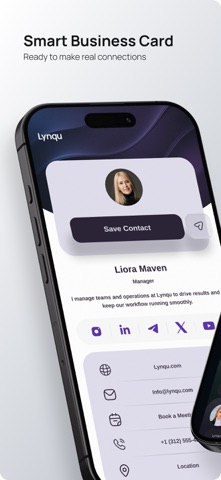
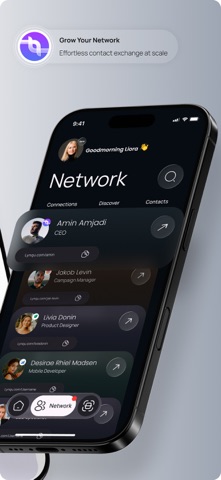
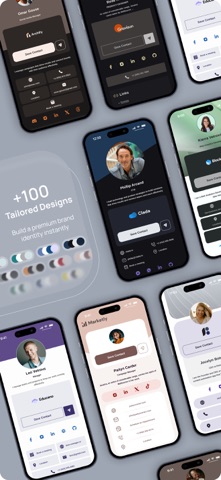
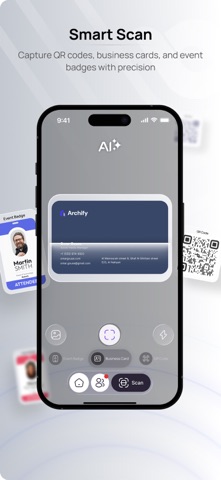
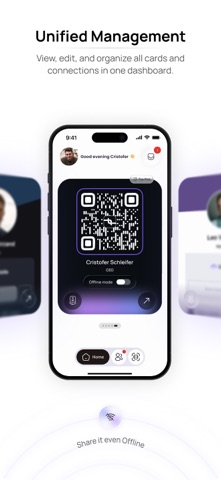
More than a digital business card. Lynqu is the professional networking and lead-capture platform that turns every introduction into a contact you never lose. Share your digital card via QR, Apple Wallet, NFC, or link — recipients view from any device, no app needed. Scan paper cards with AI. Capture every lead. Localized in 12 languages. KEY FEATURES • Unified digital card — Bring your contact details, social profiles, links, documents, and media together in one dynamic, always up-to-date card. • Share anywhere — QR codes, NFC, personalized links, Apple Wallet, email, and messaging. Connect faster in person, online, or on the go. • AI-powered lead capture — Scan physical business cards and event badges, extract contact details automatically, and save leads directly to your network. • Contact hub — Every card you share, every contact you scan, every lead you capture lives in one searchable hub. Tag, add notes, and follow up. Nothing falls through the cracks. • Customizable design — Choose from professionally designed templates and color palettes to match your personal or company brand. • Engagement analytics — Track profile views, link taps, and contact saves to understand how people interact with your card. • Real-time updates — Edit your details anytime. Recipients always see your latest information without needing a new card. • Multi-card support — Create separate cards for different roles, events, or audiences and switch between them instantly. • Cross-platform — Works seamlessly across all platforms. Your contacts can view and save your card from any device. • Bookings — Let people book time with you straight from your card, then approve, reschedule, or complete every appointment from your phone. • NFC tags — Write your Lynqu smart card, tag, or key fob once, then change which card it opens any time. The tag never needs rewriting. • Start in seconds — Build your card from a photo of an old business card, a QR code, a screenshot, or a link to your profile elsewhere. • Voice notes — Record a note the moment you walk away from a conversation. Lynqu transcribes it and files it against the right contact. • Contact enrichment — Fill in details a scan could not read, on the contacts you choose, one at a time. • Follow-ups and tasks — Give every contact a next step with a due date, and see what is owed today. FOR TEAMS & BUSINESSES Turn every employee into a lead-generation channel: branded cards across your organization, shared templates, CRM-ready lead capture with pipeline tracking and campaign analytics, team management with roles and permissions, plus MCP AI integration so Claude, ChatGPT, or Gemini can manage cards and capture leads through natural conversation. YOUR DATA STAYS YOURS Encrypted storage, biometric app lock (Face ID), GDPR + CCPA compliant. No data sold, ever. BUILT FOR PROFESSIONALS Whether you are a founder making first impressions, a sales professional managing hundreds of contacts, or a team that needs consistent branding — Lynqu gives you one platform to share who you are, capture who you meet, and make every introduction count. Get started free. Make every introduction count. Privacy Policy: https://lynqu.com/privacystatement Terms of Use: https://lynqu.com/termsofservice
What's new · 1.1.6
- Search your contacts by name, company, title, email, phone number or tag from the first letter, without worrying about accents. - A voice note comes back as a short summary with the main points as bullets, and any steps you dictated kept in order, instead of a word for word transcript. - If you are on a team plan, your AI scan and enrichment allowance follows your team's plan, even when a personal subscription you used to have has ended. - Sort your contacts by Recent, Name or Company, and filter them by tags. - Each widget keeps the card you picked, and adding a widget asks which card it should show. - Team leads: edit a lead's details, and add a note or a task, right from the lead. - A follow-up that needs the lead's first name waits until the name is added, and the lead tells you what's missing. - At your AI scan limit, Scan tells you what you can do next: add the contact by hand, ask your admin, or upgrade. - Scans that can't upload right away try again on their own, Contacts shows when scans are waiting, and one photo is always one scan, even on a weak connection. - Invite Friends shows where each of your invites stands. - When you sign up, you can go back from the code step to fix your email, and the code shows whether it's right as soon as you finish typing it. - Booking setup has a new Availability section with quick presets for your days and hours. - Screen brightness goes back to normal when the QR code closes or you leave the app.
Details