
Chart standing · US
What changed · US
Listing changes AppTracker has observed for this app in this storefront — new versions, price moves, rating shifts, and store copy.
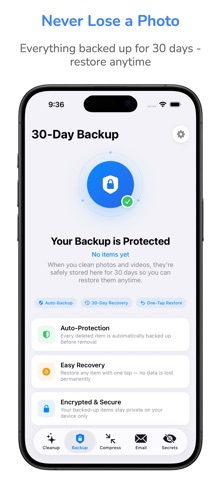
The Backup tab just became your safety net. • Tap any backed-up photo or video for a full-screen look — pinch to zoom, videos play — with Restore, Keep, and Delete right there. No more judging a blurry-or-not call from a thumbnail. • Deleted something forever, then winced? You now get a 10-second Undo before anything is truly destroyed. • Not sure yet? The new Keep button restarts an item's countdown so it isn't auto-deleted while you decide. • Restored photos now land in a "Restored by Cleaner" album — no more hunting through your camera roll for the photo you just rescued. • Tapping an expiry alert now takes you straight to the items about to be deleted. Also in this update: • The Cleanup tab is reordered so what matters most is at the top — your categories, Quick Clean, and honest numbers first. • Smoother iPad experience in Split View — your screen no longer resets when resizing. • Fixes and performance improvements throughout. Your phone deserves to breathe again.
Ratings breakdown · US
The star breakdown behind this app's rating in this storefront.
Screenshots




About
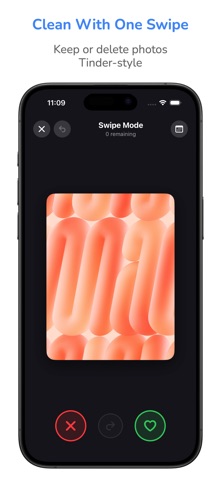
Cleanup My Phone frees up storage without the things you hate about other cleaners: no ads, ever. No forced ad-watching to delete a photo, no servers, no tracking. Every scan runs on your device, and everything you remove is kept in a 30-day backup so you never lose a memory. Find duplicates, similar and blurry shots, screenshots and big videos; trim or compress 4K video; browse the web with ads and trackers blocked; clean any email inbox; and lock private photos behind Face ID. Why you'll love it • Instant results – Watch your storage meter jump as clutter disappears • Private by design – All analysis happens on your iPhone. Nothing leaves your device. Ever. • No surprises – Preview every item before cleaning, undo with a countdown, and restore anything for up to 30 days SMART CLEANUP CATEGORIES • Similar Photos – Groups near-identical shots and marks the best one "Keep" • Duplicate Photos – Finds exact copies wasting double the space • Blurry & Dark Photos – AI flags out-of-focus, motion-blurred, and failed low-light shots • Screenshots & Old Screenshots – Rounds up clutter you've long forgotten • Screen Recordings, Live Photos & Burst Photos – The hidden space hogs LARGEST FILES — BIGGEST WINS FIRST • Instantly ranks the biggest photos and videos on your device • Clear the heaviest items first and reclaim gigabytes in seconds VIDEO — TRIM OR COMPRESS, NEVER LOSE A MEMORY • One minute of 4K/60 video is ~400 MB — videos are your biggest storage hog • Trim dead footage, or shrink with HEVC up to 80% — same resolution, same memory • See exactly how much space you'll reclaim, with the original safe in your 30-day backup PRIVATE BROWSER — ADS & TRACKERS BLOCKED • A fast, built-in browser that blocks ads and tracking scripts on-device • Private by default: no history, cookies, or cache survive the session • Pages load faster and use less data — and nothing about your browsing leaves your phone EMAIL CLEANER — ANY INBOX • Works with Gmail, iCloud Mail, Outlook, Yahoo, AOL, and any IMAP account • Bulk-clean promotions, social, and spam in taps instead of hours • Auto Clean rules keep your inbox tidy by itself, with a weekly digest • Deletions are undoable; permanent deletes always warn you first MORE CLEANUP TOOLS • Contact Cleaner – merge ALL duplicates in one tap (no one-by-one) • Calendar Cleaner – clear years of stale events • Speaker Cleaner – eject trapped water and dust with tuned tones • HEIC converter, Smart Albums, and a fun swipe-to-sort mode • On This Day resurfaces your photos from years ago SECURE VAULT • Hide private photos behind Face ID, Touch ID, or a passcode • Hidden from your main library, encrypted, and stored only on your device 30-DAY UNDO • Deleted items go to a recovery folder — tap Restore anytime within 30 days Pricing: Free to download and the full scan is free, so you see exactly what's cleanable before paying anything. Premium unlocks unlimited cleanup with weekly, monthly, and yearly plans, plus a one-time Lifetime purchase. Cancel anytime in Settings. Subscriptions automatically renew unless cancelled at least 24 hours before the end of the current period. Manage and cancel in your App Store account settings. Terms of Use: https://cleanupmyphone.com/terms.html Privacy Policy: https://cleanupmyphone.com/privacy.html
What's new · 5
The Backup tab just became your safety net. • Tap any backed-up photo or video for a full-screen look — pinch to zoom, videos play — with Restore, Keep, and Delete right there. No more judging a blurry-or-not call from a thumbnail. • Deleted something forever, then winced? You now get a 10-second Undo before anything is truly destroyed. • Not sure yet? The new Keep button restarts an item's countdown so it isn't auto-deleted while you decide. • Restored photos now land in a "Restored by Cleaner" album — no more hunting through your camera roll for the photo you just rescued. • Tapping an expiry alert now takes you straight to the items about to be deleted. Also in this update: • The Cleanup tab is reordered so what matters most is at the top — your categories, Quick Clean, and honest numbers first. • Smoother iPad experience in Split View — your screen no longer resets when resizing. • Fixes and performance improvements throughout. Your phone deserves to breathe again.
Details