

Video Translator: Transcribly
Mohamed Ameghnouss · Photo & Video
Independent analytics for this App Store listing. AppTracker is not affiliated with Mohamed Ameghnouss.
Chart standing · US
What changed · US
Listing changes AppTracker has observed for this app in this storefront — new versions, price moves, rating shifts, and store copy.
Bug Fixes - Brought back support for iOS 17, so users on older devices get a critical fix. For right-to-left (RTL) languages: - Fixed the trim handles and the editor timeline. - Captions now move the way you drag them and stay in the same spot in your exported video. - Moving your video inside the crop frame now goes the right way. Settings Page Design Update - A cleaner Settings page that's easier to find your way around. - A new Feature Requests card that makes the feature easier to find. - Added a link to the Help & FAQ page for quick answers to common questions. Translation - Languages in the translation list now appear in your device language, or in the app language you selected in Settings. Thanks for using Video Translator - Transcribly, the easy way to translate any video, generate subtitles, and transcribe video to text.
Price & rating history · US
Reconstructed from the listing changes AppTracker has observed in this storefront. A field is charted once it has changed more than once, and each line starts at the value it moved from.
Average rating · ★ 4.23 now · 2 changes on record
In-app purchases · US
What this app sells inside itself, grouped by kind and priced for this storefront.
Screenshots



About
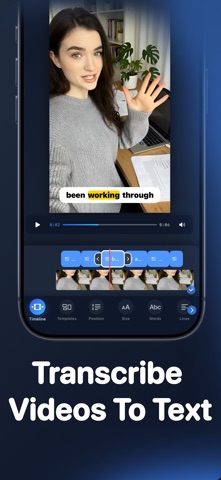
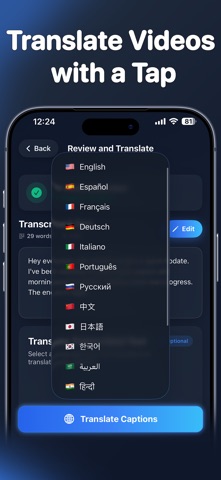
Video Translator: Transcribly is your all-in-one AI-powered video translator and subtitle generator. Whether you’re a content creator, educator, social media editor, or just want to share a personal video in multiple languages. This is the fastest, easiest way to translate video, generate subtitles, and share your message globally. Gone are the days of manually typing out captions or hiring expensive translators. With just a few taps, Transcribly can auto-caption any video, transcribe video to text, and translate it into 30+ languages, all while giving you full control over subtitle styling, export quality, and sharing options. Why Use Video Translator: Transcribly? - Import Any Video: Select videos directly from your device and begin editing in seconds. - Translate Captions to 30+ Languages: Easily use the video translate feature to reach global audiences. Our AI video translator works fast and accurately. - Smart Subtitle Generation: Automatically transcribe video to text using intelligent auto captions and speech recognition no need to type a word. - Customize Styles and Fonts: Personalize your subtitles captions for videos with stylish fonts, colors, and placements to match your brand or mood. - Export in Full HD: Download Video Translator: Transcribly now and transform how you caption, translate, and share your videos! Subscriptions - Yearly Subscription: $39.99 USD with a 3-day free trial (auto-renewable) - Monthly Subscription: $9.99 USD with a 3-day free trial (auto-renewable) - Weekly Subscription: $7.99 USD with a 3-day free trial (auto-renewable) Prices may vary by region. Your subscription will automatically renew unless auto-renew is turned off at least 24 hours before the end of the current period. Subscriptions can be managed, and auto-renewal can be turned off by going to your Account Settings after purchase. Privacy Policy: https://redifyne.net/Transcribly-app/Privacy.html Terms of Use: https://redifyne.net/Transcribly-app/Terms.html
What's new · 2.7.3
Bug Fixes - Brought back support for iOS 17, so users on older devices get a critical fix. For right-to-left (RTL) languages: - Fixed the trim handles and the editor timeline. - Captions now move the way you drag them and stay in the same spot in your exported video. - Moving your video inside the crop frame now goes the right way. Settings Page Design Update - A cleaner Settings page that's easier to find your way around. - A new Feature Requests card that makes the feature easier to find. - Added a link to the Help & FAQ page for quick answers to common questions. Translation - Languages in the translation list now appear in your device language, or in the app language you selected in Settings. Thanks for using Video Translator - Transcribly, the easy way to translate any video, generate subtitles, and transcribe video to text.
Details