Video and Photo Converter

永梅 施 · Utilities

5.0 5 ratings Free

Chart standing · US

Not currently charting in this storefront.

What changed · US

Listing changes AppTracker has observed for this app in this storefront — new versions, price moves, rating shifts, and store copy.

Aug 26, 2026
New version 1.2 → 1.5

MediaConvert 1.5 is a major update: • Added audio conversion to MP3, M4A, AAC, WAV, FLAC, OGG, Opus, AIFF and ALAC • Added audio extraction from video, including audio-track selection • Added video time-range trimming and output-size controls • Added text and image watermark editing with live positioning • Added image crop editing and JPEG compression quality controls • Added batch conversion for up to five files • Added input and output previews with draggable video and audio timelines • Added local conversion history with preview, save, share and delete actions • Added “Open in MediaConvert” and an iOS Share Extension • Added System, Light and Dark appearance modes • Improved large-file import feedback and shared-file import performance • Added clearer rewarded-ad progress: three completed rewards unlock unrestricted use for the rest of the day

Ratings breakdown · US

The star breakdown behind this app's rating in this storefront.

5★ 100% 5
4★ 0% 0
3★ 0% 0
2★ 0% 0
1★ 0% 0

Screenshots

About

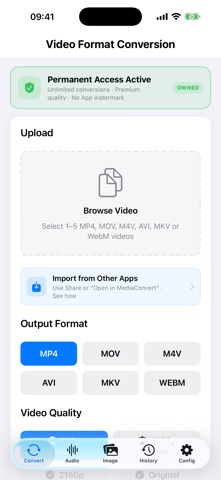
all-in-One Converter Easily convert videos (MP4, MOV, AVI…) and photos (JPEG, PNG, GIF…) into any format—no extra apps required.

What's new · 1.5

MediaConvert 1.5 is a major update: • Added audio conversion to MP3, M4A, AAC, WAV, FLAC, OGG, Opus, AIFF and ALAC • Added audio extraction from video, including audio-track selection • Added video time-range trimming and output-size controls • Added text and image watermark editing with live positioning • Added image crop editing and JPEG compression quality controls • Added batch conversion for up to five files • Added input and output previews with draggable video and audio timelines • Added local conversion history with preview, save, share and delete actions • Added “Open in MediaConvert” and an iOS Share Extension • Added System, Light and Dark appearance modes • Improved large-file import feedback and shared-file import performance • Added clearer rewarded-ad progress: three completed rewards unlock unrestricted use for the rest of the day

Details

Developer永梅 施
ReleasedJul 2025
UpdatedJul 2025
Version1.5
Size30.5 MB
RequiresiOS 15.1 or later
Age rating4+
LanguagesEnglish
PriceFree
Categories UtilitiesPhoto & Video
Bundle IDcom.zx.videoconvert