

MiniTavern-Tavern AI, Roleplay
梦星 王 · Utilities
Independent analytics for this App Store listing. AppTracker is not affiliated with 梦星 王.
Chart standing · US
What changed · US
Listing changes AppTracker has observed for this app in this storefront — new versions, price moves, rating shifts, and store copy.
MiniTavern v1.5.6 Update Critical Bug Fixes: - Resolved an issue where switching to another character without waiting for a reply from the current character could lead to message stream confusion during multi-character conversations. - Now supports the deletion of AI automatic thoughts associated with previously deleted characters. New Features: - When publishing thoughts, new support for checklist and list styles offers richer display options; random placeholder text hints have also been added to enhance user experience. - Introduced World Book support, allowing characters to configure and use different World Books. - When importing a character with a World Book, a corresponding prompt will be displayed. - When deleting a character with a World Book, deletion confirmation will be requested. - In "Settings - World Book", you can view the details of locally imported or newly created World Books. - In "Chat - Chat Settings - World Book Settings", you can configure different World Books for characters. - The switch status of World Book items is shared globally, but the World Book itself can be configured individually. Fixes: - Fixed an issue where the membership upgrade status bar displayed abnormally in dark mode. - Optimized the personal settings page; now, a click is required to load the detailed usage design to reduce resource consumption. - Added support for separate display of PRO-type members. - Fixed an issue where custom Openrouter models could not be added due to Openrouter adding long text model types. - Added a second confirmation pop-up when publishing to the camp, optimizing the user experience. - Added unified animations for all appearances and disappearances of Toast messages, optimizing the user experience. - Optimized the purchase restoration logic; now, activating the same paid account on different devices is supported.
Ratings breakdown · US
The star breakdown behind this app's rating in this storefront.
Screenshots




About
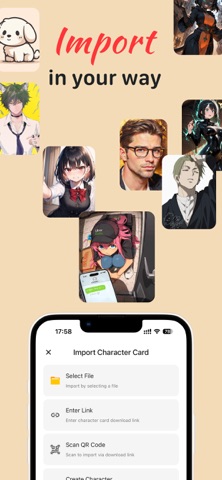
AI Characters, Always With You Meet MiniTavern — a mobile-first AI character chat app designed for creating, importing, and exploring unique AI characters right on your iPhone. Bring your favorite character cards with you, connect your preferred AI model, and enjoy a flexible chat experience wherever you go. Key Features - Instant Character Card Import: Import supported PNG and JSON character cards in seconds and start chatting with your characters right away. - Flexible AI Model Support: Connect cloud, local, or custom AI models and choose the setup that works best for you. - Mobile-First Design: A clean and intuitive interface designed specifically for iPhone, with smooth navigation, one-handed controls, and fast loading. - Free Core Experience: Enjoy the essential character chat experience without a subscription or paywall for core features. - Offline Character Support: Browse, organize, and manage your character cards offline. An internet connection is only required when connecting to an online AI model. Your Characters. Your Models. Your Conversations. MiniTavern brings a flexible AI character experience to your pocket — making it easy to create, import, organize, and chat with your favorite characters anytime, anywhere. https://www.apple.com/legal/internet-services/itunes/dev/stdeula/
What's new · 1.5.6
MiniTavern v1.5.6 Update Critical Bug Fixes: - Resolved an issue where switching to another character without waiting for a reply from the current character could lead to message stream confusion during multi-character conversations. - Now supports the deletion of AI automatic thoughts associated with previously deleted characters. New Features: - When publishing thoughts, new support for checklist and list styles offers richer display options; random placeholder text hints have also been added to enhance user experience. - Introduced World Book support, allowing characters to configure and use different World Books. - When importing a character with a World Book, a corresponding prompt will be displayed. - When deleting a character with a World Book, deletion confirmation will be requested. - In "Settings - World Book", you can view the details of locally imported or newly created World Books. - In "Chat - Chat Settings - World Book Settings", you can configure different World Books for characters. - The switch status of World Book items is shared globally, but the World Book itself can be configured individually. Fixes: - Fixed an issue where the membership upgrade status bar displayed abnormally in dark mode. - Optimized the personal settings page; now, a click is required to load the detailed usage design to reduce resource consumption. - Added support for separate display of PRO-type members. - Fixed an issue where custom Openrouter models could not be added due to Openrouter adding long text model types. - Added a second confirmation pop-up when publishing to the camp, optimizing the user experience. - Added unified animations for all appearances and disappearances of Toast messages, optimizing the user experience. - Optimized the purchase restoration logic; now, activating the same paid account on different devices is supported.
Details