

OCR Image AI - Photo to Text
RapidNova Private Limited · Productivity
Independent analytics for this App Store listing. AppTracker is not affiliated with RapidNova Private Limited.
Chart standing · US
What changed · US
Listing changes AppTracker has observed for this app in this storefront — new versions, price moves, rating shifts, and store copy.
Price & rating history · US
Reconstructed from the listing changes AppTracker has observed in this storefront. A field is charted once it has changed more than once, and each line starts at the value it moved from.
Average rating · ★ 4.48 now · 4 changes on record
Ratings breakdown · US
The star breakdown behind this app's rating in this storefront.
In-app purchases · US
What this app sells inside itself, grouped by kind and priced for this storefront.
Screenshots



About
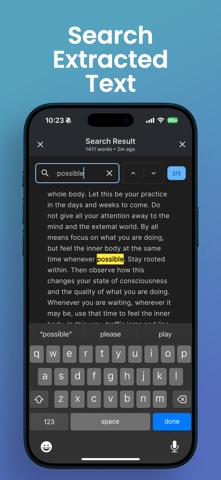
OCRacle is a powerful and user-friendly document scanning and text extraction app that helps you digitize your physical documents with ease. Whether you need to capture text from books, documents, receipts, or any printed material, OCRacle makes it simple and efficient. KEY FEATURES: ADVANCED DOCUMENT SCANNING • Smart camera with real-time document edge detection • Batch scanning for multiple pages • High-quality image processing • Flash control and zoom capabilities • Support for both camera capture and gallery imports LIVE TEXT DETECTION • Real-time text extraction as you scan • High-accuracy OCR technology • Support for multiple languages • Instant text preview POWERFUL ORGANIZATION • Automatic document organization • Searchable text content • Document history with timestamps • Easy access to recent scans • Batch processing support SMART SEARCH • Full-text search across all documents • Quick navigation to specific content • Search within individual documents • Real-time search results READING & VIEWING OPTIONS • Comfortable reading mode with page view • Adjustable text size • Dark and light theme support • Clean, distraction-free interface SHARING & EXPORT • Copy extracted text instantly • Share text and images easily • Multiple sharing options • Quick access to sharing features ADDITIONAL FEATURES • User-friendly interface • Intuitive navigation • Fast processing speed • Minimal battery usage • Regular updates and improvements Whether you're a student digitizing study materials, a professional managing documents, or someone who needs to extract text from images regularly, OCRacle provides the perfect solution with its combination of powerful features and ease of use. Download OCRacle today and experience the convenience of instant text extraction and document organization! Note: OCRacle requires camera permissions for document scanning and storage permissions for saving processed documents. For support or feedback, contact us at: rapidnova2025@gmail.com privacy policy: https://rapidnova.co/apps/ocracle/privacy-policy terms: https://www.apple.com/legal/internet-services/itunes/dev/stdeula/
What's new · 1.0.8
Changes to live detection mode and optimised for performance.
Details