

Punch List & Site Audit
Mobile Card Games & Travel Apps LLC · Business
Independent analytics for this App Store listing. AppTracker is not affiliated with Mobile Card Games & Travel Apps LLC.
Chart standing · US
What changed · US
Listing changes AppTracker has observed for this app in this storefront — new versions, price moves, rating shifts, and store copy.
Full-size photos in PDF reports. • Turn on Full-size photos on the report screen to show every photo in a Detailed report large, uncropped and at the same size, instead of small thumbnails • Your choice is remembered for your next reports
Price & rating history · US
Reconstructed from the listing changes AppTracker has observed in this storefront. A field is charted once it has changed more than once, and each line starts at the value it moved from.
Average rating · ★ 4.92 now · 5 changes on record
Ratings breakdown · US
The star breakdown behind this app's rating in this storefront.
In-app purchases · US
What this app sells inside itself, grouped by kind and priced for this storefront.
Screenshots




About
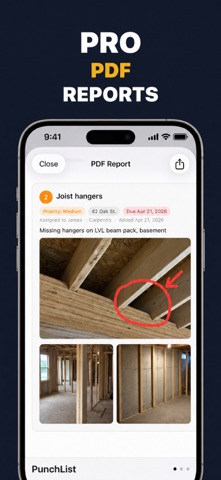
Walk the site, capture every defect with photos, and hand your client a finished PDF report before you leave. Punch List turns a site walk into a professional document — no laptop, no retyping at night. WHY FIELD PROS USE IT Right now the work happens twice: once on site with your camera, again at the kitchen table turning a camera roll into a report. Punch List collapses that into a single pass. Photograph the defect, mark it up, set the priority and due date, move to the next one. The report is already written by the time you're back in the truck. CAPTURE ON SITE • Photograph each defect and mark it up right on the image — arrows, boxes, and callouts, so nobody has to guess which crack you meant • Set status, priority, and a due date on every item • Organize by project with full client details • Works completely offline — job sites don't have signal, and it doesn't matter DELIVER THE REPORT • Generate a clean, professional PDF your client can actually read • Filter the list first and the report follows — the cover and summary reflect exactly what you're sending • Add your company logo so it goes out on your letterhead, not ours • Share straight from your phone or iPad BUILT FOR REAL FIELD WORK • Unlimited projects and unlimited photos — no caps, no counting • iCloud sync keeps your iPhone and iPad in step • Available in 30+ languages, each using the construction vocabulary that market actually uses WHO IT'S FOR • General contractors and subcontractors • Site supervisors and superintendents • Building inspectors and surveyors • Architects running punch walks and pre-completion inspections • Property managers and homeowners inspecting new construction FREE AND PRO Everything above is free to use — unlimited projects, unlimited photos, offline access, iCloud sync, and PDF reports that carry a small watermark. Pro removes the watermark, adds your company logo to every report, and unlocks data export for sharing and backing up projects. Questions or a feature you need? Get in touch — this app is shaped by what people in the field ask for. Terms of Use: https://www.apple.com/legal/internet-services/itunes/dev/stdeula/
What's new · 2.31
Full-size photos in PDF reports. • Turn on Full-size photos on the report screen to show every photo in a Detailed report large, uncropped and at the same size, instead of small thumbnails • Your choice is remembered for your next reports
Details