

gPlayer: Video & Subtitles
ROWAN INTERACTIVE · Photo & Video
Independent analytics for this App Store listing. AppTracker is not affiliated with ROWAN INTERACTIVE.
Chart standing · US
What changed · US
Listing changes AppTracker has observed for this app in this storefront — new versions, price moves, rating shifts, and store copy.
• View original and translated subtitles together and save translations as SRT. • Added 0.5–2x playback, recently watched videos, and Drive folder search and sorting. • Import and translate supported MKV and MP4 embedded text subtitles. • Added Japanese, Chinese and Spanish translation, with up to 3,200 subtitle cues. • Improved translation priority around your playback position.
Screenshots




About
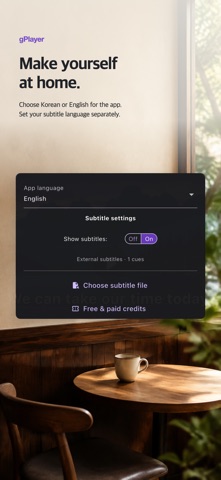
Translate your subtitles. Enjoy your videos. Turn your existing subtitle files into Korean, English, Japanese, Chinese or Spanish with AI, then watch them with your videos. Open videos from your device or Google Drive in one player. AI SUBTITLE TRANSLATION Import SRT, SMI, VTT, or standard ASS/SSA dialogue and translate the text into Korean, English, Japanese, Chinese or Spanish. View original and translated subtitles together or separately, and save completed translations as SRT files. You can also import supported MKV and MP4 embedded text subtitle tracks. TRANSLATE AND WATCH IN ONE APP Adjust subtitle size and timing, watch at 0.5–2x speed, and revisit a scene with A–B repeat. Resume from recently watched videos and search files within a Google Drive folder. PURCHASE AND USE CREDITS WITHOUT GOOGLE SIGN-IN Buy and use translation credits as a guest. Google sign-in is optional for Google Drive access or for connecting your remaining guest credits to an account for use on other devices. HOW TRANSLATION WORKS This feature translates existing subtitle text. It does not transcribe video or audio to create new subtitles. AI translation requires credits. Each target language uses one credit per 800 subtitle cues, with the required amount shown before you start. One timed subtitle counts as one cue. Each file supports up to 3,200 cues and 60,000 characters. Reusing a saved translation in the same target language uses no additional credits. A monthly 25-credit subscription and 12 extra credits are available through in-app purchases. Prices and subscription terms are shown before purchase. Before translation, you receive an explanation and are asked to consent to sending subtitle text to the service server and Google Gemini. Google sign-in is required for Google Drive access. Image subtitles, encrypted or compressed embedded tracks, fragmented MP4 and some complex embedded formats or ASS effects are not supported. The app does not provide movies or television content. Please use videos and subtitles you have the right to access. Support: https://gplayer.rowanzone.co.kr/ Privacy Policy: https://gplayer.rowanzone.co.kr/privacy Terms of Service: https://gplayer.rowanzone.co.kr/terms
What's new · 1.0.2
• View original and translated subtitles together and save translations as SRT. • Added 0.5–2x playback, recently watched videos, and Drive folder search and sorting. • Import and translate supported MKV and MP4 embedded text subtitles. • Added Japanese, Chinese and Spanish translation, with up to 3,200 subtitle cues. • Improved translation priority around your playback position.
Details