Chart standing · US
What changed · US
Listing changes AppTracker has observed for this app in this storefront — new versions, price moves, rating shifts, and store copy.
Version 6.4 brings major upgrades across contact management, follow-ups, map search, manual activity logging, and the calling/email workflow. Sales reps can now scan contacts faster with redesigned prospect and customer rows that show core activity at a glance: knocks, emails, and calls. Contact rows are more compact, easier to read, and include a working call button that uses the same calling system as the contact details screen. The calling experience has been redesigned with a cleaner CRM-style popup, inline recent call history, formatted phone numbers, previous-call counts, and simple Edit/Call actions. Calls started from the row or details screen now flow through the same logging system, so call notes, call counts, and history stay consistent. Email tracking is also improved with an initial email history system, making it easier to see sent email activity alongside other contact engagement. Manual knock logging is now available from prospect and customer details. Reps can log off-grid or unexpected knocks, choose outcomes, add notes, schedule follow-ups, add objections, and optionally log trip details. Prospect outcomes include Unqualified, Requalified, Follow Up Later, and Converted To Sale. Customer outcomes include Customer Lost, Wasn’t Home, and Follow Up Later. Follow-up appointments received a stronger calendar experience with smoother month switching, one-step rotation, and a five-day finger-scroll view. The follow-up form was also resized and refined for better usability. Map search is now more powerful with contact filtering built into the search flow, a cleaner filter UI, and fixes to make the search experience feel more reliable. Contacts can also be opened with a Take Me to Map button so reps can jump from contact context back to the map more easily. Contact profiles now support expanded company demographics, including company info fields and improved loading, clearing, and stepper UI behavior. This release also adds a guided contact screen tutorial, improves the contact opening animation, delays ads until onboarding/tutorial flow is complete, and includes several UI polish fixes across contact popups and details screens.
Ratings breakdown · US
The star breakdown behind this app's rating in this storefront.
Screenshots

About
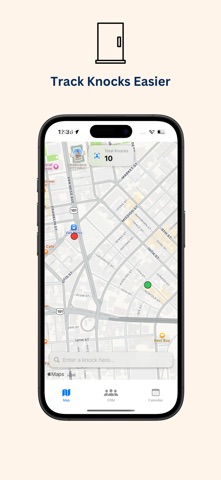
Most door-to-door reps still rely on memory, scribbled notes, or spreadsheets. It’s easy to forget which house you knocked, who was interested, or when to follow up. And if you’re just starting out, the big-name CRMs are expensive, complicated, and built for office workers—not you. D2D CRM was built for field sales reps like you. Whether you’re selling internet, solar, or real estate door-to-door, this free mobile CRM helps you track leads, follow up fast, and close more deals. It’s your sales tracker, lead manager, and route log—all in one app. Just tap a house on the map, log the outcome, and move on. Follow-ups are saved, notes are organized, and your knock history is always visible. You won’t forget a lead, and you’ll never lose track of a conversation. If you work in telecom, fiber sales, or canvassing, this app was built for your grind. No dashboards, no training, no fluff—just simple tools to log, follow up, and sell faster. You’ll finally have a CRM that moves at your speed. Use GPS-powered maps to track every door you knock. Set reminders, review conversations, and see which homes converted—all from your phone. You’ll spend less time thinking about admin and more time closing. Designed for mobile, built for real-world selling. If you’ve ever felt lost trying to make Salesforce or HubSpot work, this is your alternative. It’s simple, free, and made for reps who hustle. Don’t waste another lead. Download the CRM made for field sales and start tracking your territory with clarity and speed.
What's new · 6.4
Version 6.4 brings major upgrades across contact management, follow-ups, map search, manual activity logging, and the calling/email workflow. Sales reps can now scan contacts faster with redesigned prospect and customer rows that show core activity at a glance: knocks, emails, and calls. Contact rows are more compact, easier to read, and include a working call button that uses the same calling system as the contact details screen. The calling experience has been redesigned with a cleaner CRM-style popup, inline recent call history, formatted phone numbers, previous-call counts, and simple Edit/Call actions. Calls started from the row or details screen now flow through the same logging system, so call notes, call counts, and history stay consistent. Email tracking is also improved with an initial email history system, making it easier to see sent email activity alongside other contact engagement. Manual knock logging is now available from prospect and customer details. Reps can log off-grid or unexpected knocks, choose outcomes, add notes, schedule follow-ups, add objections, and optionally log trip details. Prospect outcomes include Unqualified, Requalified, Follow Up Later, and Converted To Sale. Customer outcomes include Customer Lost, Wasn’t Home, and Follow Up Later. Follow-up appointments received a stronger calendar experience with smoother month switching, one-step rotation, and a five-day finger-scroll view. The follow-up form was also resized and refined for better usability. Map search is now more powerful with contact filtering built into the search flow, a cleaner filter UI, and fixes to make the search experience feel more reliable. Contacts can also be opened with a Take Me to Map button so reps can jump from contact context back to the map more easily. Contact profiles now support expanded company demographics, including company info fields and improved loading, clearing, and stepper UI behavior. This release also adds a guided contact screen tutorial, improves the contact opening animation, delays ads until onboarding/tutorial flow is complete, and includes several UI polish fixes across contact popups and details screens.
Details