

Voice Memo: Braindump
BLACKSMITH SIA · Productivity
Independent analytics for this App Store listing. AppTracker is not affiliated with BLACKSMITH SIA.
Chart standing · US
What changed · US
Listing changes AppTracker has observed for this app in this storefront — new versions, price moves, rating shifts, and store copy.
Braindump 1.5.5 Know who said what Recordings with more than one person now come back with speaker labels. Every turn in a meeting, lecture, interview or call is marked by speaker, so you can follow the conversation without guessing. Tap a label to rename it ("Speaker 1" → "Anna"), and the new name is used throughout the note. Speaker names also carry over when you share or export a note. Layouts that fit your screen We reworked the layouts so Braindump uses the space better on every screen size, from compact phones to large displays, in portrait and landscape. You get more room to read and write, with less wasted space. Sorted from the start When you set up Braindump, you can now pick the categories that match your life. Your notes are filed into them automatically from your first recording. Smoother sharing Share links now publish in the background and show their progress. On a weak connection, they finish uploading by themselves instead of getting stuck. Editor improvements • Pasted text now matches your note's style instead of bringing in the source app's fonts and sizes. • Undo and redo work reliably after pasting. • Text colors and center/right alignment display correctly. • Notes written in right-to-left languages open in the correct direction. Plus stability fixes throughout.
Ratings breakdown · US
The star breakdown behind this app's rating in this storefront.
Screenshots


About
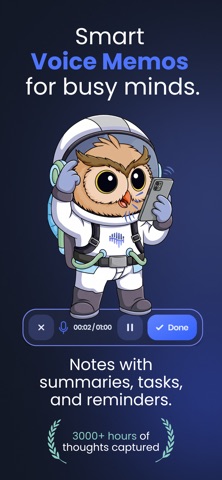
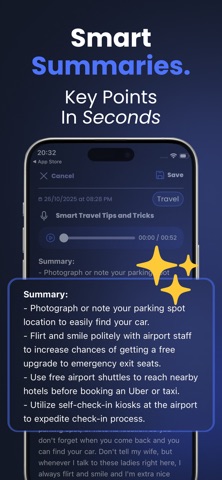
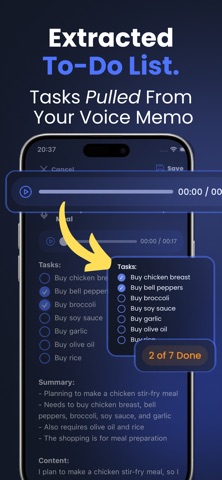
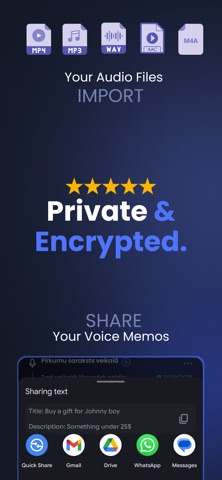
Braindump is a voice-first notes and reminder app for people who think faster than they type. Tap record, talk, and your voice memo becomes a clean note with a title, a short summary, your to-dos and a scheduled reminder. Say "remind me tomorrow at 4 PM to call the pharmacy" and the reminder is set for you, at the time you said. No calendar, no typing, no second app. WHAT IT DOES • Voice memo to text in seconds, in 59 languages, including Standard Arabic and 16 Arabic dialects • A title, a short AI summary and your to-dos, written for you • Reminders set from the dates and times you say out loud • Speaker labels for lectures and meetings: see who said what, and tap a label to rename it • Every note filed into a category on its own • Import audio and video files (MP3, M4A, WAV, MP4, MOV and more) and turn lectures, interviews and meetings into text • Edit and highlight transcripts, add checklists and photos, search every note • Share a note as text, as audio or as a link • A Live Activity while you record, and a home screen widget with your streak, latest reminder and open to-dos YOUR NOTES STAY ON YOUR PHONE There is no account to create. Your audio is sent to our servers only to be transcribed, and the finished note is stored on your device, not in the cloud. You can record without internet; the transcript arrives once you're back online. MADE FOR • ADHD: catch the thought before it's gone • Students: record lectures and study from an editable transcript • Work: talk through a meeting afterwards and get the action items • Journaling: a journal that writes itself Braindump is free to download and includes free transcription minutes. Pro is an auto-renewing subscription. Payment is charged to your Apple Account at confirmation of purchase. It renews automatically unless turned off at least 24 hours before the end of the current period. Manage or cancel it in your App Store account settings. Support: contact@braindumpnotes.app Privacy Policy: https://braindumpnotes.app/privacy-policy Terms of Service: https://braindumpnotes.app/terms-of-service
What's new · 1.5.5
Braindump 1.5.5 Know who said what Recordings with more than one person now come back with speaker labels. Every turn in a meeting, lecture, interview or call is marked by speaker, so you can follow the conversation without guessing. Tap a label to rename it ("Speaker 1" → "Anna"), and the new name is used throughout the note. Speaker names also carry over when you share or export a note. Layouts that fit your screen We reworked the layouts so Braindump uses the space better on every screen size, from compact phones to large displays, in portrait and landscape. You get more room to read and write, with less wasted space. Sorted from the start When you set up Braindump, you can now pick the categories that match your life. Your notes are filed into them automatically from your first recording. Smoother sharing Share links now publish in the background and show their progress. On a weak connection, they finish uploading by themselves instead of getting stuck. Editor improvements • Pasted text now matches your note's style instead of bringing in the source app's fonts and sizes. • Undo and redo work reliably after pasting. • Text colors and center/right alignment display correctly. • Notes written in right-to-left languages open in the correct direction. Plus stability fixes throughout.
Details