

Subt: Live Captions
NILESH HARISH MADHAVJI · Utilities
Independent analytics for this App Store listing. AppTracker is not affiliated with NILESH HARISH MADHAVJI.
Chart standing · US
What changed · US
Listing changes AppTracker has observed for this app in this storefront — new versions, price moves, rating shifts, and store copy.
Listening modes Subt now adapts to where you are. Tap Aa and choose a mode: • Everyday: filters background noise and echo. Best for most places. • Fast pace: quickest captions, for fast talkers. • Quiet & TV: most accurate in calm rooms, and with TV or videos. • Noisy: cuts deep hum from engines, air con, trains and fans. • Group: picks up several voices around a table. Smoother captions Words now appear instantly, with no fading or flicker. Tidier settings Text size is now one tap, and fonts have their own menu.
In-app purchases · US
No in-app purchases.
Screenshots




Similar apps
Competitors and close alternatives, as estimated by AppTracker.





About
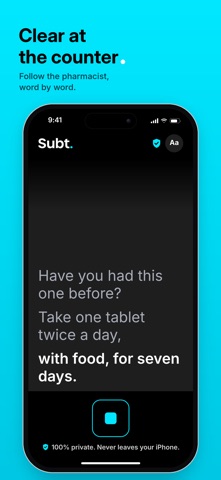
Read what’s being said. Subt turns speech into big, clear captions on your iPhone, so you can follow face-to-face conversations at the counter, on the platform, at the pub or round the family table. Hold your phone between you and the person speaking, tap the button and read along. Each line appears as they talk, with the newest line in bold white so you always know where you are. MADE FOR REAL CONVERSATIONS • Large, high-contrast captions you can read at a glance • Three caption sizes and a choice of easy-to-read fonts • The last few lines stay on screen if you fall behind • The screen stays awake while you listen PRIVATE BY DESIGN • Speech is turned into captions on your iPhone itself • Nothing is recorded, saved or sent anywhere • No account, no adverts, no tracking GOOD TO KNOW • Works in languages your iPhone can recognise on-device, including English (UK and US) • Captions work best with one person speaking at a time and less background noise • Subt stops listening after 2.5 minutes of silence to save battery Subt is made in the UK by an independent developer. Questions or ideas: support@subt.app
What's new · 1.1
Listening modes Subt now adapts to where you are. Tap Aa and choose a mode: • Everyday: filters background noise and echo. Best for most places. • Fast pace: quickest captions, for fast talkers. • Quiet & TV: most accurate in calm rooms, and with TV or videos. • Noisy: cuts deep hum from engines, air con, trains and fans. • Group: picks up several voices around a table. Smoother captions Words now appear instantly, with no fading or flicker. Tidier settings Text size is now one tap, and fonts have their own menu.
Details