

App Ads Manager
Remington Vortmann · Finance
Independent analytics for this App Store listing. AppTracker is not affiliated with Remington Vortmann.
Chart standing · US
What changed · US
Listing changes AppTracker has observed for this app in this storefront — new versions, price moves, rating shifts, and store copy.
Custom date range: a new Custom pill on the Dashboard and the Campaigns tab opens a start and end picker, so a launch week or a promotion window is one tap away. Both tabs now share one timeframe, so what you pick on one is what the other shows. Your numbers now match Apple's: reports are requested in your organization's reporting time zone, so days, totals and comparisons line up with the Apple Ads console. Conversion rate up front: the Dashboard shows CR instead of tap-through rate, and campaign rows carry CR too. TTR stays on the metric shelf. Feedback with a reply address: the feedback form has an optional email field, so we can answer you. Also fixed: a metric you switch on in Metric Order now appears at the front of the row, the row hints that it scrolls, a hiccup at launch no longer signs you out, and creating an ad no longer reports a failure when it went through. Thanks for using App Ads Manager!
In-app purchases · US
What this app sells inside itself, grouped by kind and priced for this storefront.
Screenshots




Similar apps
Competitors and close alternatives, as estimated by AppTracker.
 Campaign Manager for App Ads
INNOVATIVE DIGITAL TECHNOLOGIES LIMITED
Campaign Manager for App Ads
INNOVATIVE DIGITAL TECHNOLOGIES LIMITED
 Rocket Ads - Apple Ads Manager
Mihai Seremet
Rocket Ads - Apple Ads Manager
Mihai Seremet
 Google Ads
Google LLC
Google Ads
Google LLC
 ASO.dev for AppStore Connect
ASO.DEV LLP
ASO.dev for AppStore Connect
ASO.DEV LLP
 AppScout: Find & Build Apps
Elfarabey LLC
AppScout: Find & Build Apps
Elfarabey LLC
 AI Money Manager & Expenses
Johan Astudillo
AI Money Manager & Expenses
Johan Astudillo
 AppSpy: App Finder & Tracker
Mehroz Sheikh
AppSpy: App Finder & Tracker
Mehroz Sheikh
 Appster - Developer's Diary
EFRAIN ANTONIO PEREZ ROJAS
Appster - Developer's Diary
EFRAIN ANTONIO PEREZ ROJAS
About
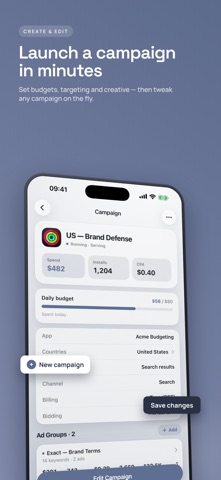
Pause a campaign, move a budget, or launch a new one, from your phone. Ask the built-in AI consultant what changed and what to fix next. The account you run from a desk goes where you go. ASK YOUR AI CONSULTANT Ask a question in plain English and get answers and concrete recommendations from your own live data: where spend went, what changed, what to fix first. Charts arrive on demand, drawn in the app from your real numbers, and every recommendation links straight to the screen where you act on it. For subscribers, with a free preview for everyone. GET AN ALERT WHEN SPEND GOES NOWHERE Once a week, with nobody watching, your consultant reads the account again. If it finds spend that is bringing no installs, you get one notification saying how much and what kind of thing it is attached to, and the full finding waits in the Assistant with a link to the screen where you fix it. Silence means the account looks fine. Alerts are a Consultant Tier benefit; Management Tier subscribers see the same weekly finding when they open the app. MANAGE WHAT IS ALREADY RUNNING Pause, enable, or rename a campaign. Adjust daily budgets and budget orders. Edit keywords and bids, ad groups, and targeting. Every write is confirmed, and a failure tells you what happened rather than pretending it worked. CONNECT WITHOUT A KEY ON YOUR PHONE An admin grants access in the Apple Ads console, and a secure backend holds the organization's key and mints short-lived tokens. There is nothing to paste, store, or keep safe on the device. Access is scoped to the one organization you connect and stays revocable from Apple's console. LAUNCH A CAMPAIGN END TO END Pick an app, name the campaign and set its budget, choose bidding and schedule, add locations and audience, add the keywords you want to bid on, choose the product page, then review and launch. Every step lives on the phone. SEE WHAT IT COST A dashboard leads with total spend, installs, average CPA, and conversion rate, over any preset or custom date range and in your organization's own reporting time zone, so the numbers match the Apple Ads console. Ask the Assistant for any breakdown or comparison and get a chart on the spot, so you know what happened and what it cost before you are back at a desk. BUILT FOR PEOPLE WHO RUN ADS Solo developers on their own app, agency staff covering client accounts, and in-house managers who cannot wait until the next time they open a laptop. Terms of Use (EULA): https://www.apple.com/legal/internet-services/itunes/dev/stdeula/
What's new · 2.4
Custom date range: a new Custom pill on the Dashboard and the Campaigns tab opens a start and end picker, so a launch week or a promotion window is one tap away. Both tabs now share one timeframe, so what you pick on one is what the other shows. Your numbers now match Apple's: reports are requested in your organization's reporting time zone, so days, totals and comparisons line up with the Apple Ads console. Conversion rate up front: the Dashboard shows CR instead of tap-through rate, and campaign rows carry CR too. TTR stays on the metric shelf. Feedback with a reply address: the feedback form has an optional email field, so we can answer you. Also fixed: a metric you switch on in Metric Order now appears at the front of the row, the row hints that it scrolls, a hiccup at launch no longer signs you out, and creating an ad no longer reports a failure when it went through. Thanks for using App Ads Manager!
Details