

Bookology: Book Tracker
Empty Studio · Books
Independent analytics for this App Store listing. AppTracker is not affiliated with Empty Studio.
Chart standing · US
What changed · US
Listing changes AppTracker has observed for this app in this storefront — new versions, price moves, rating shifts, and store copy.
- Manage multiple books at once. Select books, including search results, to add them to a book list, remove them from a list, or delete them from your library. - Edit book details in bulk. Update reading status, authors, translators, series, categories, formats, publisher, publication year, and purchase date across selected books. - Organize lists from book details. Add a book to multiple lists or update its existing list memberships directly from the detail page.
Price & rating history · US
Reconstructed from the listing changes AppTracker has observed in this storefront. A field is charted once it has changed more than once, and each line starts at the value it moved from.
Average rating · ★ 4.81 now · 9 changes on record
Ratings breakdown · US
The star breakdown behind this app's rating in this storefront.
In-app purchases · US
What this app sells inside itself, grouped by kind and priced for this storefront.
Screenshots




Keywords this app targets
Search terms AppTracker associates with this app — estimates, not search volume. ❝ = in the app's title; a highlighted number is its current position for that term.
Similar apps
Competitors and close alternatives, as estimated by AppTracker.
 Book Tracker: Bookshelf & TBR
Simone Montalto
1 shared topic · 3 shared title words
Book Tracker: Bookshelf & TBR
Simone Montalto
1 shared topic · 3 shared title words
 Bookly: Book Tracker
TwoDoor Games
1 shared topic · 3 shared title words
Bookly: Book Tracker
TwoDoor Games
1 shared topic · 3 shared title words
 Reading List: Book Tracker
Andrew Bennet Ltd
1 shared topic · 3 shared title words
Reading List: Book Tracker
Andrew Bennet Ltd
1 shared topic · 3 shared title words
 Reading Tracker - ReadTracker
Mario Luis Gutierrez Abed
2 shared topics · 1 shared title word
Reading Tracker - ReadTracker
Mario Luis Gutierrez Abed
2 shared topics · 1 shared title word
 BookBuddy Pro: Book Tracker
Kimico, Ltd.
1 shared topic · 3 shared title words
BookBuddy Pro: Book Tracker
Kimico, Ltd.
1 shared topic · 3 shared title words
 BookBuddy: Book Tracker
Kimico Ltd
1 shared topic · 3 shared title words
BookBuddy: Book Tracker
Kimico Ltd
1 shared topic · 3 shared title words
 Bookshelf: Book Tracker & List
Alexander Gerrese
1 shared topic · 3 shared title words
Bookshelf: Book Tracker & List
Alexander Gerrese
1 shared topic · 3 shared title words
 Bookmory - reading tracker
TonySoft
1 shared title word
Bookmory - reading tracker
TonySoft
1 shared title word
About
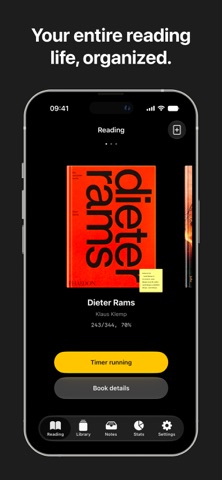
Bookology is a reading tracker and analytics app. Whether you're a casual reader or a devoted bookworm, it helps you organize your library, track your progress, and build a lifelong reading habit with ease. [Library Management] - Quickly add books via barcode scanning, online search, or manual entry - Track reading status: Want to Read, Reading, Finished, Abandoned, On Hold - Organize your collection with custom booklists - Support for categories and series management [Visual Bookshelf] - Skeuomorphic bookshelf with spine and cover display modes - Customize decorations and ornaments to create your own reading space - Sync shelves and lists across devices via the cloud [Reading Timer] - Dedicated reading timer that automatically logs each session - Supports Live Activities for real-time lock screen updates - Start / pause / resume without breaking your tracking - Literary Clock: shows excerpts from literature based on the current time - Add countdown timers to stay focused and goal-oriented [Progress Tracking] - Log progress by pages or percentage - Reading calendar for a clear daily overview [Notes & Reflection] - Capture quotes, thoughts - Support for images and export - Write reviews and rate books - Daily note review: rediscover past notes with a curated daily selection [Multi-Platform Import] - Import notes from Kindle, Apple Books, WeRead, and DiMo Reader - Import your library from Goodreads - Automatic deduplication [Reading Stats & Insights] - Analyze reading time and session patterns - Track formats: print, eBook, audiobook - Monthly and yearly reading summaries - Annual book showcase - Most-read books statistics [Widgets] - Home screen widgets for quick progress tracking - Reading streak widget to help maintain your habit [Bookology Pro] - Cloud backup and cross-device sync - Unlimited booklists - Advanced stats and historical data - Unlimited reading session logs - Full access to bookshelf decorations - Goodreads library import - Continuous access to future Pro features Bookology is dedicated to being your best reading companion, exploring the joy of reading together with you. Terms of Use: https://www.apple.com/legal/internet-services/itunes/dev/stdeula/ Privacy Policy: https://empty.mt/privacy_policy_bookology
What's new · 1.13.10
- Manage multiple books at once. Select books, including search results, to add them to a book list, remove them from a list, or delete them from your library. - Edit book details in bulk. Update reading status, authors, translators, series, categories, formats, publisher, publication year, and purchase date across selected books. - Organize lists from book details. Add a book to multiple lists or update its existing list memberships directly from the detail page.
Details