

PxPad: Pixel Art Maker Studio
Andrew Moloney · Graphics & Design
Independent analytics for this App Store listing. AppTracker is not affiliated with Andrew Moloney.
Chart standing · US
What changed · US
Listing changes AppTracker has observed for this app in this storefront — new versions, price moves, rating shifts, and store copy.
v1.2.1 • Improved canvas performance, including zooming, selections and fills. • Reduced memory use when editing larger documents and importing images. • Improved autosave and iCloud responsiveness. • Fixed layer duplication within folders and selection issues after undo. • WebP exports now use lossless compression to preserve pixel detail.
Ratings breakdown · US
The star breakdown behind this app's rating in this storefront.
In-app purchases · US
No in-app purchases.
Screenshots



About
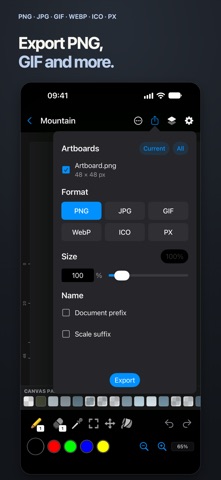
Create stunning pixel art with PxPad, a powerful native sprite editor for iPhone, iPad and Mac. Perfect for game developers, artists, and retro art enthusiasts. Features • Brush, eraser, fill, select, move, and eyedropper tools • Undo / redo feature • Zoom / pan / rotate gestures • Layers • Multiple artboards in one document • Image imports • iCloud integration • Files app icon previews • Dark mode • Export PNG / JPG / GIF / WebP / ICO / PX • Export multiple artboards at once • Canvas resizing • Full color picker • Haptics • Apple Pencil support on compatible iPads • Left-handed mode • Sample files • 41 Languages Create retro art, game graphics and sprite sheets across iPhone, iPad and Mac, with iCloud integration, native sharing and file previews. Touch shortcuts and gestures • Double-tap with the brush to fill an area (enable in Settings). • Press and hold on the canvas while using the brush, eraser or fill tool to pick a color. • 2 finger tap: Undo • 3 finger tap: Redo • 2 finger pan: Pan view • 2 finger pinch: Zoom view • 2 finger rotate: Rotate canvas • Swipe gesture on folder previews, in the grid view, to cycle through previews. • Drag eyedropper onto canvas to activate with one gesture. Notes • When editing, an orange circle by the file name indicates the file is unsaved. Green briefly confirms a successful save. Red indicates a save error. • Import .px files by moving them into the PxPad folder (see Settings). If you like PxPad, please let me know in a review! Thank you, Andy (The Developer) License Agreement: https://www.apple.com/legal/internet-services/itunes/dev/stdeula/
What's new · 1.2.1
v1.2.1 • Improved canvas performance, including zooming, selections and fills. • Reduced memory use when editing larger documents and importing images. • Improved autosave and iCloud responsiveness. • Fixed layer duplication within folders and selection issues after undo. • WebP exports now use lossless compression to preserve pixel detail.
Details