

GroundGlass
存滨 崔 · Photo & Video
Independent analytics for this App Store listing. AppTracker is not affiliated with 存滨 崔.
Chart standing · US
What changed · US
Listing changes AppTracker has observed for this app in this storefront — new versions, price moves, rating shifts, and store copy.
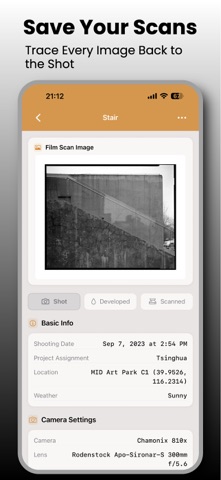
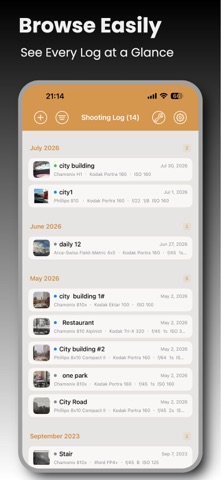
GroundGlass 4.9.9 NEW · Bulb times keep fractional seconds, and anything past one hour is recorded in full. · Enter bulb time as minutes and seconds. Seconds can go past 59, and decimals are fine. · Free-text times you typed before (like “about two and a half minutes”) stay as they are, and you can still edit them. · Times follow your language. The word for bulb is the same in the detail view, share images, and PDFs. · Share images are clearer: 3:4 by default, and the whole image grows taller when there’s more to show. · The photo wall shows what you’re filtering by. If nothing matches, you can clear it in one tap. · The detail page now has a short exposure summary at the top. A scan shows first when you have one; you can switch to the scene photo. · Individual zone readings and long development notes can be folded away. · Analytics can include bulb records. · Large text is easier to use. Several calculators now have diagrams.
In-app purchases · US
No in-app purchases.
Screenshots



About
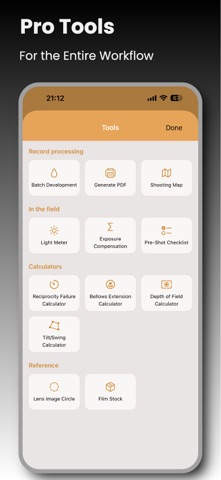
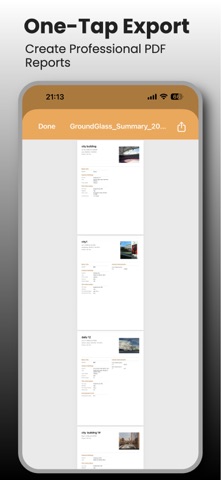
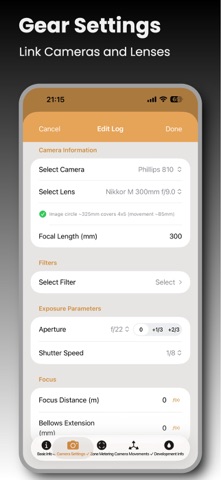
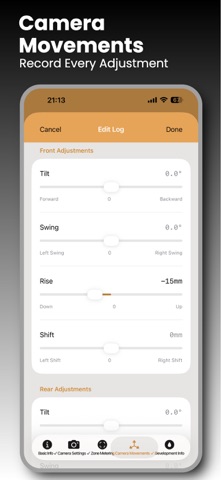
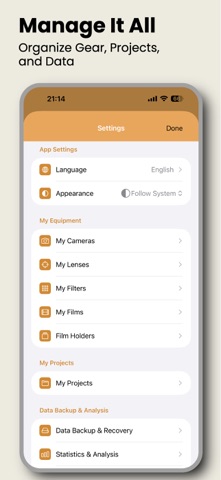
GroundGlass is a shooting log app built for large format photographers. Whether you shoot 4x5, 8x10 or any other format, GroundGlass captures every detail of the moment you press the shutter — from exposure settings and Zone System metering to camera movements and development records. KEY FEATURES ◆ Complete shooting records — Camera, lens, aperture, shutter, film, filters and movements, all in one place. Effective aperture is calculated automatically from bellows extension; holder numbers are one tap away. ◆ Zone System metering — Full metering workflow in the spirit of Ansel Adams: multiple readings, base subject selection, exposure decisions, with the zone distribution at a glance. Includes a built-in spot meter with pinch zoom. ◆ iCloud Sync — Records and equipment sync across your devices through your private iCloud database. Switch phones without worry. The developer has no access to your data. ◆ Film workflow — Record status (Shot → Developed → Scanned), film holder management, stock tracking with automatic sheet deduction, and batch development entry. From loading to archiving, everything is on file. ◆ Record templates — Save your go-to camera/lens/film combinations and apply them with one tap. ◆ PDF export — Index label PDFs for film sleeves and full-page record archive PDFs, with preview before sharing. ◆ Statistics & analysis — Shooting trends, gear usage, parameter distributions and a shooting calendar heat map, exportable as a report. ◆ Shooting map — All geotagged records gathered on one map. Revisit your footsteps. ◆ Calculators — Reciprocity failure, bellows exposure compensation, and depth of field with per-format circle of confusion presets. ◆ Extensive equipment database — About 180 large format camera models from 25 brands, including Linhof, Sinar, Arca-Swiss, Chamonix and Ebony. Lens presets from Schneider, Rodenstock, Fujinon, Nikkor and more. ◆ Professional filter management — Structured selection by brand, type and strength, including center filters, with automatic stacked compensation. ◆ Map-based location — One-tap locate, with reverse geocoding for place names and coordinates. ◆ Data backup — JSON import/export, with or without photos. Your data is always yours. ◆ Darkroom-themed interface — Amber-toned design with card layouts, made for photographers. Your data lives on your device and in your private iCloud database. We collect no personal information. Large format photography begins with a record.
What's new · 4.9.9
GroundGlass 4.9.9 NEW · Bulb times keep fractional seconds, and anything past one hour is recorded in full. · Enter bulb time as minutes and seconds. Seconds can go past 59, and decimals are fine. · Free-text times you typed before (like “about two and a half minutes”) stay as they are, and you can still edit them. · Times follow your language. The word for bulb is the same in the detail view, share images, and PDFs. · Share images are clearer: 3:4 by default, and the whole image grows taller when there’s more to show. · The photo wall shows what you’re filtering by. If nothing matches, you can clear it in one tap. · The detail page now has a short exposure summary at the top. A scan shows first when you have one; you can switch to the scene photo. · Individual zone readings and long development notes can be folded away. · Analytics can include bulb records. · Large text is easier to use. Several calculators now have diagrams.
Details