

WakeWake: Easy Video Splitter
Kensuke Hoshikawa · Photo & Video
Independent analytics for this App Store listing. AppTracker is not affiliated with Kensuke Hoshikawa.
Chart standing · US
What changed · US
Listing changes AppTracker has observed for this app in this storefront — new versions, price moves, rating shifts, and store copy.
Internal updates.
In-app purchases · US
What this app sells inside itself, grouped by kind and priced for this storefront.
Screenshots


About
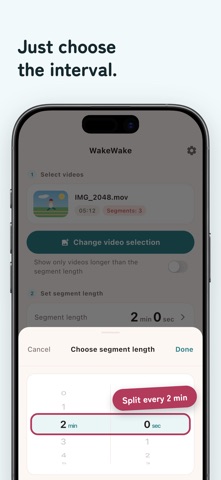
WakeWake splits and cuts long videos by any interval and saves the clips straight to your Photos app. Hit the 2-minute limit in family photo-sharing apps, the 60-second limit for Stories, or a video too long to send in chat? Split it into sendable clips in 3 steps. Original recording dates are preserved, so the clips stay in chronological order in your albums. ◆ Great for • Recorded a 5-minute video but your family app only takes 2-minute clips • Cutting a video into Story- or chat-friendly lengths • Organizing long videos from school events, recitals, and trips • Managing videos by timeline ◆ Main features • Auto-split videos by your chosen interval (5 seconds to 10 minutes) • Save split clips to Photos in chronological order • Preserve original recording timestamps • Simple 3-step flow: Select video → Set interval → Start • Share split clips directly to other apps • Delete unnecessary clips after sharing ◆ Highlights • High quality, fast processing • Flexible interval from 5 seconds to 10 minutes • Free to download with ads; an ad-free premium is available Make your memories easier to organize and revisit.
What's new · 1.4.2
Internal updates.
Details