

Framable | Framed Screenshots
镇 王 · Graphics & Design
Independent analytics for this App Store listing. AppTracker is not affiliated with 镇 王.
Chart standing · US
Ratings breakdown · US
The star breakdown behind this app's rating in this storefront.
In-app purchases · US
No in-app purchases.
Screenshots



Keywords this app targets
Search terms AppTracker associates with this app — estimates, not search volume. ❝ = in the app's title; a highlighted number is its current position for that term.
Similar apps
Competitors and close alternatives, as estimated by AppTracker.


About
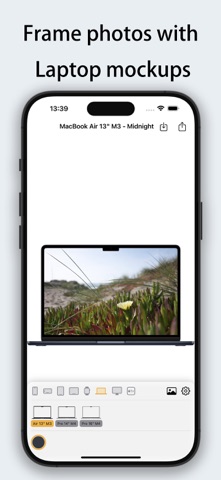
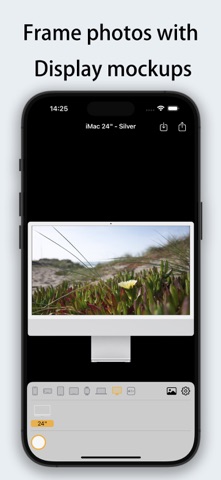
Framable - Add Stunning Device Frames in One Tap! Make your screenshots look professional instantly! Framable supports adding realistic device frames to screenshots/photos for iPhone, iPad, Mac, Apple Watch, and Apple TV. Process in 1 second and share with ease. Perfect Fit for the Latest Apple Devices • iPhone 14/15/16/17 series (including Pro/Pro Max/Air) • iPad Air/Pro/mini (Full M2/M4 support) • MacBook Air/Pro (13"~16", M3/M4 chips) • iMac 24", Apple TV 4K • Apple Watch S10/S11/Ultra 2/Ultra 3 (42mm/46mm) [New Update] Flexible Composition & Interactive Optimization • Diverse Fit Modes: Supports "Stretch", "Fit Width (Vertical Scroll)", and "Fit Height (Horizontal Scroll)" for any image ratio. • Intuitive Gesture Control: In fit modes, simply drag the image inside the frame to adjust the visible area and capture the perfect look. [Exclusive] Powerful Shortcuts Support • System Integration: No need to open the app! Use the Share Sheet in the Photos app to add frames instantly. • Batch Processing: Process dozens of screenshots at once via Shortcuts workflows for maximum efficiency. • Dedicated Intents: Individual shortcuts for iPhone, iPad, and Watch to meet your precise automation needs. Core Features • Blazing Fast - Generate framed images in under 1 second. • HD Output - Retains original image quality with 4K support. • Diverse Frames - Multiple color options (Space Black, Starlight, Midnight, Titanium, etc.). • Smart Adaptation - Automatically detects portrait/landscape orientations to match the best device frame. Use Cases • Developers: Create App Store marketing materials. • Tech Enthusiasts: Design personalized social media or review posts. • Professionals: Give product demos and document screenshots a premium look. • Efficiency Seekers: Use Shortcuts for a fully automated framing workflow. "From ordinary screenshot to professional display in 1 second. Automated composition has never been this easy!"
What's new · 1.0.3
[1.0.3] 1. New Image Fit Modes: Stretch, Fit Width (Vertical Scroll), and Fit Height (Horizontal Scroll). 2. Drag Gesture Support: Adjust the visible area by dragging the image inside the frame. 3. Fixed known issues. [1.0.2] 1. Shortcut Support: Create automated workflows for iPhone, iPad, and Watch. Supports direct execution from the Share Sheet. 2. Batch Processing: Process multiple images at once via Shortcut workflows to save time.
Details