

PG Orbit - Postgres Client
Acrogenesis LLC · Developer Tools
Independent analytics for this App Store listing. AppTracker is not affiliated with Acrogenesis LLC.
Chart standing · US
What changed · US
Listing changes AppTracker has observed for this app in this storefront — new versions, price moves, rating shifts, and store copy.
PG Orbit 2.6.0 — see what's new after every update, a tidier sidebar, and sturdier Premium. NEW • After an update, PG Orbit shows what's new in the version you just installed IMPROVED • Tables, views, and other objects in the sidebar are no longer indented far past their folder, so long names fit on one line PREMIUM • Re-entering a license key on the same device no longer uses another activation, and devices unused for 90 days free their slot • On Mac, App Store purchases are re-confirmed with the App Store at launch, and again when the app comes back to the foreground if that check couldn't finish • On Mac, Premium unlocked with a license key in 2.5.x needs the key entered once more after updating. If you bought on the web and are signed in, Premium comes back on its own the next time the app is online
Ratings breakdown · US
The star breakdown behind this app's rating in this storefront.
In-app purchases · US
What this app sells inside itself, grouped by kind and priced for this storefront.
Screenshots




Keywords this app targets
Search terms AppTracker associates with this app — estimates, not search volume. ❝ = in the app's title; a highlighted number is its current position for that term.
Similar apps
Competitors and close alternatives, as estimated by AppTracker.
 Tablewright: PostgreSQL Editor
ROBERT BARRETT LAUNIUS
Tablewright: PostgreSQL Editor
ROBERT BARRETT LAUNIUS
 PostgreSQL Elite
AYANG TECH SDN. BHD.
PostgreSQL Elite
AYANG TECH SDN. BHD.
 PostgreSQL Client
Filippo Maguolo
PostgreSQL Client
Filippo Maguolo
 TablePro
Dat Ngo Quoc
TablePro
Dat Ngo Quoc
 Schema: A database client
Allan Grinshtein
Schema: A database client
Allan Grinshtein
 SQLPro Studio database client
Hankinsoft Development Inc
SQLPro Studio database client
Hankinsoft Development Inc
 DBConnect
KHANG LE
DBConnect
KHANG LE
 SQLite Editor & DB Viewer
Sahana A S
SQLite Editor & DB Viewer
Sahana A S
About
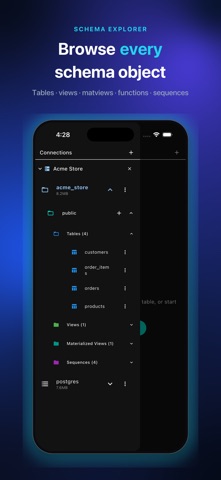
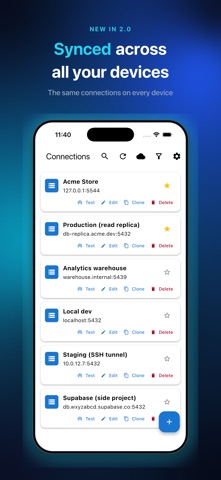
A real PostgreSQL client on your phone. Browse schemas, run queries, and fix data from your iPhone or iPad with PG Orbit — the PostgreSQL client built for developers, DBAs, and data professionals who get paged away from their desk. NEW IN 2.0: SYNC ACROSS DEVICES • One account — Sign in with Apple, Google, or an email code • Connections and saved queries follow you to every device, including the new Mac app • Passwords, SSH keys, and passphrases NEVER sync — they stay in your device's keychain • Query history sync is opt-in and off by default • Desktop-class workspace on iPad: pinned sidebar, object tabs and SQL tabs, keyboard shortcuts (Cmd+T, Cmd+1–9) FREE FEATURES: • Browse & Query — explore tables and views, run SELECT queries with advanced filtering • Advanced Filtering — multi-column filters with AND/OR logic and custom operators • Schema Explorer — databases, tables, views, materialized views, functions, and sequences; works on hardened hosts like Heroku shared plans • SQL Editor — real autocomplete with schema context, find & replace, comment toggle, saved queries, and history with favorites • Secure Connections — SSL/TLS (Require and Verify-Full with client certificates) and SSH tunneling • SSH Key Management — import and store RSA and Ed25519 private keys with passphrase support, or generate an RSA key on device • Multiple Connections — connect to and manage several databases at once • Cloud Discovery — sign in to AWS, Google Cloud, Azure, DigitalOcean, Linode, or Supabase and import your instances with one tap PREMIUM ($9.99, ONE-TIME — YOURS FOREVER): • Write Operations — INSERT, UPDATE, DELETE, CREATE, ALTER, DROP • In-Place Editing — edit cells directly with a tap, set NULL, insert and delete rows • Visual Table Designer — modify table structure with a preview of the exact DDL before it runs • CSV Export — export query results and table data with progress tracking • Sequence Management — inspect and update sequences easily SYNC (OPTIONAL SUBSCRIPTION): • $1.99/month or $14.99/year, auto-renewing — cancel anytime in the App Store • Syncs connection settings and saved queries; secrets never leave your device • Delete your account (and all synced data) from settings at any time SECURITY FIRST: • Biometric protection with Face ID or Touch ID, and auto-lock on app switch • Credentials stored in the iOS Keychain with industry-standard encryption • Your queries run directly from your device to your database — table data never passes through our servers PERFECT FOR: • DBAs managing PostgreSQL remotely • Developers debugging production from anywhere • DevOps engineers who live behind SSH bastions • Data analysts exploring and exporting datasets • Students learning SQL Free forever for read-only. Premium is $9.99, once.
What's new · 2.6.0
PG Orbit 2.6.0 — see what's new after every update, a tidier sidebar, and sturdier Premium. NEW • After an update, PG Orbit shows what's new in the version you just installed IMPROVED • Tables, views, and other objects in the sidebar are no longer indented far past their folder, so long names fit on one line PREMIUM • Re-entering a license key on the same device no longer uses another activation, and devices unused for 90 days free their slot • On Mac, App Store purchases are re-confirmed with the App Store at launch, and again when the app comes back to the foreground if that check couldn't finish • On Mac, Premium unlocked with a license key in 2.5.x needs the key entered once more after updating. If you bought on the web and are signed in, Premium comes back on its own the next time the app is online
Details