

Photo Cleaner: Swipe Cleanup
Mohamed Elatabany · Utilities
Independent analytics for this App Store listing. AppTracker is not affiliated with Mohamed Elatabany.
Chart standing · US
What changed · US
Listing changes AppTracker has observed for this app in this storefront — new versions, price moves, rating shifts, and store copy.
• Duplicate scan now reliably finds similar and duplicate photos • A brand-new animated welcome tour • Empty the Trash Bin in one tap • Celebrate every cleanup with your storage saved • Smoother, more stable swiping
Price & rating history · US
Reconstructed from the listing changes AppTracker has observed in this storefront. A field is charted once it has changed more than once, and each line starts at the value it moved from.
Average rating · ★ 4.57 now · 2 changes on record
Ratings breakdown · US
The star breakdown behind this app's rating in this storefront.
Screenshots



About
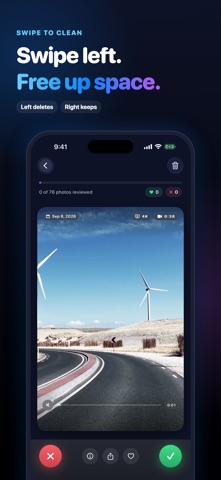
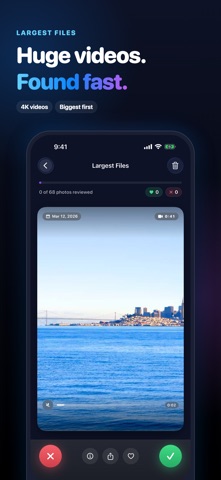
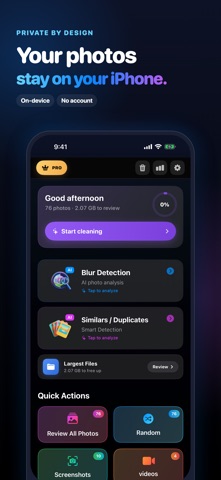
Free up space. Keep the photos you love. Turn a cluttered camera roll into a quick, satisfying cleanup. Photo Cleaner helps you find duplicate and similar photos, review blurry shots, and remove unwanted photos and videos with a swipe. SWIPE LEFT TO DELETE. RIGHT TO KEEP. Keep your favorites and mark the rest for deletion. Undo a swipe whenever you change your mind. Review your picks in the Trash Bin, then confirm with Apple Photos. You decide what goes. KEEP THE BEST. LOSE THE COPIES. Compare duplicate and similar photos together, review the suggested best shot, and select the extras. Sort groups by best match, potential savings, or photo count to choose where to start. CLEAR OUT BLURRY SHOTS Find blurry photos and review them by severity. Keep a meaningful moment even if it is imperfect, or select the shots you no longer need. MAKE ROOM WITH THE BIG FILES See your largest photos and videos in one place. Start with the files taking up the most space and choose which ones to remove. CLEAN UP A LITTLE AT A TIME Start a quick session with up to 20 unreviewed photos, or browse month by month. Pick up where you left off without sorting your entire library at once. MORE WAYS TO ORGANIZE • Browse screenshots, videos, Live Photos, bursts, and favorites. • Review media from supported messaging-app albums. • Rediscover photos from this day in past years. • Track reviewed photos, cleanup activity, and estimated storage savings. • Enjoy light and dark appearances on iPhone and iPad. YOUR PHOTOS STAY UNDER YOUR CONTROL Photo analysis happens on your device, without uploading your photos to our servers. No account is required. Choose selected-photo or full-library access and change it in iOS Settings. Photos stored only in iCloud may need to download before review. FREE TO START The free plan includes 100 free deletions. Pro unlocks unlimited deletions and premium tools, and the yearly plan starts with a 3-day free trial. Purchase options and local prices appear before you buy. Subscriptions renew automatically unless canceled at least 24 hours before the current period ends. Manage or cancel them in your Apple account settings. A one-time lifetime option is also available. Storage figures are estimates. Deleted items may remain in Apple Photos' Recently Deleted album until removed there or automatically expired. Actual space recovered depends on your files and iCloud settings. Download Photo Cleaner and make room for your next memory. Terms of Use: https://www.apple.com/legal/internet-services/itunes/dev/stdeula/ Privacy Policy: https://atabany.notion.site/Privacy-Policy-217a2ea1ded680b5b20ef84c16adb6d3
What's new · 2.0.2
• Duplicate scan now reliably finds similar and duplicate photos • A brand-new animated welcome tour • Empty the Trash Bin in one tap • Celebrate every cleanup with your storage saved • Smoother, more stable swiping
Details