

Photos Exifer
栋 陈 · Photo & Video
Independent analytics for this App Store listing. AppTracker is not affiliated with 栋 陈.
Chart standing · US
What changed · US
Listing changes AppTracker has observed for this app in this storefront — new versions, price moves, rating shifts, and store copy.
1. Swipe to Compare Metadata Easily swipe between the “Before” and “After” views to compare photo metadata directly on the original photo details screen. 2. New Photo Discovery Tools Quickly find duplicate photos, large files, photos without captions, and photos that aren't included in any album. 3. Filename Display View filenames beneath each image for easier identification and reference. 4. Incremental Date & Time Editing Adjust the dates and times of multiple photos with automatic increments, making it easier to update timestamps in chronological order. 5. Edited Photos Category Quickly find photos that have been edited within the app in a dedicated category. 6. Bug Fixes & Improvements Fixed an issue that could occur when deleting original photos after editing. Improved duplicate photo detection and scanning for more reliable results. Improved overall stability and performance.
In-app purchases · US
What this app sells inside itself, grouped by kind and priced for this storefront.
Screenshots



About
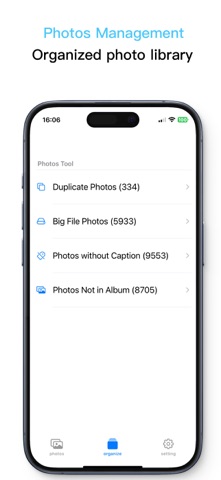
Photos Exifer is a powerful and intuitive app designed to give you full control over the metadata of your photos and videos in the Photo Library. Whether you're a photographer, content creator, or simply someone who wants to organize their media with precision, Photos Exifer provides everything you need to view, add, edit, or completely remove metadata with ease. But Photos Exifer goes far beyond basic metadata management. It’s packed with powerful tools — including duplicate photo removal, large file detection, caption management, and album organization — to help you clean up, optimize, and enhance your photo library in one seamless experience. Key Features: • View and Edit Metadata: Access and edit metadata for both photos and videos, including EXIF, GPS, IPTC, and TIFF data. • Remove Sensitive Information: Quickly remove location (GPS), camera details, or any embedded metadata for privacy or file cleanup. • Batch Editing: Save time by applying metadata changes to multiple photos or videos at once, including batch editing captions, titles, and dates. • Resize Photos: Resize images using custom dimensions, or retain original quality with lossless resizing options. • Add Date & Time Stamps: Overlay date and time information directly onto your photos — perfect for archival or storytelling. • Convert Live Photos: Convert Live Photos to static JPEG images while preserving quality. • Adjust EXIF Dates: Set or modify EXIF date fields and sync them with the actual file creation date. • Metadata Copy Tools: Copy filename to caption or title, or transfer values between fields (e.g., title to caption, caption to title) with just a tap. • Remove Duplicates: Find and remove duplicate photos to reclaim storage and keep your library organized. • Find Large Files: Locate and delete large photos and videos to free up valuable space. • Find Photos Without Captions: Identify photos missing captions and batch add tags to make them easier to find and organize. • Find Photos Not in Albums: Detect photos not assigned to any album and batch move them to existing or new albums for better classification. Why Choose Photos Exifer? Photos Exifer is ideal for professionals and everyday users alike who want to manage their photo metadata with precision. Whether you're preparing photos for publishing, correcting metadata from imported images, or ensuring privacy before sharing, Photos Exifer makes the process smooth and reliable. Take full control of your media library with a comprehensive toolkit that’s fast, accurate, and easy to use — all while staying seamlessly integrated with your iOS Photo Library. Terms of Use (EULA): https://www.apple.com/legal/internet-services/itunes/dev/stdeula/
What's new · 1.1.2
1. Swipe to Compare Metadata Easily swipe between the “Before” and “After” views to compare photo metadata directly on the original photo details screen. 2. New Photo Discovery Tools Quickly find duplicate photos, large files, photos without captions, and photos that aren't included in any album. 3. Filename Display View filenames beneath each image for easier identification and reference. 4. Incremental Date & Time Editing Adjust the dates and times of multiple photos with automatic increments, making it easier to update timestamps in chronological order. 5. Edited Photos Category Quickly find photos that have been edited within the app in a dedicated category. 6. Bug Fixes & Improvements Fixed an issue that could occur when deleting original photos after editing. Improved duplicate photo detection and scanning for more reliable results. Improved overall stability and performance.
Details