

Transcribo: Voice Memo to Text
Mehmet Cevik · Utilities
Independent analytics for this App Store listing. AppTracker is not affiliated with Mehmet Cevik.
Chart standing · US
What changed · US
Listing changes AppTracker has observed for this app in this storefront — new versions, price moves, rating shifts, and store copy.
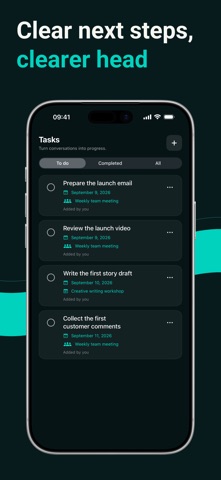
• Explore features hands-on with a new interactive onboarding tour. • Add recording-linked tasks, due dates and completion tracking. • Organize your library with favorites, filters and expanded search. • Work with timestamps, bookmarks and improved document/subtitle exports. • Improved audio preservation and retry for unfinished transcriptions. • Simplified first-use AI permission and fixed cancellation during audio conversion and file import.
Screenshots





About
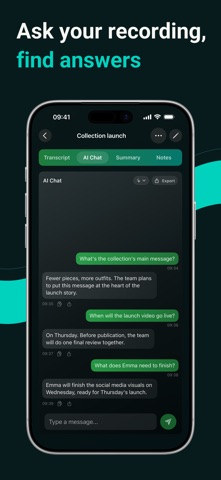
A useful conversation deserves more than an audio file. Transcribo turns meetings, lectures, interviews and spoken ideas into notes you can read, search and put to work. CAPTURE THE WORDS Record in the app or import supported audio and video files. Transcription runs on compatible devices in supported languages. An initial language-model download may require internet access. FIND THE MOMENT THAT MATTERS Edit your transcript, add personal notes and bookmark important passages. Tap timestamps to revisit the source audio. Keep your library useful with favorites, filters and search across your saved content. TURN NOTES INTO NEXT STEPS Choose AI summaries, Smart Notes, chat or translation when you want help working with a transcript. Add your own recording-linked tasks, set due dates and track completion. Check AI-generated results before relying on them. TAKE YOUR WORK WITH YOU Export TXT, DOCX, PDF and RTF documents, or create SRT and VTT subtitles from timed transcripts. Choose whether to include summaries, personal notes, tasks and bookmarks in document exports. ONLINE AI IS YOUR CHOICE With your permission, online AI sends transcript and chat text through Firebase to OpenAI, not your audio file. These features require internet access. You can withdraw permission in Settings. Free use allows up to 3 recordings with a 10-minute limit per recording. Features including file import, AI summaries and chat require Premium. See the app for available plans and prices. Start with the interactive tour and build a library of notes you can actually use. Privacy Policy: https://sites.google.com/view/transcriboai/privacy Terms of Use: https://sites.google.com/view/transcriboai/terms
What's new · 1.10
• Explore features hands-on with a new interactive onboarding tour. • Add recording-linked tasks, due dates and completion tracking. • Organize your library with favorites, filters and expanded search. • Work with timestamps, bookmarks and improved document/subtitle exports. • Improved audio preservation and retry for unfinished transcriptions. • Simplified first-use AI permission and fixed cancellation during audio conversion and file import.
Details