

Whats for Dinner: Recipe Saver
Christian Altamura · Food & Drink
Independent analytics for this App Store listing. AppTracker is not affiliated with Christian Altamura.
Chart standing · US
What changed · US
Listing changes AppTracker has observed for this app in this storefront — new versions, price moves, rating shifts, and store copy.
Three ways to decide what's for dinner The spin is no longer the only way to pick. Tap the new mode selector above the stage and choose how you want tonight's answer: Spin — the one-tap luck machine you already know, untouched. Narrow it down — up to three quick questions (time tonight, protein, kind of meal, cuisine, effort) that filter your library down to a shortlist. Questions adapt to what's actually in your collection, and an untagged recipe is never quietly dropped from the draw. Face-off — a photo bracket. This or that, three rounds, one winner. Works even if none of your recipes are tagged. And don't worry! Our team is here for you with bug fixes! • Fixed a freeze when opening the What’s for Dinner tab. If a recipe’s cook time was written like “30 mins.” or “1–2 hours”, the app could lock up. It doesn’t anymore. • Say your whole grocery list in one go. Tap the mic once, pause between items, tap Add and keep talking — Done when you’re through. No more one-item-at-a-time. • Dictation now picks up punctuation as you speak, so items and recipes come through cleaner. Spotted something off? Tell us from Settings and we’ll get on it.
Ratings breakdown · US
The star breakdown behind this app's rating in this storefront.
In-app purchases · US
What this app sells inside itself, grouped by kind and priced for this storefront.
Screenshots




About
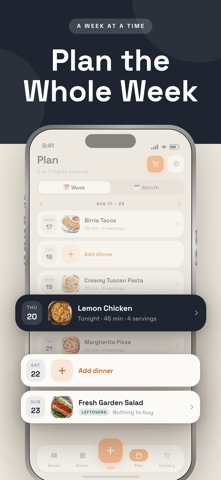
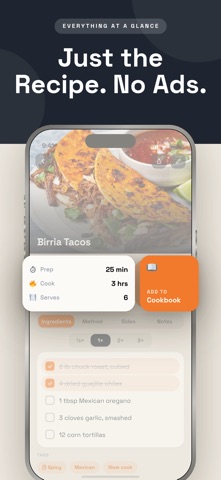
The Ultimate Meal Planning Playbook. Whether you’re planning a busy week or just need a last-minute dinner idea, as a recipe saver, Whats for Dinner makes it effortless to save, organize, and find your favorite recipes in seconds. Simply add recipes from popular websites, or your own creations. Our recipe saver and meal planner helps you decide what’s for dinner, while automatically building a grocery list from your chosen recipes for the week. Stay organized, save time, and enjoy stress-free cooking — all in one app. Terms of Use: https://www.apple.com/legal/internet-services/itunes/dev/stdeula/ Icons by: https://icons8.com/icons/set/food--style-sf-regular
What's new · 13.1
Three ways to decide what's for dinner The spin is no longer the only way to pick. Tap the new mode selector above the stage and choose how you want tonight's answer: Spin — the one-tap luck machine you already know, untouched. Narrow it down — up to three quick questions (time tonight, protein, kind of meal, cuisine, effort) that filter your library down to a shortlist. Questions adapt to what's actually in your collection, and an untagged recipe is never quietly dropped from the draw. Face-off — a photo bracket. This or that, three rounds, one winner. Works even if none of your recipes are tagged. And don't worry! Our team is here for you with bug fixes! • Fixed a freeze when opening the What’s for Dinner tab. If a recipe’s cook time was written like “30 mins.” or “1–2 hours”, the app could lock up. It doesn’t anymore. • Say your whole grocery list in one go. Tap the mic once, pause between items, tap Add and keep talking — Done when you’re through. No more one-item-at-a-time. • Dictation now picks up punctuation as you speak, so items and recipes come through cleaner. Spotted something off? Tell us from Settings and we’ll get on it.
Details