

iDOCTOR: Hardware Test
Rodrigo Belloso · Utilities
Independent analytics for this App Store listing. AppTracker is not affiliated with Rodrigo Belloso.
Chart standing · US
What changed · US
Listing changes AppTracker has observed for this app in this storefront — new versions, price moves, rating shifts, and store copy.
updated to latest iOS.
Price & rating history · US
Reconstructed from the listing changes AppTracker has observed in this storefront. A field is charted once it has changed more than once, and each line starts at the value it moved from.
Average rating · ★ 4.79 now · 5 changes on record
In-app purchases · US
What this app sells inside itself, grouped by kind and priced for this storefront.
Screenshots


About
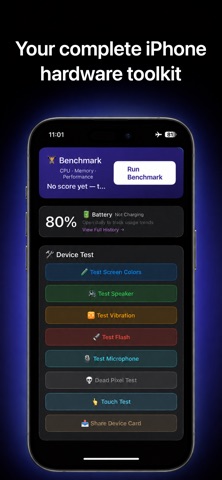
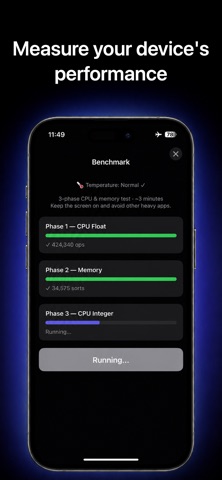
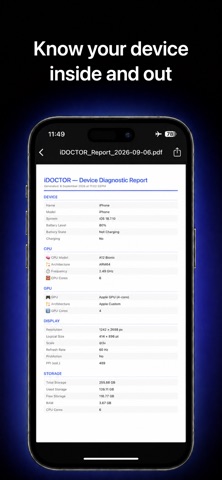
iDOCTOR: CPU & System gives you a clear, reliable view of your iOS device’s technical specifications. Whether you are a developer, tester, advanced user, or simply curious about what makes your iPhone run, this app delivers the hardware and system information you need in one place. Designed to be fast, simple, and private, Device Info offers real-time access to essential specs—no logins, subscriptions, or unnecessary permissions. What does Device Info show? Device Info collects and displays accurate technical data using official Apple APIs. The app includes the following categories: System Overview Device model and generation iOS system version Device type (iPhone or iPad) Interface language and region Time zone CPU and Performance Chip type (Apple A-series) Number of processor cores Active processor threads System uptime (since last reboot) Low Power Mode status Memory and Storage Installed RAM (physical memory) Available memory at runtime Total storage capacity Free disk space (formatted) Screen and Display Resolution in physical pixels Retina scale factor Screen orientation (portrait or landscape) Brightness level Appearance mode: light or dark Battery and Power Battery level (%) Charging status: unplugged, charging, or full Battery state (charging or not) Low Power Mode on/off Security and Accessibility Biometric authentication (Face ID, Touch ID, or none) VoiceOver status Reduce Motion enabled/disabled Reduce Transparency enabled/disabled ***Why choose Device Info? -Device Info: CPU & System is the ultimate tool for viewing your iPhone’s hardware and system status. This lightweight iOS app gives you: -Instant access to CPU info, memory, battery, and more -A clean, user-friendly dashboard -No logins, no tracking, no ads -Optional advanced diagnostics (via rewarded ads) -Full compatibility with the latest iOS devices ***Perfect for: -Developers checking test environments -QA testers verifying device specs -Power users monitoring performance -Buyers and sellers confirming hardware details -Anyone curious about their device’s true capabilities Free to use. No accounts. Built for speed and accuracy.
What's new · 1.0.3
updated to latest iOS.
Details