

wBlock
Alexander Skula · Utilities
Independent analytics for this App Store listing. AppTracker is not affiliated with Alexander Skula.
Chart standing · US
What changed · US
Listing changes AppTracker has observed for this app in this storefront — new versions, price moves, rating shifts, and store copy.
New • Filter and userscript order syncs over iCloud, and Reset Ordering applies on every device. • Pick which sites get cosmetic filtering while network blocking stays on everywhere. • Each URL-based list has its own Automatic Updates switch, synced and saved in backups. • Site Settings shows which lists leave a site out, with full undo. • Rebuilt Add sheets with separate tabs for URLs and text, a File tab, an editable import preview, and bulk URL imports. • A source editor with undo and search, and you can turn on line wrap. • An option to drop generic hiding rules and keep the site-specific ones. • Adding a script asks whether it's a userscript or a userstyle. • Settings shows how full your rule capacity is and when the next update lands. iCloud sync status shows there too. Improved • Browsing is faster, since site-specific hiding rules now load once per page and No Autoplay only loads while it's on. • Apply is faster, especially with lots of lists turned on. • The filter catalog matches AdGuard's names and download mirrors, all in the same order. • Regional lists show up in one list during setup, with native language names, and custom regional lists can be given a language. • Pause Blocking sits in the Settings toolbar. • Updated German, Japanese, Greek and Turkish translations. Fixed • Safari rejecting a blocker because of uppercase domains or unsupported cosmetic rules. • Excluding sites from very large lists failing to compile. • Anti-adblock popups on How-To Geek and related sites. • The Safari 17 extension popup not loading. • Rules and userscripts missing when a page starts loading early. • Deleted userscripts coming back. • Settings getting lost when two parts of wBlock saved at the same moment. • Restoring a backup keeping custom lists the backup didn't have. • Setup marking the content blockers as done before Safari had all five turned on. • Pressing Get on a userscript not turning it on. • Deferred iOS updates not finishing when you open the app.
Price & rating history · US
Reconstructed from the listing changes AppTracker has observed in this storefront. A field is charted once it has changed more than once, and each line starts at the value it moved from.
Average rating · ★ 4.78 now · 15 changes on record
Ratings breakdown · US
The star breakdown behind this app's rating in this storefront.
In-app purchases · US
No in-app purchases.
Screenshots

About
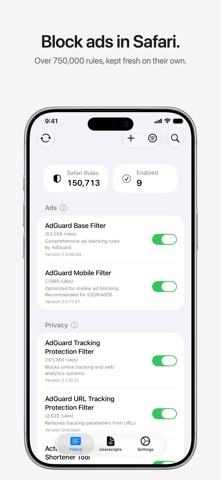
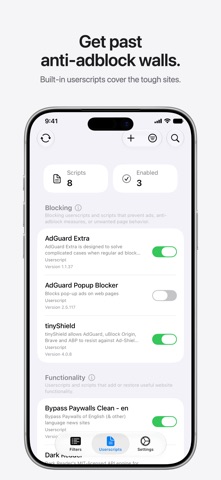
wBlock is a free, open-source ad blocker for Safari. It blocks ads and trackers all over the web with more than 750,000 filter rules, and it never asks you to subscribe. Blocks ads in Safari wBlock leans on Safari's own content blocking, so pages come up clean and fast. Lists like AdGuard Base and EasyList refresh in the background, and you pick which ones run. Handles the sites filters can't Built-in userscripts get past anti-adblock walls and pop-ups. You can drop in your own userscripts and userstyles as well, and Return YouTube Dislike is one tap away. Zap anything you don't want to see The element zapper lets you tap a cookie banner or overlay and hide it, and wBlock remembers it next time you visit. Light on memory wBlock sits at about 40 MB of RAM when idle, so Safari stays quick. Your call on every site Turn blocking off for a site with one tap, or pause wBlock for a while when you need to. Settings sync over iCloud and can be saved to a file. Private by design wBlock collects no data and needs no account. The code lives on GitHub, so anyone can look at what it does. Free for good No subscriptions and no in-app purchases.
What's new · 3.2.0
New • Filter and userscript order syncs over iCloud, and Reset Ordering applies on every device. • Pick which sites get cosmetic filtering while network blocking stays on everywhere. • Each URL-based list has its own Automatic Updates switch, synced and saved in backups. • Site Settings shows which lists leave a site out, with full undo. • Rebuilt Add sheets with separate tabs for URLs and text, a File tab, an editable import preview, and bulk URL imports. • A source editor with undo and search, and you can turn on line wrap. • An option to drop generic hiding rules and keep the site-specific ones. • Adding a script asks whether it's a userscript or a userstyle. • Settings shows how full your rule capacity is and when the next update lands. iCloud sync status shows there too. Improved • Browsing is faster, since site-specific hiding rules now load once per page and No Autoplay only loads while it's on. • Apply is faster, especially with lots of lists turned on. • The filter catalog matches AdGuard's names and download mirrors, all in the same order. • Regional lists show up in one list during setup, with native language names, and custom regional lists can be given a language. • Pause Blocking sits in the Settings toolbar. • Updated German, Japanese, Greek and Turkish translations. Fixed • Safari rejecting a blocker because of uppercase domains or unsupported cosmetic rules. • Excluding sites from very large lists failing to compile. • Anti-adblock popups on How-To Geek and related sites. • The Safari 17 extension popup not loading. • Rules and userscripts missing when a page starts loading early. • Deleted userscripts coming back. • Settings getting lost when two parts of wBlock saved at the same moment. • Restoring a backup keeping custom lists the backup didn't have. • Setup marking the content blockers as done before Safari had all five turned on. • Pressing Get on a userscript not turning it on. • Deferred iOS updates not finishing when you open the app.
Details